Dynamic Range in Photography Explained
Understand scene and camera dynamic range, highlight clipping, shadow noise, stops, base ISO, RAW latitude, tone mapping, and exposure bracketing.
Three ranges photographers often confuse
Scene dynamic range
The ratio between the brightest and darkest relevant light in front of the camera. A softly lit overcast portrait has a modest range. A dark interior containing a sunny window can have an enormous one.
Capture dynamic range
The range a sensor and recording mode can distinguish between saturation in the highlights and noise in the shadows at an acceptable quality threshold.
Display or print dynamic range
The contrast a screen or paper can reproduce in the viewing environment. A RAW capture may contain more range than a print can show directly, requiring tonal compression.
Statements such as “this image has 14 stops” are incomplete unless they identify which range and measurement criterion.
What a stop means
One stop is a factor of two in light. A highlight receiving twice as much light as a midtone is one stop brighter; four times is two stops; 1,024 times is ten stops.
If a camera records 12 usable stops under a particular test definition, the brightest recordable signal is roughly 2¹² times the darkest signal at that threshold. Laboratory results differ because “usable shadow” depends on noise, color accuracy, resolution, processing, and the evaluator's standard.
Highlight clipping
A photosite has a limited capacity. Once it saturates, additional light cannot create a higher recorded value. Texture disappears, and one or more color channels may become flat.
If all channels clip, a cloud, dress, wall, or sign can become featureless white. If one channel clips first, saturated color can shift hue or lose texture.
Lowering a Highlights slider can darken the white area, but it cannot recreate information that was never distinguished. It may blend neighboring detail and make the result look better without true recovery.
Shadow noise
Dark regions receive fewer photons. Their useful signal is weak relative to photon variation, read noise, pattern noise, and processing. Lifting them makes that weakness visible as grain, colored speckles, banding, and inaccurate color.
Unlike hard highlight saturation, shadow quality declines gradually. Whether a shadow is usable depends on output size and subject. A web image may tolerate detail that fails in a large print.
Dynamic range is bounded by highlight saturation at one end and an acceptable shadow-quality threshold at the other.
Why base ISO usually gives the widest range
At a true base ISO, the sensor generally retains its greatest highlight headroom relative to the shadow noise floor. Raising ISO maps a smaller captured signal range toward the output maximum, reducing highlight headroom even if analog gain can improve read-noise behavior.
Extended low ISO may be created by capturing at base gain and pulling brightness digitally. It can reduce highlight capacity rather than adding new sensor range. Log video modes can use different base settings and exposure conventions.
Use base ISO when light, aperture, shutter speed, and subject permit it. Do not keep ISO low if that causes unwanted motion blur or insufficient depth of field. A technically broad but blurred file is not a better photograph. See ISO Settings Explained.
Sensor size and dynamic range
A larger sensor can collect more total light for matched framing and depth-of-field conditions, but format alone does not determine dynamic range. Sensor architecture, pixel count, readout mode, ISO, exposure, temperature, processing, and measurement criteria all matter.
A newer smaller-format sensor can outperform an older larger one in a specific mode. Compare tested cameras at normalized output rather than assuming every full-frame body has the same advantage.
RAW versus JPEG range
A RAW file usually preserves more tonal precision and uses a gentler, adjustable interpretation. A JPEG commits to an 8-bit rendered tone curve, contrast, color, noise reduction, and compression.
The sensor does not capture extra light because RAW is selected. RAW gives processing more access to what was captured. Camera JPEG features may compress highlights and lift shadows attractively, but the finished file has less room for major reinterpretation.
Read RAW vs. JPEG for format and workflow details.
How to recognize a range problem
Use the brightness and RGB histograms plus the highlight warning:
- a pileup at the right edge suggests clipped highlights;
- a pileup at the left suggests black clipping;
- both edges at once can indicate the scene exceeds the chosen capture range; and
- an RGB channel can clip before the combined brightness graph appears extreme.
The displayed graph usually describes a processed preview, not exact RAW limits. Keep margin when the capture cannot be repeated. Our camera histogram guide explains the interpretation.
Choose which tones matter
Not every bright or dark pixel deserves detail. The sun, bare bulbs, and mirror-like reflections may remain white. Empty corners and silhouettes may remain black.
Protect skin, clouds, feathers, fabric, product surfaces, stage costumes, or whatever communicates the photograph. Metering and dynamic range cannot choose that priority for you.
Improve the single exposure
Change camera position or composition
Exclude the bright window, hide the sun behind an object, or move so reflective glare no longer enters the frame.
Change the light
Add flash or a reflector to shadows, diffuse a hard source, close a curtain, turn down a fixture, or wait for softer daylight. Reducing scene range at the source often looks more natural than extreme editing.
Use graduated filtration
A graduated neutral-density filter darkens part of the frame, traditionally a bright sky. It works best across a reasonably straight transition and can unnaturally darken mountains, buildings, or trees that cross the gradient.
Expose for critical highlights
Give the sensor as much useful light as possible without clipping the detail you need. This improves shadow signal, but aperture and shutter consequences still take priority.
Exposure compensation is the fastest adjustment in an automatic mode.
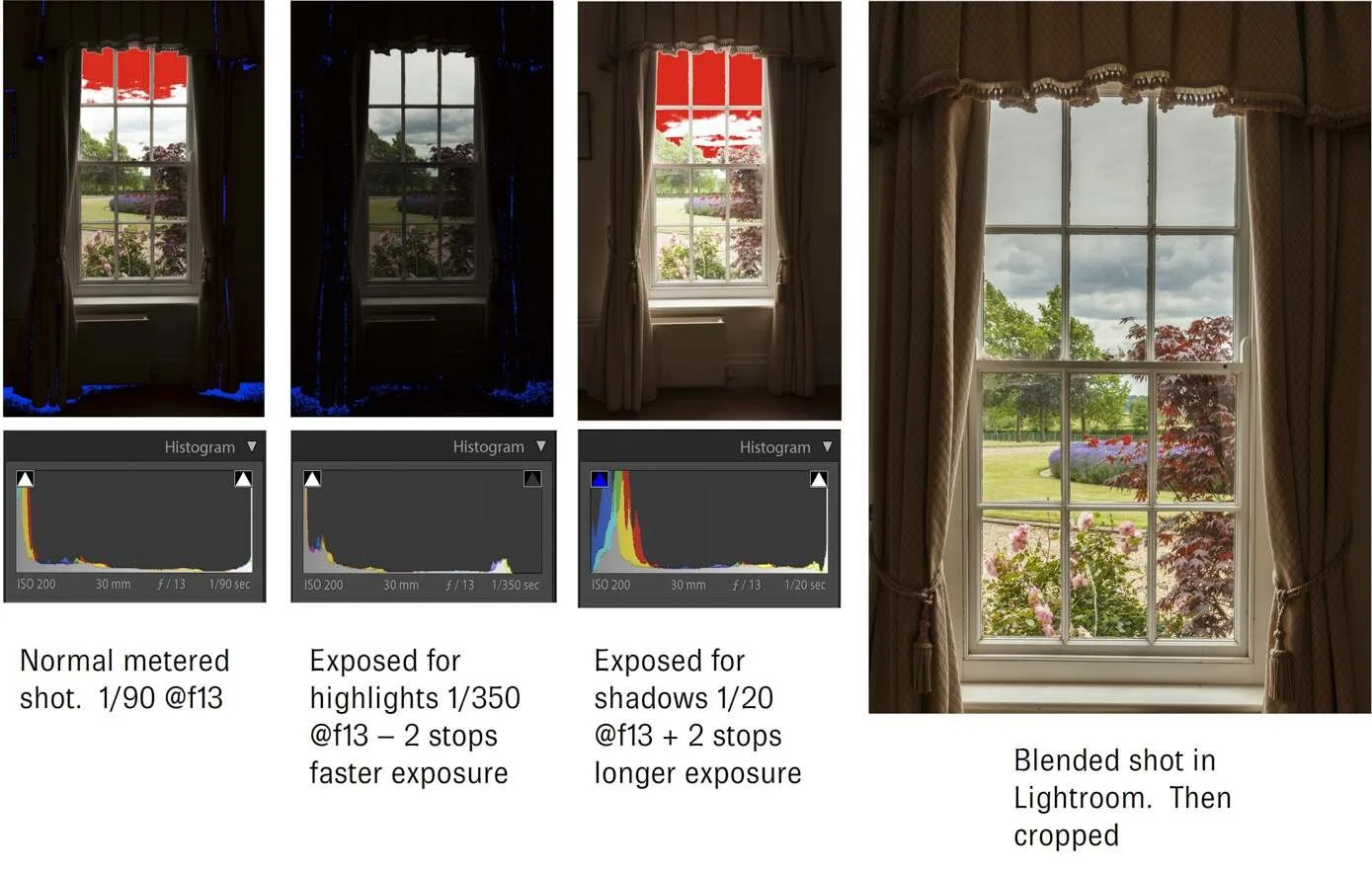
Exposure bracketing and HDR
When a stationary scene exceeds one capture, make a bracket at different exposures:
- a darker frame preserves highlights;
- a middle frame covers midtones; and
- a brighter frame records cleaner shadows.
HDR software aligns and merges the source information, then tone maps the combined range into a displayable image. The final result can look natural or stylized depending on local contrast, saturation, halos, and movement handling.
Keep aperture and focus fixed so depth of field matches. Change shutter speed, use a stable camera when necessary, and avoid Auto White Balance changes between frames. Moving leaves, water, people, and clouds can produce ghosting.
HDR capture versus HDR display
These terms are related but different:
- Multi-exposure HDR: combines captures to contain a high-range scene.
- Single-shot high dynamic range: describes a sensor/file retaining broad highlight and shadow information.
- HDR display/output: uses a compatible file, transfer function, color space, software, and bright display to present greater brightness range than standard output.
An HDR-merged photograph can be delivered as an ordinary SDR JPEG, and an HDR display can show a single exposure. Identify the workflow rather than treating “HDR” as one effect.
In-camera shadow and highlight optimization
Features such as Nikon Active D-Lighting and similar systems can protect highlights through exposure strategy and adjust the tone curve to lift shadows. They are most visible in camera-rendered JPEGs and previews.
They do not change the sensor's physical capacity. Strong settings can make a flat-looking image, reveal noise, and change the histogram used to judge RAW exposure. Learn how the chosen feature affects both capture and rendering.
Editing a high-range RAW file
A restrained workflow is:
- set overall exposure around important midtones;
- reduce highlights until recorded texture appears natural;
- lift shadows only as far as noise and color remain acceptable;
- set black and white points deliberately;
- restore local contrast without creating halos; and
- apply noise reduction and sharpening at final output size.
Opening every shadow and lowering every highlight often produces a gray, artificial result. Dynamic range is capacity, not a requirement to show all tones equally.
How cameras are compared
Published dynamic-range numbers depend on:
- ISO and exposure calibration;
- RAW bit depth and compression;
- mechanical versus electronic shutter or burst mode;
- noise and signal threshold;
- resolution normalization;
- software decoding; and
- whether color accuracy is part of the criterion.
Use the same testing method and output size when comparing bodies. A fraction of a stop rarely matters more than lens choice, autofocus, handling, and exposing correctly.
A practical exercise
- Photograph a dim room containing a bright window at base ISO.
- Make one frame for the room, one for the window, and a bracket between them.
- Inspect the RAW histograms and try to recover the single exposures.
- Merge the bracket and compare moving objects and tonal naturalness.
- Add light to the room or wait until exterior light falls, then make one more exposure.
This separates sensor limits, editing latitude, HDR merging, and lighting solutions.
Common mistakes
- Equating dynamic range with contrast. Range is capacity; contrast is how tones are rendered.
- Believing a slider restores clipped data. It can only reinterpret recorded information.
- Using lowest displayed ISO without checking whether it is extended. Base ISO is model- and mode-specific.
- Opening every shadow. Darkness is part of visual structure.
- Bracketing moving scenes carelessly. Motion creates merge artifacts.
- Comparing lab numbers from different methods. Threshold and normalization change results.
Sources and further reading
High-contrast scene limitations and exposure bracketing were checked against Nikon's official High Dynamic Range Photography guide. In-camera tonal optimization was cross-checked with Nikon's Active D-Lighting documentation, and clipping interpretation with Nikon's official histogram guide.
Frequently Asked Questions
-
It is the span between the brightest and darkest values in a scene, capture, or output. Camera dynamic range specifically describes the range retained between highlight saturation and an acceptable shadow noise threshold.
-
More range can help, but published numbers depend on the test threshold and mode. Compare consistent tests and consider whether the camera meets your actual scenes and output.
-
RAW does not change the light or physical sensor capture, but it usually preserves more tonal precision and flexible rendering than a finished JPEG, making more of the captured range usable in editing.
-
It generally reduces highlight headroom relative to base ISO, though gain changes can improve some shadow read-noise behavior. Use the ISO required for shutter speed and aperture rather than sacrificing the photograph for a lab maximum.
-
No. Dynamic range is a span of brightness. HDR can refer to merging bracketed exposures, a broad single capture, or a high-dynamic-range display format. Those workflows are related but distinct.