Smartphone vs. Digital Camera: Which Should You Use?
Compare smartphone and dedicated cameras by image quality, computational processing, zoom, low light, autofocus, controls, video, workflow, and cost.
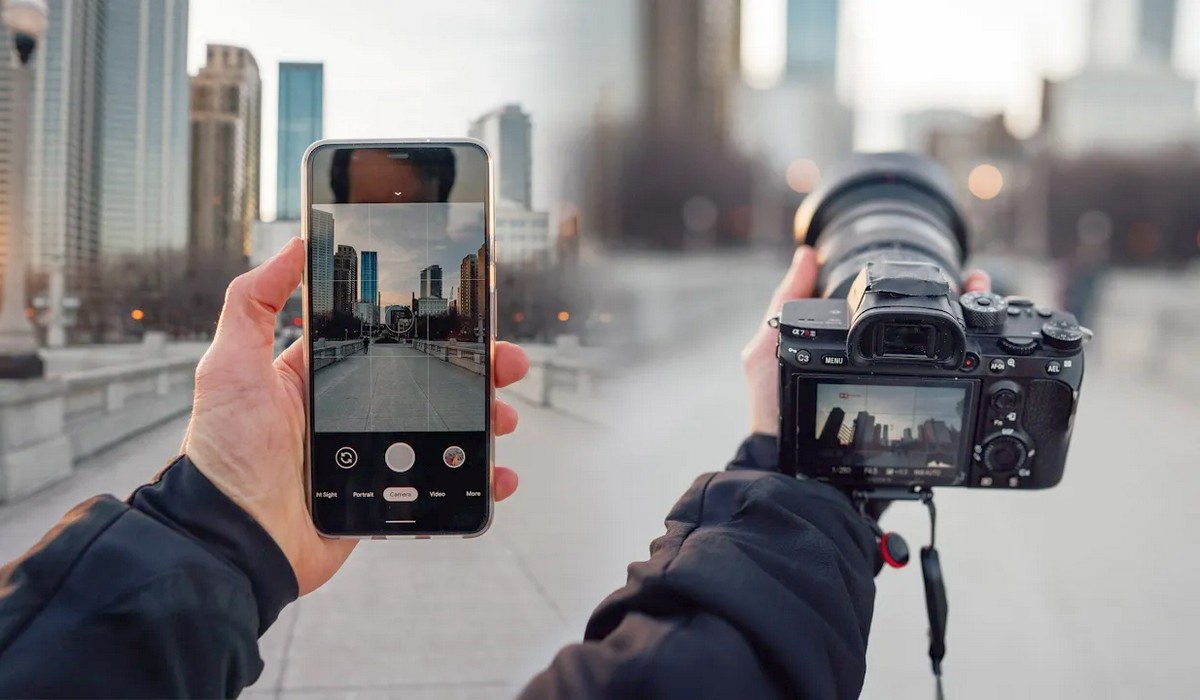
What makes a smartphone camera different?
A phone typically contains multiple fixed-lens camera modules: main, ultra-wide, and sometimes one or more telephoto units. Each module has its own sensor and lens. Software decides which module—or combination—to use as you tap or drag the zoom control.
The phone can capture several frames at different times or exposures, align them, reduce noise, recover highlights, sharpen detail, recognize faces, and create a finished HEIF or JPEG almost instantly. This is computational photography.
A dedicated camera also processes images, but it generally exposes more controls and relies more heavily on one optical capture. Newer cameras increasingly add computational functions, so the distinction is a spectrum rather than a wall.
Portability and readiness
The phone is already in a pocket, charged, location-aware, and connected. It can capture, edit, back up, caption, and share without moving a card. For daily life, travel notes, food, family, and social publishing, this low friction often matters more than a technical advantage.
A camera requires deliberate carrying, batteries, cards, and transfer. That friction can be useful: a viewfinder, grip, dedicated controls, and freedom from notifications help the photographer concentrate.
Sensor size and captured light
Dedicated cameras often use larger sensors than phones. A larger sensor paired with an appropriate lens can collect more total light for the same framing and exposure conditions, supporting lower noise, greater tonal flexibility, and natural shallow depth of field.
Phone processing compensates by combining frames and applying aggressive noise reduction. This works very well on a mostly still scene. Moving hair, leaves, water, pets, or people can reveal alignment errors, smearing, ghosting, or inconsistent fine texture.
Sensor size alone does not decide the final image. Lens aperture, stabilization, shutter time, processing, subject motion, and output size matter.
Megapixels
A 48-megapixel phone and a 24-megapixel camera cannot be compared by those numbers alone. Pixel binning, demosaicing, lens resolution, noise reduction, multi-frame fusion, selected mode, and actual output dimensions affect detail.
Some phones offer full-resolution modes in strong light and lower-resolution fused modes when dynamic range or noise matters. A camera's RAW or JPEG resolution may also change with crop, aspect ratio, burst mode, or compression.
Judge finished detail at the intended print or display size.
Optical reach and zoom
An interchangeable-lens camera can mount a true wide, macro, portrait, or super-telephoto lens. That optical flexibility is a major advantage for birds, field sports, stage events, close-up products, architecture, and controlled portraits.
A phone's labeled positions may combine:
- a physical switch to another camera module;
- a crop from a high-resolution main sensor;
- digital enlargement;
- multi-frame super-resolution; and
- blending between modules.
Results can change abruptly in low light because the phone may avoid a smaller telephoto sensor and crop the main camera instead. Pinching to a high number does not create the subject detail that a long optical lens projects.
For a full explanation of equivalent focal length and field of view, see the focal length guide.
Depth of field and portrait mode
A camera with a larger sensor and wide-aperture lens can create shallow depth of field optically. The transition from sharp to blurred follows lens, distance, and aperture behavior.
Phone portrait modes estimate subject depth and blur selected regions computationally. They can produce attractive results, especially on people with clear edges. Fine hair, transparent objects, glasses, gaps, reflections, and foreground overlap can reveal masking errors.
Computational blur is not inferior by definition—it is a different method. Use the one whose rendering and speed suit the output.
Low light
A phone night mode stabilizes and combines several frames, often creating a bright handheld image of a static city or room. It is remarkable for a device in a pocket.
A dedicated camera becomes stronger when the subject moves, when a fast lens is available, when a tripod permits long exposure, or when the file needs extensive editing. It also gives direct control over how much motion becomes blur.
For either device, more real light improves the signal. Move toward better light, stabilize the device, or add controlled illumination before expecting software to solve darkness.
Autofocus and action
Phones focus quickly on ordinary people and scenes, with face detection and touch tracking. Their deep apparent depth of field can hide small focus errors.
Current dedicated cameras can offer sophisticated subject recognition, long-lens tracking, high burst rates, minimal viewfinder blackout, large buffers, and controls usable without looking away. Sports and wildlife success also depends on lens reach, shutter speed, and operator technique.
A phone can capture a decisive nearby moment because it is ready. A dedicated system gives more repeatable control when action is the assignment.
Manual control and ergonomics
Camera bodies provide grips, viewfinders, command dials, customizable buttons, hot shoes, cable ports, and tactile operation in sun, cold, gloves, or rain. They are designed for repeated exposure changes.
Phone camera apps prioritize a clean automatic interface. Third-party or manufacturer modes may expose shutter, ISO, focus, and RAW, but aperture is usually fixed per module and touch controls can be difficult during fast action.
RAW and computational files
Traditional phone RAW can bypass much of the multi-frame pipeline. Apple documents ProRAW as combining RAW flexibility with computational processing such as multi-image fusion on supported devices. Other phone systems have their own RAW and computational approaches.
A camera RAW file usually provides more conventional control over tone, color, lens correction, and noise. Neither format guarantees a better result; software compatibility and processing skill matter. See RAW vs. JPEG for the workflow tradeoffs.
Video
Phones offer excellent stabilized video, fast switching between capture and sharing, and convenient front-facing recording. They are effective for social content, family clips, location scouting, and discreet production.
Dedicated cameras can provide larger-sensor rendering, lens choice, optical filtration, professional audio, monitoring, long recording, timecode, robust codecs, and more deliberate exposure control. Some overheat or crop in demanding modes, so compare exact models.
Flash and accessories
A phone LED is useful at close distance but differs from a brief, powerful photographic flash. Dedicated cameras can control on-camera or remote flashes, radio triggers, microphones, monitors, cages, gimbals, and specialized lenses.
Phones can also use microphones, lights, grips, and lens accessories, but mounting and app compatibility require care.
Editing, backup, and sharing
The phone provides the fastest end-to-end workflow. Automatic cloud backup is convenient, though account storage, original-file settings, and privacy should be understood.
A camera workflow is slower but can be more controlled: ingest to named folders, verify files, create two backups, edit on a calibrated display, and export for a specific output. Wireless transfer narrows the gap but may send reduced files or consume battery.
Cost
A phone camera is bundled with a device you may already replace periodically. High-end phones are expensive, but no separate lens kit is required.
A dedicated system includes body, lenses, cards, batteries, bag, computer storage, and possibly lighting. It can also remain useful for many years while only individual components change. Used cameras and lenses can offer strong value.
The best camera is not merely the one you have; it is the one you will have with you that can meet the photograph's actual constraint.
Choose a smartphone when
- daily carry and immediate sharing dominate;
- the output is mainly screens and modest prints;
- automatic multi-frame processing suits the scene;
- you need discretion and simplicity; or
- another bag would make you leave the camera behind.
Choose a dedicated camera when
- you need long, macro, tilt-shift, or wide-aperture optics;
- moving subjects and repeatable autofocus matter;
- you need physical controls and a viewfinder;
- flash, audio, filtration, or other accessories are central;
- files require substantial editing or large output; or
- reliability across a long assignment matters.
Use both when
Use the camera for planned captures and the phone for scouting, behind-the-scenes, location notes, remote control, quick delivery, and backup angles. A phone photograph with better timing can belong beside a technically stronger camera file.
For other choices—including compact, bridge, action, instant, DSLR, and mirrorless—read the beginner's guide to camera types.
Sources and further reading
Phone computational and RAW behavior was checked against Apple's official RAW and ProRAW Capture documentation and About Apple ProRAW. Current Apple specifications were used only as examples showing that phones distinguish physical camera modules, optical-quality crop positions, and digital zoom; individual phone capabilities vary.
Frequently Asked Questions
-
It can be as good or better for convenient screen-sized results and static scenes that benefit from computational processing. Dedicated cameras offer more optical, control, action, accessory, and editing headroom.
-
Night modes align and combine multiple exposures, then reduce noise and map tones computationally. Subject movement can limit the result because the scene changes between frames.
-
Not from megapixels alone. Lens detail, sensor area, pixel binning, processing, noise, selected mode, and output size all affect the finished result.
-
It can for many daily, travel, family, and social uses. It is less likely to replace a system needed for long telephoto, fast action, controlled flash, specialized lenses, demanding video, or extensive RAW work.
-
Either can teach light, timing, framing, color, and subject distance. A camera exposes aperture, shutter, focal length, and accessories more directly; a phone removes friction and encourages frequent practice.