Golden Ratio Photography Composition Guide
Understand the phi grid and golden spiral, how they differ from the rule of thirds, and how to use them as practical overlays without treating them as a formula.
What the golden ratio means
Two quantities are in the golden ratio when the relationship of the larger to the smaller matches the relationship of their total to the larger. The value, commonly represented by the Greek letter phi, is about 1.618.
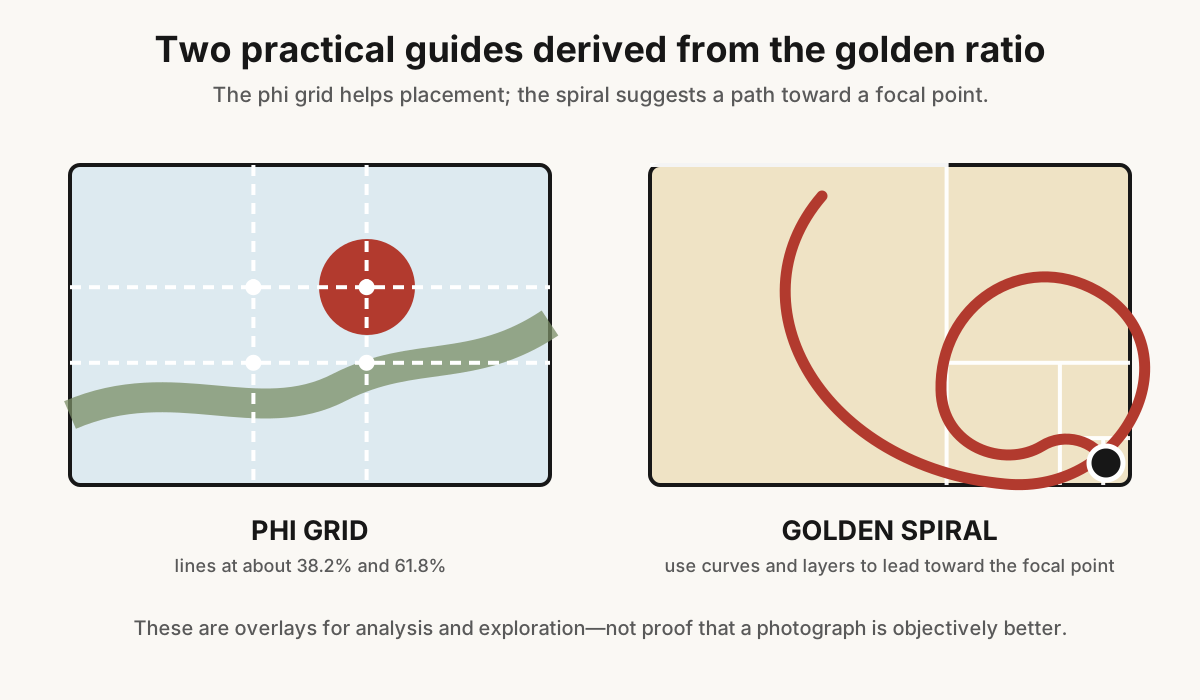
That mathematical relationship can generate rectangles, grids, and spiraling constructions. Photographers usually encounter two simplified overlays: the phi grid and the golden spiral.
The phi grid
Like a thirds grid, a phi grid has two vertical and two horizontal lines. Instead of equal thirds, its central section is narrower. The lines fall at approximately 38.2% and 61.8% of the frame's width or height.
This keeps possible focal points closer to the center. It can suit portraits, landscapes, and architecture where a thirds placement feels too close to the edge but dead center feels too static.
The golden spiral
A golden spiral overlay begins broadly and curls toward a small focal area. It can help when the scene contains a curved shoreline, staircase, road, arm, wave, arrangement of objects, or sequence of tonal masses that guides the eye inward.
Real photographs rarely trace a mathematical spiral perfectly. Look for a convincing visual path and a clear endpoint rather than forcing every contour onto the line.
Golden ratio versus rule of thirds
The rule of thirds is quicker to see and is built into many cameras. Its intersections sit farther from the center, creating more obvious asymmetry. The phi grid is subtler and leaves less empty space at the outer edge.
- Choose thirds for a simple off-center starting point, generous lead room, or a strong division between sky and land.
- Choose a phi grid when thirds feels stretched or the subject needs to stay nearer the visual center.
- Choose a spiral when curves and layers create a path toward a focal point.
- Choose none when symmetry, repetition, central impact, or spontaneous action already organizes the frame.
These are alternatives, not levels of sophistication. A photograph does not become more advanced because its overlay has a Greek name.
How to use a phi grid in the camera
Most cameras provide a 3×3 grid, not a phi grid. You can still estimate it by imagining the standard thirds lines pulled slightly toward the center.
- Identify the main focal detail.
- Place it a little inside a thirds intersection.
- Align a horizon, wall, or major tonal boundary with a horizontal phi line if useful.
- Check the remaining space and frame edges.
- Make a centered and thirds version for comparison.
Do not delay an unrepeatable moment for precise placement. Frame with a little safety space and refine later if the file permits.
How to use a spiral on location
Start at the focal endpoint, not the wide end. Decide where the eye should finish: a face, building, flower, boat, or bright opening. Then look for a large curve or series of shapes that can carry attention toward it.
The spiral can be rotated and mirrored. Its endpoint may sit in any corner. Walk around the scene and change height until overlaps form a clean path. The camera position usually changes the composition more meaningfully than rotating an overlay in software.
Landscapes
A curved river or coast can enter from a lower edge and bend toward a mountain, tree, or patch of light. A phi grid can place the horizon slightly nearer the center than the thirds rule while retaining an unequal balance.
Watch foreground scale. A wide lens close to a foreground object may create a strong start to the spiral but shrink the destination until it loses importance. Move or change focal length so the endpoint remains readable.
Portraits
A phi intersection can hold the nearer eye while the face stays comfortably inside the frame. A shoulder, arm, fabric, or environmental line may form a loose curve toward the eye.
Do not rotate or bend a pose to satisfy the overlay. Expression, gesture, anatomy, and clean edges matter more. Use the guide after you have a believable portrait.
Still life, food, and products
These controlled subjects are ideal for experimentation. Place the hero object near the spiral endpoint, then arrange supporting items along the broader curve. Reduce size, contrast, sharpness, or saturation as objects move away from the focal point.
Keep product requirements intact. A label, shape, or feature may need to remain centered and unobstructed even if a spiral arrangement looks elegant.
Architecture and interiors
A phi grid can organize a doorway, column, furniture edge, or horizon without moving it as far outward as thirds. A spiral may appear in a stair, vaulted ceiling, or sequence of rooms.
Perspective correction can shift elements after capture. Leave extra room around edges and correct verticals before making the final crop; otherwise the overlay may no longer align.
Street and documentary work
Use the spiral as an anticipation tool rather than a tracing exercise. Compose a curved shadow, railing, or group arrangement and wait for a person to enter the intended endpoint.
Authentic timing outranks geometric precision. Avoid cropping in a way that changes the meaning of a documentary scene merely to improve an overlay match.
Applying an overlay while editing
Some editing applications include golden-ratio crop overlays; others require a guide or transparent template. Straighten and correct perspective first, then rotate or flip the overlay to match the scene.
- Duplicate the crop or virtual copy.
- Try a phi grid and record what improves.
- Try the spiral only if the image contains real directional flow.
- Hide the overlay.
- Compare at the final display size.
If the composition works only while the guide is visible, the actual hierarchy may be weak.
Aspect ratio is a separate decision
A 3:2 camera frame is not a golden rectangle. You do not need to crop every image to 1:1.618 to use a phi grid or spiral. Composition overlays can be scaled to many frame shapes.
Choose 3:2, 4:3, 1:1, 4:5, 16:9, panoramic, or another ratio based on subject and output. The relationship among elements inside the frame matters more than matching a single rectangle.
Avoid retrofitting
It is easy to place a spiral over a finished photograph, resize and rotate it repeatedly, and eventually find a partial match. That does not explain why the image succeeds. Curves, contrast, faces, color, gesture, and cultural reading can guide attention independently.
Use the golden ratio prospectively to make a choice or comparatively to test a crop. Avoid presenting a loose after-the-fact alignment as objective proof.
When not to use it
- a perfectly symmetrical facade or reflection;
- a radial flower or centered tunnel;
- a repeating pattern with no single endpoint;
- a close action frame where the subject fills nearly everything;
- a scene whose strongest lines oppose the spiral; or
- a decisive moment that would be lost while refining geometry.
Common mistakes
- Calling every curve a golden spiral. A useful visual path does not need a mathematical claim.
- Confusing phi and thirds grids. Phi lines sit closer to the center.
- Cropping away necessary context. A diagram should serve the story.
- Ignoring visual weight. A bright corner can pull the eye away from the intended endpoint.
- Assuming the golden rectangle is required. The guides can scale to different aspect ratios.
- Treating the overlay as a score. It offers options, not a quality measurement.
A useful practice session
- Choose a still life with one hero object and three supporting objects.
- Make a centered arrangement.
- Make a thirds arrangement.
- Pull the thirds placements inward to approximate a phi grid.
- Create one curved arrangement that leads toward the hero.
- Hide every overlay and compare clarity, movement, and edge control.
The golden ratio is valuable when it helps you see a relationship you would otherwise miss. Once the frame works, the viewer does not need to know which guide you used.
Frequently Asked Questions
-
It is the approximate 1:1.618 relationship used to derive composition aids such as the phi grid and golden spiral.
-
Thirds lines sit at 33.3% and 66.7% of the frame. Phi-grid lines sit closer to the center, at approximately 38.2% and 61.8%.
-
Place the main focal detail there—a face, eye, building, flower, or bright point—then use real curves or layers to guide attention toward it.
-
No. The grid or spiral can be scaled to many frame shapes. Choose aspect ratio based on the subject and final output.
-
No. It keeps focal areas nearer the center and may suit some scenes, while thirds is simpler and more visibly asymmetric. Use the guide that supports the photograph.