What Is an Anamorphic Lens? Squeeze Ratios Explained
Understand anamorphic squeeze ratios, de-squeezing, aspect ratios, horizontal field of view, oval bokeh, lens flares, focusing, and camera compatibility.
Why the image looks squeezed in camera
A normal spherical lens magnifies the scene approximately the same way in both directions. An anamorphic optical group has different power across the horizontal and vertical axes. It fits a horizontally wider view into the same sensor width.
The uncorrected recording makes faces and circles look tall and thin. A monitor or editing application expands the horizontal dimension by the lens's stated factor. This process is called de-squeezing.
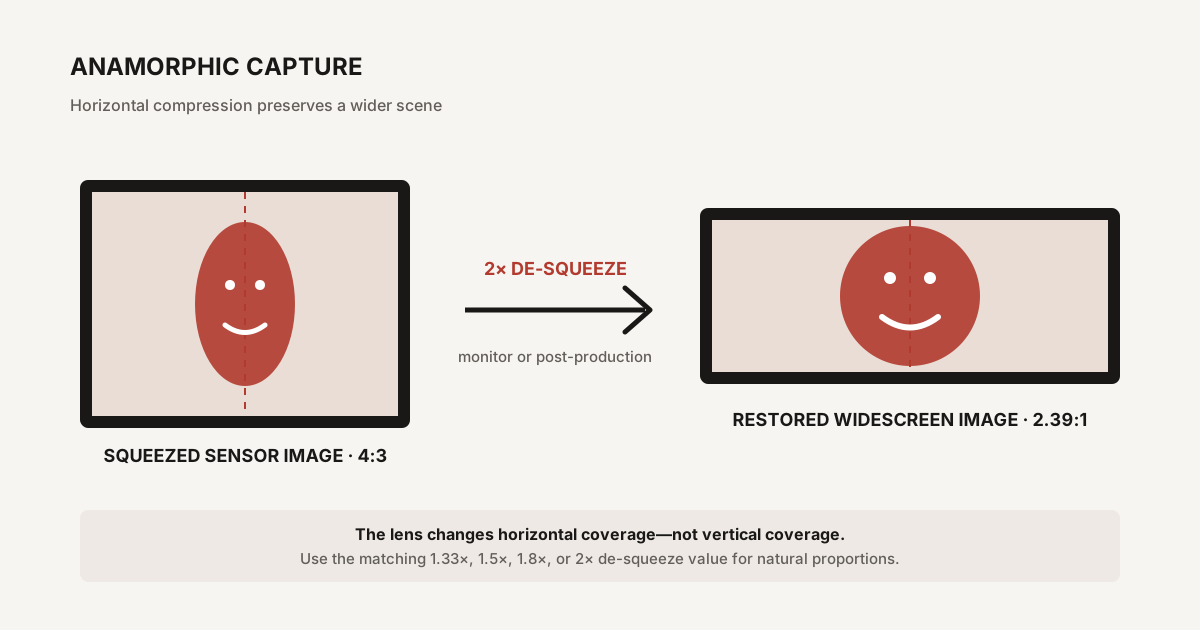
How squeeze ratio changes the output
Multiply the sensor's capture aspect ratio by the squeeze factor to estimate the uncropped de-squeezed ratio:
- 16:9 (1.78:1) × 1.33 = about 2.37:1;
- 3:2 (1.5:1) × 1.5 = 2.25:1;
- 4:3 (1.33:1) × 1.8 = about 2.40:1; and
- 4:3 × 2 = about 2.66:1.
A production may crop slightly to 2.39:1, 2.00:1, or another delivery format. The ideal squeeze therefore depends on the camera's recorded area, not just the final aspect ratio.
What “more horizontal field of view” means
Consider a 50mm 2x anamorphic lens. Vertically, framing resembles a 50mm spherical lens. Horizontally, it captures roughly the width associated with a 25mm spherical lens, subject to the actual design and distortion.
This combination—a longer-lens vertical perspective with wider horizontal coverage—is central to the anamorphic look. It is not the same as placing a 25mm spherical lens on the camera and cropping the top and bottom.
Camera position still controls perspective. Anamorphic optics change coverage and rendering, not the geometry of where the camera stands.
Anamorphic versus cropping a spherical image
A spherical lens can produce a wide frame by recording normally and cropping. That workflow is simpler, supports more autofocus and stabilization options, and can be optically cleaner.
Anamorphic capture can use more of the sensor's vertical pixels for a wide final frame and include a wider horizontal view for a given vertical focal-length character. It also introduces its own flare, bokeh, distortion, and focus behavior.
Choose anamorphic because those properties serve the project—not because black bars alone make footage cinematic. Lighting, blocking, camera movement, production design, sound, and editing have greater influence than aspect ratio by itself.
Oval bokeh
Out-of-focus highlights often become vertically stretched ovals after de-squeezing. The amount and consistency depend on squeeze ratio, aperture shape, focus distance, optical design, and whether the lens uses front or rear anamorphic elements.
Some modern lenses deliberately reduce extreme oval distortion for cleaner rendering. Others emphasize it. Sample footage at several focus distances is more informative than a marketing label.
Horizontal lens flares
Bright sources can produce long horizontal streaks, traditionally blue but available in neutral, amber, or other coatings. The flare comes from internal reflections interacting with the cylindrical optical geometry.
A flare is not automatically desirable. Repeated bright streaks can obscure faces, lower contrast, and distract from the story. Use flags, matte boxes, light position, and lens choice to control it rather than pointing the camera at every lamp.
Distortion and edge behavior
Anamorphic lenses may show barrel-like horizontal distortion, stretched objects near the frame edges, curved lines, uneven sharpness, or a “mumps” effect that widens faces near close focus. Modern designs correct these issues to different degrees.
Lens metadata and software correction are less universal than with ordinary native lenses. Test the exact recording mode and de-squeeze workflow before a production that requires clean architecture or visual effects.
Focus breathing
Breathing is a change in field of view or squeeze as focus moves. Anamorphic designs can breathe asymmetrically, causing the background to appear to stretch as well as reframe.
Some filmmakers value that movement as character; others find it distracting during focus pulls. A static sample at one distance will not reveal it. Watch a full near-to-far focus test.
Minimum focusing distance
Many anamorphic lenses cannot focus as close as comparable spherical lenses. Close-up diopters—single-element or achromatic filters placed in front—can reduce the minimum focus distance, but they also limit the farthest distance that can remain in focus.
Measure the shot requirements before relying on a diopter. Front diameter, matte-box clearance, filter strength, and image quality all matter.
Three common lens arrangements
Single-focus anamorphic lens
A purpose-built lens contains the spherical and anamorphic optics in one barrel and focuses with one ring. This is the simplest production workflow.
Dual-focus adapter
An anamorphic attachment sits in front of a separate taking lens, and both must be focused to the same distance. This can be inexpensive and characterful, but slow for moving subjects.
Single-focus adapter system
An additional focusing module allows the taking lens and anamorphic attachment to remain at a base setting while one front ring controls focus. The combination can become long, heavy, and prone to vignetting.
Choosing the taking lens for an adapter
The taking lens must cover the sensor through the adapter without dark corners. Wider focal lengths are more likely to vignette. Large front elements, complex zooms, focus breathing, and moving front barrels can also cause problems.
Simple moderate primes are common starting points. Full-frame sensors usually require longer taking lenses than Super 35 or Micro Four Thirds for the same adapter.
Monitoring and de-squeeze
It is difficult to judge composition and focus when people look unnaturally thin. Use a camera, external monitor, or viewing app that supports the exact squeeze factor.
A 1.33x viewing setting is wrong for a 1.5x lens. The picture may look plausible at a glance while faces and circles remain distorted. Confirm whether de-squeeze affects only monitoring or is baked into the recorded file. Most professional workflows record the squeezed source and apply metadata or scaling later.
Resolution after de-squeezing
De-squeezing expands the horizontal pixel dimension mathematically. A 3840 × 2160 file expanded by 1.33 becomes about 5107 × 2160 before cropping or resizing. That does not mean the camera suddenly captured 5K of independent horizontal sensor samples. The extra width describes display geometry.
The optical system encoded a wider scene into the original pixels, while lens resolution and sampling determine actual detail. Deliver at the project's required raster after the image has been de-squeezed and cropped.
Open-gate recording
Open gate uses a taller or nearly full sensor area instead of a standard 16:9 crop. It can pair well with anamorphic lenses because the extra height supports wider delivery ratios without wasting as much sensor area.
Check frame rate, bit depth, rolling shutter, heat, stabilization, and recording format. An open-gate label does not guarantee that every camera mode retains the same quality or features.
Autofocus and stabilization
Native electronic anamorphic lenses are beginning to offer autofocus and metadata, but many cinema lenses are manual. Subject-detection boxes may operate on the squeezed preview yet still require manual confirmation.
In-body stabilization may not understand asymmetric magnification. Some cameras offer anamorphic-specific stabilization settings; others can create edge warping. Test walking, panning, and static shots with the exact focal length and squeeze.
A pre-shoot checklist
- Confirm sensor coverage and mount compatibility.
- Choose a squeeze factor that suits the recorded and delivery ratios.
- Enable the matching monitor de-squeeze.
- Test focus at minimum, typical, and infinity distances.
- Check vignetting at every intended resolution and stabilization mode.
- Shoot a focus pull to evaluate breathing.
- Place bright lights near and inside the frame to assess flare.
- Run one clip through the complete editing and export workflow.
Common misconceptions
- “Anamorphic just adds black bars.” It changes horizontal coverage and optical rendering.
- “Every lens makes blue flares and oval bokeh.” Coatings and designs vary widely.
- “A 2x lens always produces 2.39:1.” Output depends on the sensor's recorded aspect ratio and crop.
- “De-squeezing creates extra sensor resolution.” It restores display geometry; captured detail remains limited by optics and sampling.
- “Any taking lens works with an adapter.” Coverage, front diameter, focus, and vignetting must be tested.
Frequently Asked Questions
-
It optically compresses a wider horizontal field of view into the camera's sensor frame. The image is then expanded by the matching de-squeeze factor during monitoring or post-production.
-
It is the horizontal compression factor, commonly 1.33x, 1.5x, 1.8x, or 2x. A 2x lens records a scene twice as wide horizontally as its squeezed image initially appears.
-
Multiply the recorded sensor aspect ratio by the squeeze factor. For example, 16:9 is about 1.78:1; multiplied by 1.33 it becomes roughly 2.37:1 before any finishing crop.
-
Yes, if the lens covers the sensor and the camera can mount it. The still must be de-squeezed in compatible software, and some in-camera de-squeeze features apply only to video monitoring.
-
Not universally. It can preserve more vertical sensor use and create distinctive coverage, bokeh, flare, and distortion. Cropping a spherical image is simpler and may be sharper, cleaner, and easier to focus.