8 Best Memory Card Reader of 2026: Match Your Cards and Connectors

Find a memory card reader that actually matches your camera cards and laptop ports, so transfers stay fast and your files stay safe.

Most card reader listings advertise slot count first: SD, microSD, CF, Memory Stick. In practice, the card slot that matters most is the one your camera writes to, and the connector that matters most is the one your laptop or phone accepts. Stated support and real-world card handling don't always line up.

That gap shows up in bent CF pins, readers that stop being recognized after a few weeks, and 'iOS compatible' models that some iPhones ignore. The fix is to choose by your actual cards and ports first, then let speed and build quality settle the tie. A dual USB-C/USB-A reader costs about the same as a USB-A-only model and removes the need for dongles.

For most photographers, SD/microSD is the whole job. Multi-format support matters only if you still shoot CompactFlash or Memory Stick. This guide separates those use cases so you buy the right slot layout and connector the first time.

1

Best Overall

Acer USB-C SD Card Reader

93 /100
Studio Score High Confidence

Key details

Connector
USB-C, USB-A
Slot Build
Aluminum body, dust covers
Card Formats
SD, microSD
Transfer Speed
5 Gbps
Check Price on Amazon

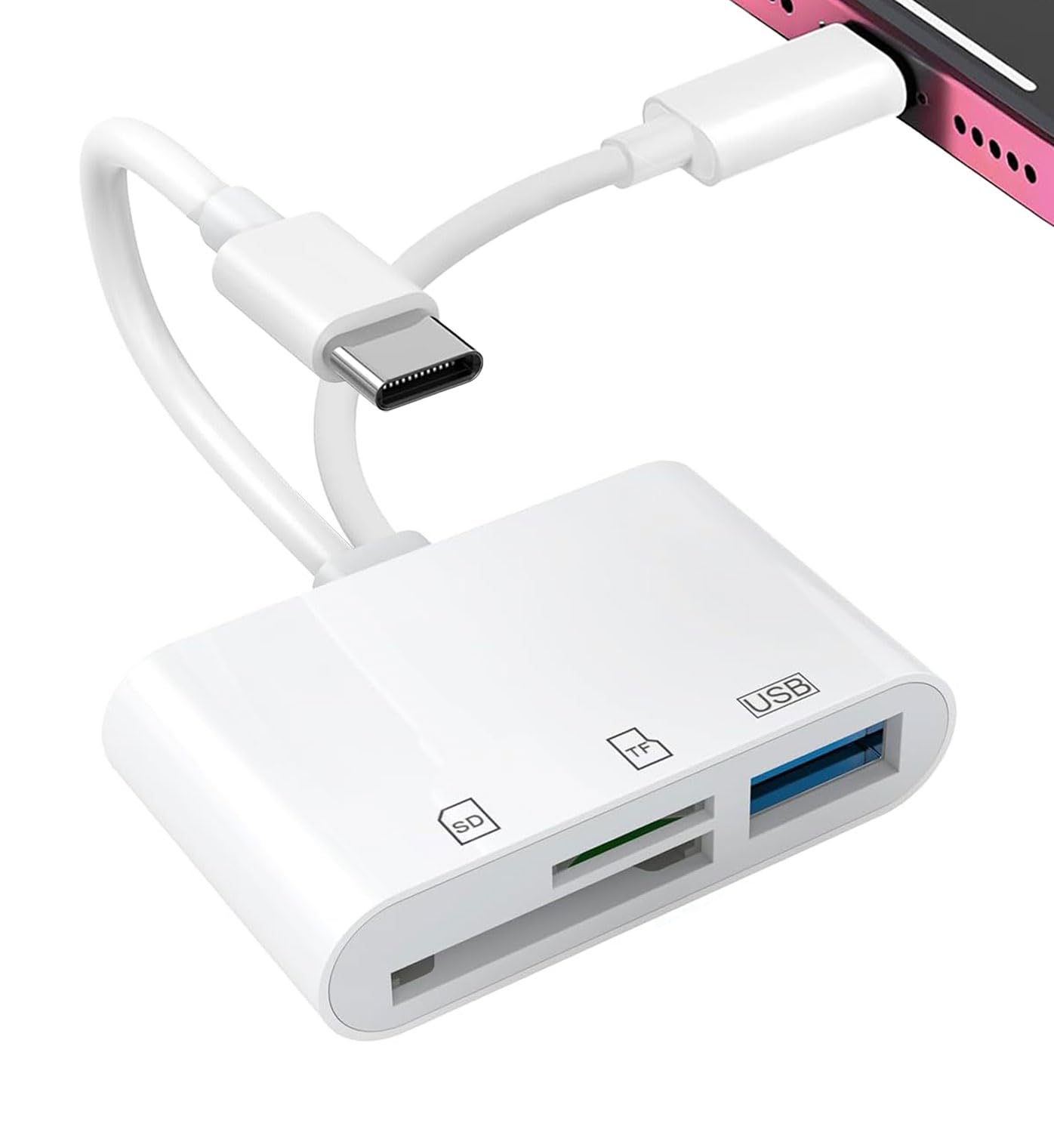
Dual USB-C and USB-A heads let the Acer plug into a MacBook, Windows laptop, iPad, or USB-C phone without an adapter. The USB 3.0 interface transfers image and video files at up to 5 Gbps, so large card dumps do not become a bottleneck. The aluminum shell feels more substantial than the plastic readers around this price, and the slot covers add a level of protection that some entry-level readers skip.

Cards seat firmly in both slots, and the dust covers keep pocket lint out between uses. The body is tiny enough for a camera bag or laptop sleeve, though it is not the slimmest dongle in this comparison. The dual-head layout compensates by eliminating the need to carry a USB-C-to-USB-A adapter or swap connectors between devices.

On a MacBook, Windows PC, Android phone, or USB-C iPad, the reader appears as a standard mass-storage device, so file imports work without installing an app. For drone or action-cam owners, that means pulling a card from the camera, plugging it into a phone, and reviewing clips shortly after landing. The USB-C connector also works with current iOS devices that use USB-C, which keeps the same reader relevant if you switch between an Android phone and an iPhone.

At an entry-level price, the Acer sidesteps the main limitation of older USB-A-only readers: it handles the USB-C ports that current MacBooks, tablets, and phones use without a dongle. That makes it a more current choice than the long-running USB-A workhorses in this comparison, while the aluminum body avoids the flimsy feel that can come with budget electronics. The same dual-head design keeps the workflow simple for mixed-device households where a Windows desktop and a USB-C phone share the same card reader.

This is for SD/microSD shooters who want one reader across MacBook, Windows, iPad, and USB-C phone workflows. If you shoot CF or Memory Stick, the multi-slot reader in this set is the right match; this Acer is built around the two formats used by current mirrorless, drone, and action cameras. For that target, the dual-head design and USB 3.0 speed cover the daily workflow without extra accessories.

Pros

  • Dual USB-C/USB-A connectors cover MacBook, Windows, iPad, and phone workflows without an adapter.
  • Aluminum housing and dust covers withstand regular packing in a camera bag.
  • USB 3.0 speed moves large photo and video files quickly.
  • Compact footprint makes it easy to keep in a laptop sleeve or field kit.

Cons

  • SD and microSD only; no CF or Memory Stick slots.
Our verdict

For SD/microSD shooters with mixed USB-C and USB-A devices, the Acer's dual-head design and USB 3.0 speed are the practical reason to keep it in the bag.

Check Latest Price
2

Tried-And-True USB-A Pick

Anker 2-in-1 USB 3.0 Reader

93 /100
Studio Score High Confidence

Key details

Connector
USB-A only
Slot Build
Compact 14 g body
Card Formats
SD, microSD
Transfer Speed
5 Gbps
Check Price on Amazon

The Anker 2-in-1 covers the two most common card formats with no extra cable or hub: SD and microSD read simultaneously through a USB 3.0 Type-A plug. Simultaneous reads mean a two-card day doesn't turn into a swap-and-export chore. That makes it the practical USB-A option in this roundup, while the dual-connector top pick adds USB-C for modern phones and tablets.

RAW photo and 4K video transfers hold close to USB 3.0 expectations, and both cards mount as separate volumes, so copying from a camera card while a drone microSD sits in the second slot doesn't require constant swapping. The 14 g body is light enough to live in a laptop bag. Windows and macOS recognize it without a driver, so a fresh install doesn't mean hunting for setup software.

This is for photographers, drone pilots, and vloggers who need a simple SD/microSD transfer tool for a laptop or desktop. The boundaries are a USB-A connection and SD/microSD-only slots; outside those, a dual-connector or multi-slot reader makes more sense. Within that boundary, the Anker does what a card reader should: move files quickly without setup fuss. At a budget price, it's easy to keep one at the desk and one in a camera bag.

Pros

  • Simultaneous SD and microSD slots let one reader handle camera and drone cards at the same time.
  • Plug-and-play on Windows and macOS; no driver setup before first use.
  • USB 3.0 transfer speed keeps large photo and video files moving quickly.
  • Budget-friendly price leaves room in a kit for cards or a second reader.

Cons

  • CompactFlash and Memory Stick shooters will need a multi-slot reader for those cards.
  • USB-C-only laptops and phones require an adapter because the plug is USB-A.
Our verdict

Count on this reader for the daily SD/microSD card dump; look elsewhere when your port or card lineup grows.

Check Latest Price
3

Best Multi-Format for CF/MS

UGREEN 4-in1 USB 3.0 Reader

93 /100
Studio Score High Confidence

Key details

Connector
USB-A only
Slot Build
4 simultaneous slots
Card Formats
SD, microSD, CF, MS
Transfer Speed
5 Gbps
Check Price on Amazon

One USB-A reader puts four card formats within reach: SD, microSD, CF, and Memory Stick can be read simultaneously. The 1.7 ft USB 3.0 cable reaches across a desk at 5 Gbps, and the slot layout accepts each card without extra adapters. That gives legacy-format shooters a single hub for file imports and old-card archiving.

Copy speeds hold up on large RAW and video transfers, and the shell has enough heft that card insertion does not feel flimsy. Plug-and-play operation works across Windows, macOS, Linux, and Chrome OS with no driver setup, and the four slots are recognized independently, so one transfer does not block the others.

The right buyer is a photographer or archivist who still pulls files from CF and Memory Stick cards and wants that access alongside SD and microSD. This reader is USB-A only, so USB-C-only devices need an adapter, and long-term durability can vary between units.

Compared with the slimmer dual-connector pick in this set, the UGREEN is the multi-format choice that covers CF and MS alongside SD and microSD; the added format support is what separates it from the SD-only readers.

Pros

  • Four slots read SD, microSD, CF, and Memory Stick at the same time through one USB-A port.
  • Build has a solid feel, so card insertions do not flex or wobble.
  • Plug-and-play operation works without installing drivers on major desktop operating systems.
  • USB 3.0 speeds handle large photo and video transfers comfortably.

Cons

  • In a packed laptop bag, the multi-slot body is bulkier than an SD-only dongle.
  • For direct plug-in fans, the tethered 1.7 ft cable keeps the reader anchored on the desk.
Our verdict

The UGREEN pulls SD, microSD, CF, and MS into one USB-A hub — the desk setup for legacy-card transfers.

Check Latest Price
4

Best for iPhone/iPad Import

SZHAIYIJIN iPhone/iPad Reader

89 /100
Studio Score Strong Evidence

Key details

Connector
USB-C, Lightning
Slot Build
2 slots, USB-A port
Card Formats
SD, microSD
Transfer Speed
25 MB/s iOS import
Check Price on Amazon

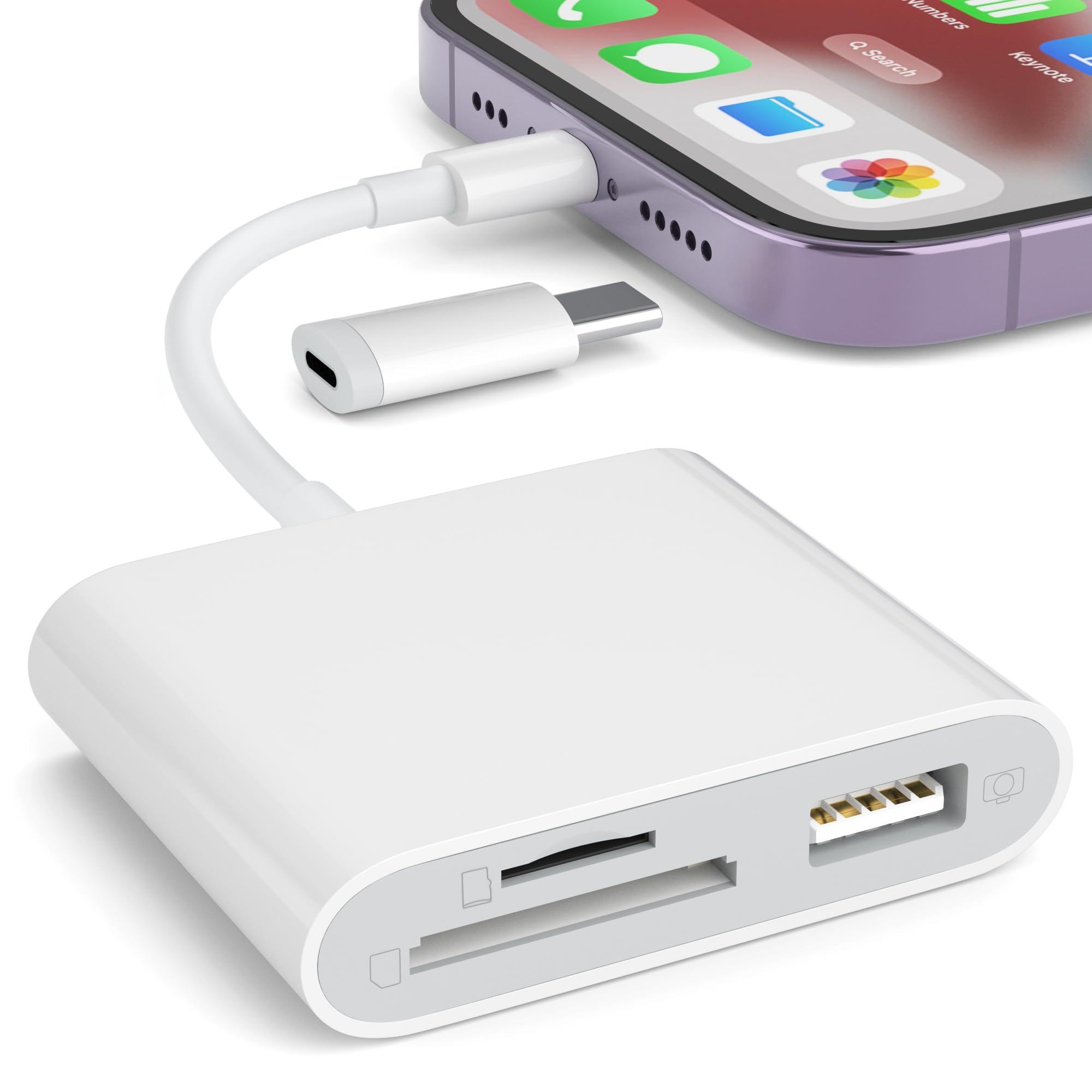
The SZHAIYIJIN reader combines Lightning and USB-C connectors with dedicated SD and microSD slots, so an iPhone or iPad user can move images off a camera card without an adapter or a companion app. Its 25 MB/s iOS import speed handles typical photo sessions without turning the transfer into a wait.

Once the accessory is recognized, Photos opens automatically and pulls the card's contents into the camera roll. The dual connectors also serve USB-C iPads, which extends its usefulness across more recent Apple tablets. The 25 MB/s rated import speed keeps typical photo transfers from becoming a long wait.

This is for mobile photographers who travel with an iPhone or iPad and want a compact SD/microSD import dongle. Apple compatibility varies by device and iOS version, so check support before a shoot. It is not a general-purpose multi-format hub: CF, Memory Stick, and desktop-centric card workflows are outside its scope, and Android users should look to a USB-C-focused reader instead. For that focused Apple workflow, the dual connectors and pocket-friendly body make it a sensible match.

Priced at the budget end, it delivers the core Apple import function without the bulk of a dock. The USB-A port also accepts ordinary USB drives, which broadens the dongle's usefulness when you need to move files between a camera card and a flash drive on the go.

💡 Keep the reader stationary during transfers so the Lightning connection stays secure.

Pros

  • No-app photo import into Apple's Photos app for supported iOS devices.
  • Fast SD/microSD transfer for camera photo and video files.
  • Practical mobile workflow tool with strong buyer approval.

Cons

  • No CF or Memory Stick support, leaving legacy camera cards to a separate reader.
  • The Lightning plug can drop its connection if the reader is moved during a transfer.
  • Some iOS versions and devices do not recognize the reader, so compatibility needs checking before purchase.
Our verdict

For an Apple-ecosystem SD/microSD import dongle, this is the practical travel pick; for a general-purpose multi-format reader, CF/MS needs point elsewhere.

Check Latest Price
5

Best Compact Travel Reader

UGREEN USB-C SD/MicroSD Reader

93 /100
Studio Score High Confidence

Key details

Connector
USB-C, USB-A
Slot Build
Slim pocket-sized body
Card Formats
SD, microSD
Transfer Speed
5 Gbps
Check Price on Amazon

The dual USB-C and USB-A heads make this the easiest SD/microSD reader to carry between a modern laptop and an older desktop. The slim body fits in a pocket or camera bag, and the two slots read SD and microSD at the same time, so you can import from a camera and a dash cam without swapping cards.

USB 3.0 transfer speed keeps large photo and video files moving quickly, which suits dash cam, drone, and action-cam users pulling clips from several cards. The reader shows up as a normal storage device on Windows, macOS, and Android, and the slot mechanism holds cards firmly during transfers. No separate cable is needed, which removes one more thing to lose from a camera bag.

This is for travel photographers and dash cam owners with both USB-C and USB-A devices who want one compact card reader instead of two separate adapters. It handles SD and microSD only, so CF/MS legacy shooters need a multi-slot reader. The USB-A head covers older desktops, while the USB-C head works with modern laptops, phones, and tablets. For location work, swapping the dual heads saves you from carrying a separate USB-C and USB-A reader.

Pros

  • Dual USB-C and USB-A heads cover modern laptops and older desktops without an extra adapter.
  • Budget-friendly pricing with strong everyday performance across cameras, laptops, and phones.
  • USB 3.0 transfers move large photo and video files quickly.
  • Compact body slips into a pocket or camera bag without adding bulk.

Cons

  • The USB-C connector neck is short, so a thick phone case can prevent a full connection.
  • Some iPhone and iPad models may not recognize the reader; compatibility varies by device and iOS version.
Our verdict

If you live between a USB-C laptop and a USB-A desktop, this is the card reader to keep in the bag.

Check Latest Price
6

Budget Multi-Format Users

SmartQ C368 USB 3.0 Reader

93 /100
Studio Score High Confidence

Key details

Connector
USB-A only
Slot Build
LED, cable organizer
Card Formats
SD, microSD, MS, CF
Transfer Speed
5 Gbps
Check Price on Amazon

The SmartQ C368 is a budget four-slot reader for older computers and cameras that still use CF or Memory Stick. It is recognized immediately by Windows, macOS, and Linux, and SD/microSD files transfer quickly over USB 3.0. The tradeoff is connection behavior: the transfer can drop mid-file or the reader can lose recognition of a card during a session, which is why it sits below the stronger multi-format picks for long archive jobs.

USB-A only excludes USB-C-only laptops and phones. For legacy card types at entry-level pricing, it remains a reasonable backup or travel companion.

Pros

  • Covers SD, microSD, MS, and CF from one USB-A port for a budget price.
  • Recognized instantly on Windows, macOS, and Linux without driver setup.
  • Moves photos and files quickly over USB 3.0.

Cons

  • USB-A only leaves USB-C-only laptops and phones needing an adapter.
  • Longer transfers can be interrupted if the connection drops or a card is no longer recognized.
Our verdict

For a USB-A multi-card reader at entry-level pricing, this covers the legacy formats that matter. Treat it as a backup or travel unit rather than the primary archive reader.

Check Latest Price
7

Dual-Connector SD Users

BENFEI 4-in1 USB-C/USB 3.0

91 /100
Studio Score High Confidence

Key details

Connector
USB-C, USB-A
Slot Build
4-in-1 slots
Card Formats
SD, microSD, MS, CF
Transfer Speed
Up to 160 MB/s
Check Price on Amazon

The BENFEI pairs USB-C and USB-A in a compact body, so current SD/microSD users can offload photos to a phone, tablet, or laptop without a separate adapter. Setup is immediate: insert a card, connect, and it shows up as a drive. Four slots cover SD, microSD, MS, and CF, though the last two are the reason this is not a higher pick. CF-slot pins can bend on insertion, and standard Memory Stick/M2 cards are outside the supported list, so photographers working with those legacy formats need a dedicated multi-format reader. For predominantly SD/microSD use, the dual-head design covers current cameras, phones, and laptops at a budget price.

Pros

  • Plug-and-play operation: cards appear as drives with no software setup.
  • USB-C and USB-A heads let one dongle move cards between a phone and an older laptop.

Cons

  • Standard Memory Stick and M2 cards are not recognized despite the MS slot.
  • CF-slot pins can bend on insertion and may damage the card.
Our verdict

For SD/microSD-first workflows, the dual-head BENFEI is an easy budget pick; photographers leaning on legacy formats will be better served elsewhere.

Check Latest Price
8

Apple Lightning Users

CULGC iPhone/iPad Card Reader

88 /100
Studio Score Strong Evidence

Key details

Connector
Lightning, USB-C
Slot Build
3 slots incl USB-A
Card Formats
SD, microSD
Transfer Speed
5 Gbps
Check Price on Amazon

With Lightning and USB-C connectors on one compact body, this reader moves SD, microSD, and USB-A storage into iPhone and iPad libraries. Import speed is strong for the budget tier, which suits it as a spare Apple-ecosystem bridge. Apple-device recognition can depend on the specific iPhone or Mac model and iOS version, so verify fit before trusting it with an important transfer. Compared with the more established iPhone import pick, this is a convenience backup rather than a workhorse. Build quality also varies between individual units, so it is best treated as a low-cost companion, not the only reader you own.

Pros

  • One compact body bridges Lightning iPhones, USB-C iPads, and USB-A storage.
  • Photos and videos import quickly to iPhone and iPad.
  • Build quality aligns with the budget-friendly price.

Cons

  • Two-way transfer requires iOS 13 or newer, leaving older Apple devices without export support.
  • No CF or Memory Stick slots, so legacy-card archiving needs a separate multi-format reader.
Our verdict

Useful as a spare import dongle for iPhone/iPad owners who already have a primary multi-format reader.

Check Latest Price

How to Choose

Card Format Support

If your camera writes SD or microSD, a two-slot reader covers nearly every workflow. Multi-format readers add CF or Memory Stick support, but every extra slot is another connector that can wear.

CF is the format to scrutinize: its socket has delicate pins, and a card inserted at even a slight angle can bend them. CF shooters should prioritize slot guides and pin-damage reports over slot count.

Connector Type

USB-C is the default on modern laptops, tablets, and phones; USB-A remains on desktops and older machines. A dual USB-C/USB-A reader removes the need for adapters and costs about the same as single-connector models.

The trade-off is physical: dual-head readers are slightly larger, but that size lets one device plug into a phone and a laptop.

Transfer Speed

USB 3.0 at 5 Gbps is the practical floor for moving RAW files and 4K clips. USB 2.0-level readers work, but full-card offloads take much longer.

The reader's speed rating is not the card's speed limit. A 5 Gbps reader with a UHS-I card moves data at the card's own bus speed.

Slot Build Quality

The slot connector is the part that wears out, not the plastic shell. CF slots are riskiest because exposed pins bend easily; SD slots are more forgiving but still need a secure socket.

Compact readers with no cable can torque the port when the card is inserted while plugged in. A short cable or low-profile body reduces that stress.

Apple and Mobile Compatibility

iOS compatibility is not guaranteed by a USB-C port. Some readers are recognized on one iPhone and ignored on another.

If you import on Apple devices, choose a reader made for iOS and check compatibility notes for your exact model. Desktop readers should not be expected to work with mobile devices.

Frequently Asked Questions