5 Best Keyboard for Video Editing of 2026: Multi-App Reliability

The best keyboard for video editing depends on your NLE; this guide explains which shortcut pads, dials, and Bluetooth trade-offs actually matter.

Most editing shortcut pads promise smooth multi-app control, but the reality depends on which software you actually cut in. DaVinci Resolve gets deep hardware integration from a few dedicated consoles, while Premiere and Final Cut workflows rely on generic presets and macro mapping. That difference decides whether a pad feels like an extension of the edit or just another box of buttons.

Bluetooth is the other hidden variable. Wireless control is the main reason many editors buy these devices, yet it produces the most complaints once the pad is on the desk. For a fixed edit bay, a USB connection removes the entire class of dropouts; on location, a stable wireless link matters more than extra buttons.

Hybrid shooters moving between photo editors and video timelines are better served by multi-app presets than by a console built for one NLE. Decide first whether you need one controller across multiple apps or maximum speed inside one NLE. Then treat wireless as a convenience, not a given.

1

Best Overall for Video Editing
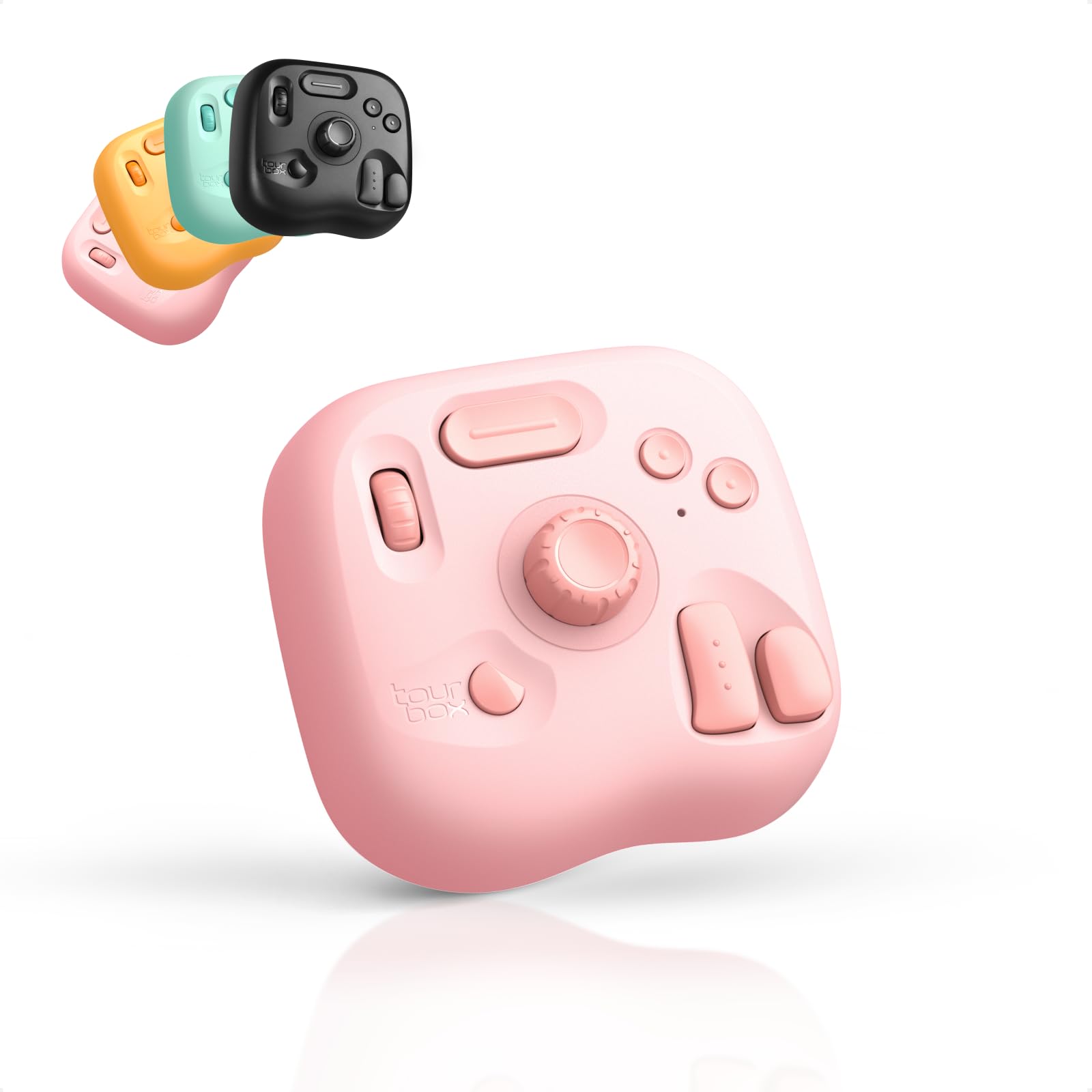
TourBox Lite Bluetooth

89 /100
Studio Score Strong Evidence

Key details

Dial Behavior
Knob plus wheel
Keys And Profiles
8 keys, app detection
Software And Macros
Native macro support
Wireless Reliability
Bluetooth 5.0, USB-C
Check Price on Amazon

TourBox Console ships with ready-made profiles for Premiere Pro, Final Cut, and DaVinci Resolve, and it swaps profiles automatically when the active app changes. The HUD shows the current key assignments, so finding a command doesn't require memorizing a layout. For a multi-NLE workflow, that removes the usual setup friction. The profile system also means a single pad can cover timeline editing, color adjustments, and even Lightroom adjustments without reinstalling or remapping per app.

Macro setup in TourBox Console doesn't require scripting. You pick a key, record the sequence, and assign it to the active profile; from there the pad handles the rest whenever the app opens. That puts the Lite above shortcut pads that only send single keystrokes, and it extends the reach of the eight physical buttons. The macro editor is a practical middle ground between a fixed shortcut pad and a full programmable deck.

The compact body keeps the pad beside a normal keyboard instead of replacing it. The knob/wheel handles timeline scrubbing and frame-by-frame moves, while the keys cover transport, trim, and cut duties. Bluetooth supports untethered editing, and USB-C provides a wired option for sessions where constant connection matters. The grip keeps it stable on a desk without adding bulk, so it travels well in a laptop bag.

An editor who moves between Resolve, Premiere, and Final Cut will see the benefit immediately: one controller, no per-app key mapping marathon. Beginners get the same advantage because the preset is already configured. The eight-key ceiling is the tradeoff; editors who expect one physical button for every function will outgrow this layout, so it suits people who embrace layers and macros. Resolve editors wanting a deeper transport deck with a bundled Studio license will find that in Resolve-specific hardware. For everyday video-editing workflows, the Lite's profile switching matters more than raw button count.

At a mid-range price, the Lite targets editors who want one controller for NLE work rather than a fixed console for a single app. The macro engine and automatic profile switching deliver much of the practical value of a larger deck in a smaller package.

๐Ÿ’ก Assign the macros you reach for first; the eight-key layout works better when layers hold the rest.

Pros

  • Out-of-the-box presets for Premiere Pro, Final Cut, and DaVinci Resolve change automatically as you switch apps.
  • Native macros let one key press run multiple commands, stretching the eight-button layout further than its size suggests.
  • Setup is fast enough to go from unboxing to editing in one session, with no mapping homework.
  • The Console HUD shows each key's current function, so switching between apps doesn't mean losing your place.
  • Lightweight body with knob/wheel and Bluetooth keeps a travel editing kit small without giving up tactile control.

Cons

  • Eight physical keys caps the number of simultaneous controls an editor can reach before relying on layers.
  • Linux-only editing rigs won't get driver support, so the pad can't act as a controller in that OS.
Our verdict

For editors who switch between Premiere, Final Cut, and Resolve, the TourBox Lite makes multi-app control feel immediate instead of requiring a separate mapping session for each app. That convenience, plus native macros, is what separates it from simpler shortcut pads.

Check Latest Price
2

Best for DaVinci Resolve Editors

Blackmagic Speed Editor

92 /100
Studio Score High Confidence

Key details

Dial Behavior
Search dial, transport keys
Keys And Profiles
17 tactile keys
Software And Macros
Studio license bundle
Wireless Reliability
Bluetooth, USB-C
Check Price on Amazon

The Speed Editor is a Resolve-specific control surface with a search dial and tactile transport keys arranged around the Cut page workflow. It ships with the DaVinci Resolve Studio activation card, so the hardware purchase also covers software licensing. This is a dedicated console rather than a typing keyboard, so the key layout follows Resolve's editing logic instead of a QWERTY arrangement.

The search dial moves through the timeline frame by frame or in clip increments, turning a mouse-driven scrub into a wrist motion. The dedicated transport keys keep hands close to the console during trims and stringouts, which is where a permanent control surface pays off. Editors who spend long sessions on the Cut page will notice the difference right away.

This is for editors who cut primarily in DaVinci Resolve, especially on the Cut page, and want the Studio license without a separate software purchase. Outside Resolve, the keys and dial have limited function, and the Edit page does not expose the same set of controls. If Premiere or Final Cut is your primary NLE, the top pick's broader presets and macro support fit that workflow better.

Pros

  • The search dial and transport keys keep the hand on the console instead of jumping back to the mouse.
  • The bundled Studio activation card gives Resolve Free users a paid upgrade path with the hardware.
  • Solid construction keeps the console planted on the desk during fast dial spins.

Cons

  • The button arrangement is not self-explanatory, so early editing sessions run slower before the layout feels natural.
  • Bluetooth pairing can be temperamental in a wireless-heavy edit bay; a USB cable restores control.
Our verdict

Resolve-focused editors who want the Studio license without a second purchase get the closest hardware-software match in this group. Multi-app editors will find the console too narrow.

Check Latest Price
3

Best OLED Visual Shortcut Pad

Xencelabs Quick Keys

87 /100
Studio Score Strong Evidence

Key details

Dial Behavior
Rotary dial, 4 modes
Keys And Profiles
8 OLED keys, 5 sets
Software And Macros
No macro support
Wireless Reliability
Bluetooth 5.0, USB-C
Check Price on Amazon

The OLED labels are the reason to pick this over any pad with blank keys: each of the five key sets shows its current assignment on the keycap, so shifting between Premiere, DaVinci Resolve, and audio software is a matter of reading the pad rather than recalling a layer. The rotary dial adds four programmable modes for scrubbing or adjusting levels, and the high-density body gives it a settled, desk-ready feel without dominating a small workspace.

The companion software maps key functions without the usual tangle of menus, and Bluetooth 5.0 pairs privately with a USB-C fallback for deadline-prone sessions. Linux support is a rare addition here, and the 142-gram body travels well while still feeling substantial enough for a fixed edit bay. Keycaps have a satisfying press with no wobble, which makes long days of cutting substantially less fiddly.

Best for editors who toggle between multiple NLEs and want the assignment visible on the keycap rather than memorized. It is not for macro-driven automation or for editors who expect every Adobe palette command to map without a manual reassign; those workflows live in the top pick's territory.

Pros

  • OLED labels show every key assignment across five sets, so profile changes don't require memorizing layers.
  • Premium build with a solid, low-profile body that fits a desk without feeling like cheap plastic.
  • Companion software maps functions quickly and the initial setup is painless.

Cons

  • Adobe users may need to reassign some shortcuts manually, especially in Lightroom or Photoshop.
  • No macro or script automation, so complex multi-step actions are beyond the pad's reach.
Our verdict

The Quick Keys fits a multi-app editor who prefers reading keycaps to memorizing layers. When macros enter the workflow, the top pick is the more logical desk partner.

Check Latest Price
4

Best Budget Shortcut Pad

XP-Pen Mini Keydial

85 /100
Studio Score Strong Evidence

Key details

Dial Behavior
24-detent rotary dial
Keys And Profiles
10 keys, 4 sets
Software And Macros
Software macro mapping
Wireless Reliability
Bluetooth, dongle, USB-C
Check Price on Amazon

The XP-Pen Mini Keydial fits a 24-detent dial, ten programmable keys, and four shortcut sets into a 75-gram body, making it an especially light editing surface for this group. It works across Windows, macOS, and Linux, and its compact footprint suits a laptop bag better than a full-size edit-bay console. The 1000 mAh battery is rated for roughly 300 hours, so charging is not a daily concern. Entry-level pricing keeps it within reach for first-time macro pad buyers.

The key switches are tactile and quiet, and the one-hand layout makes it easy to find controls without looking. The four sets switch quickly, so moving between Premiere, Resolve, and productivity assignments does not require a separate device. The dial sits close enough to the keys that one hand can cover both, and clear keycap labeling supports the quick identification that makes this a comfortable tool for long editing sessions.

Budget-conscious video editors and digital artists who want a small travel pad are the right fit. Bluetooth and driver reliability can be inconsistent, so plan to use USB when stability matters; this pad rewards a wired-first workflow. Travelers who mostly need one or two applications will find the four sets more than enough for a compact editing kit.

๐Ÿ’ก Turn the dial slowly when scrubbing a timeline to avoid laggy playback jumps.

Pros

  • Solid keypad build and satisfying key feel for an entry-level controller.
  • Lightweight 75-gram body with one-hand ergonomics and easy key identification.
  • Covers creative software and general productivity tasks from a small footprint.

Cons

  • Ten physical keys require switching through four sets; editors with many simultaneous controls may feel cramped.
  • The detented dial is step-based, so editors used to smooth jog wheels will need to adapt.
Our verdict

A compact dial pad that gives editors a real wheel and 40 shortcuts without adding bulk to a laptop bag.

Check Latest Price
5

Best Full-Size Resolve Workstation

Blackmagic Resolve Editor

82 /100
Studio Score Strong Evidence

Key details

Dial Behavior
Integrated search wheel
Keys And Profiles
Full QWERTY mechanical
Software And Macros
โ€”
Wireless Reliability
Wired USB only
Check Price on Amazon

A full-width mechanical QWERTY deck with an integrated search wheel sets this apart from the compact shortcut pads in this roundup. The wheel drives timeline scrub and fine jog control directly, while transport keys and Resolve-specific shortcuts cover Cut and Edit pages without leaving the keyboard. The steel chassis and 3kg weight keep it planted on a desk even during rapid trimming.

The dedicated Resolve layout puts common Cut and Edit page commands on physical keys, so you are not hunting through menus or memorizing layered macros. The wheel handles both high-speed scrubbing and fine jogging from one control, and the transport keys are laid out for muscle memory. This is a stationary editing centerpiece rather than a portable add-on.

The right buyer works from a stationary edit bay, spends full days in Resolve, and wants a real QWERTY keyboard for naming clips and typing notes. The wired-only connection, heavy footprint, and Resolve-specific key layout are boundaries, not flaws, for that user. It is not a general-purpose Windows keyboard; standard keys are repurposed for Resolve functions, and Bluetooth users should look elsewhere. If you also edit in Premiere or Final Cut, the fixed layout will fight your workflow rather than support it.

Pros

  • The integrated search wheel puts timeline scrubbing and fine jog control directly under your right hand.
  • Mechanical switches and a heavy steel frame keep the console planted through long edit sessions.
  • Dedicated Resolve keycaps put Cut and Edit page commands on physical keys instead of layered macros.

Cons

  • Premium pricing is only recouped by editors who use this console full-time in Resolve.
  • The jog wheel may become unresponsive in some cases and need a USB cable reseat.
Our verdict

This is the full-size console for an editor who wants a search wheel and real keyboard keys in a Resolve-only room.

Check Latest Price

How to Choose

Software Compatibility

A dedicated Resolve console talks to Resolve's internal commands, which gives lower latency and deeper control than generic keystrokes. A multi-app pad sends normal shortcut keys, so it works in Premiere, Final Cut, and Resolve, but with less direct integration. That difference is invisible on the product page.

If you switch apps during a project, multi-app presets are the practical choice. If you spend full days in Resolve, a dedicated console will feel more responsive even when both devices have the same number of keys.

Dial Behavior

A free-spinning dial suits volume and brush size, while timeline scrubbing needs a detented wheel with firm click-stops so frames do not skip. Search wheels on Resolve consoles use absolute position, while generic dials send relative input. That distinction decides whether you can park a clip at an exact frame.

Check whether the wheel handles timeline navigation or parameter adjustment before buying. A dial that feels smooth for brush control can be annoying when you need frame accuracy.

Keys and Profiles

Physical key count matters less than how many profiles sit one button away. An 8-key device with five application profiles can cover 40 shortcuts, while a 20-key single-profile pad is stuck with one layout. Layered keys require a second press, so editors who use simultaneous modifiers may prefer more physical buttons.

Smaller pads trade key density for desk space and portability. That is fine for a laptop editing kit, but less practical for a fixed edit bay with complex shortcuts.

Wireless Reliability

Bluetooth is the category's most common pain point because it shares spectrum with other devices and can drop into power-saving modes when idle. Wired USB removes that variable entirely. Many buyers end up keeping the USB cable plugged in despite buying a wireless pad.

For travel, a dongle connection is often more stable than standard Bluetooth. For desk use, wired is the simpler answer.

Software and Macros

Macro support is the hidden line between a shortcut pad and an automation tool. Without macros, one key can send one shortcut; with macros, one key can run a sequence of actions. Products with polished macro editors and auto-detecting profiles are easier to live with over time.

Driver quality matters more than hardware. A solid pad with buggy software will waste more time than a simpler pad that maps instantly.

Frequently Asked Questions