7 Best Teleprompter of 2026: Builds That Beat the App

The best teleprompters for video creators who want clear glass, solid builds, and dependable control without the usual app headaches.

Teleprompter listings love to advertise app control and Bluetooth remotes, but the weakest link in this category is the software, not the glass or frame. Most creators discover that after the first pairing failure or connection drop, what actually matters is the physical build, the beam-splitter clarity, and how easily the prompter fits the camera and tablet they already own.

This guide focuses on the practical choices: which prompters handle a full-size iPad, which ones only really work with a phone, and which designs keep text readable without glare or vignetting. A teleprompter is only useful when it disappears into your workflow. The right one for you depends on your camera rig, your device size, and how much setup you can tolerate.

The real trade-off is between convenience and control. Some prompters work with any mirror-text app you choose, while others push you into a brand-specific app and remote that may or may not cooperate. Knowing which you are buying before checkout saves a frustrating shoot.

1

Best Overall

Glide Gear TMP 100

92 /100
Studio Score High Confidence

Key details

Control
Any mirror-text app
Mounting
1/4-inch, 3/8-inch
Glass Size
12-inch 70/30
Max Device
10.5 x 8 inches
Check Price on Amazon

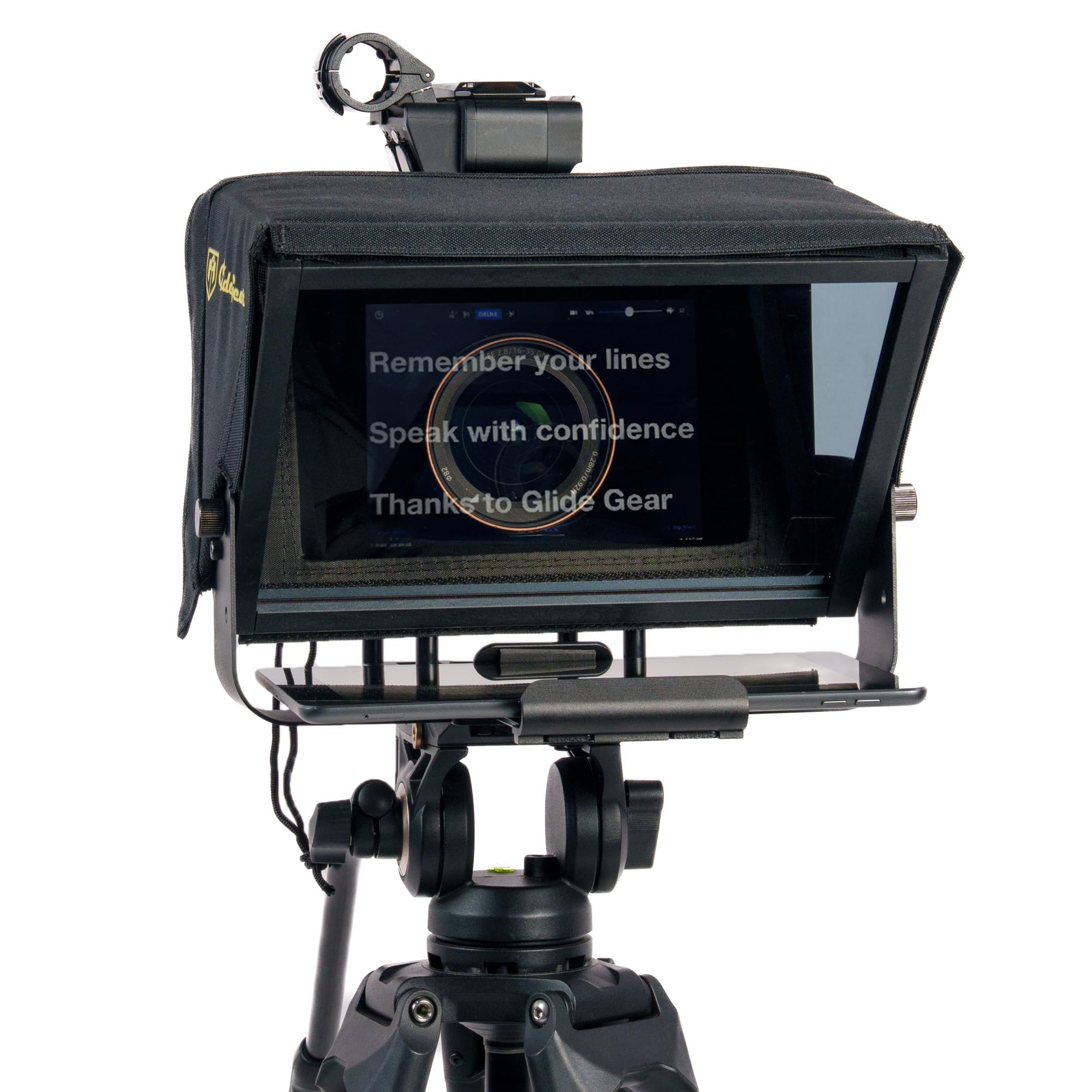
The Glide Gear TMP 100 pairs a 12-inch 70/30 beam-splitter glass with a collapsible 6061 aluminum frame, and it does not lock you into a proprietary app. The glass reflects a readable script toward the talent while passing a clear camera view, which makes it suited to solo video work where eye contact matters. Any mirror-text teleprompter app handles the text side, so the weakest link in this category — bundled software and finicky remotes — drops out of the equation. The 12-inch reading surface is large enough for a script at normal teleprompter distance, and the aluminum frame keeps the assembly stable while you adjust the shot.

Setup follows a short sequence: mount the camera, seat the phone or compact tablet in the holder, open the mirror-text app, then align the glass. The frame folds into its padded case for trips between a home desk and a location shoot, and the 1/4-inch-20 and 3/8-inch-16 threads accept standard tripod heads. Extra accessory mounts let you attach a small light or microphone without rebuilding the rig. The whole unit stores flat in the case, so the beam splitter is not exposed to loose gear in a kit bag.

This is a phone-and-compact-tablet tool. Phones and tablets up to 10.5 x 8 inches sit securely, while a 12.9-inch iPad Pro sits outside the holder's envelope and needs a larger glass prompter. The same goes for teams that expect a bundled remote and app ecosystem: the TMP 100 is app-agnostic, so the software side belongs to the user. Solo creators who already run a mirror-text app will find that workflow carries over unchanged, which removes the learning curve when moving between a desk setup and a location shoot.

The 12-inch reading surface suits talking-head videos, social clips, and desk interviews where the camera sits a few feet from the talent. A longer studio read from across a room calls for a larger glass panel, but that is outside this product's portable intent. Inside its intended range, the prompter does what a dedicated video tool should: it keeps the script in the lens line and gets out of the way when you need to change camera position.

At a mid-range price, the build quality carries the value: the aluminum frame stays rigid on the tripod, the 70/30 glass reads clearly, and the case protects the kit between shoots. The metal construction stands apart from competitors with plastic hoods and thinner trays, and the mount threads match the tripod ecosystem solo video creators already use. That combo makes it the practical all-round choice for creators who want an app-agnostic prompter without moving to a built-in screen workstation.

💡 Keep the mirror-text feature enabled in your teleprompter app before mounting the phone, and confirm the tablet holder fits your device the first time you swap.

Pros

  • Mid-range price buys a professional 70/30 beam splitter and padded case instead of a plastic frame.
  • Folding aluminum frame moves from case to shooting position in minutes.
  • Metal build keeps the glass rigid and steady on standard tripod heads.
  • Beam-splitter glass reflects a readable script without muddying the camera image.
  • Padded carrying case makes the folded prompter easy to grab for location shoots.

Cons

  • No built-in screen: the phone or tablet in the holder is the script display, so there is no monitor-only mode.
  • The holder accepts only phones and tablets up to 10.5 x 8 inches; larger tablets need a different prompter.
Our verdict

Solo creators with a phone or compact tablet get a portable, glass-first prompter that keeps the software choice in their own hands.
Check Latest Price
2

Best Built-In Screen

Elgato Prompter

86 /100
Studio Score Strong Evidence

Key details

Control
Camera Hub, Stream Deck
Mounting
USB desktop
Glass Size
Built-in 9-inch
Max Device
PC/Mac display
Check Price on Amazon

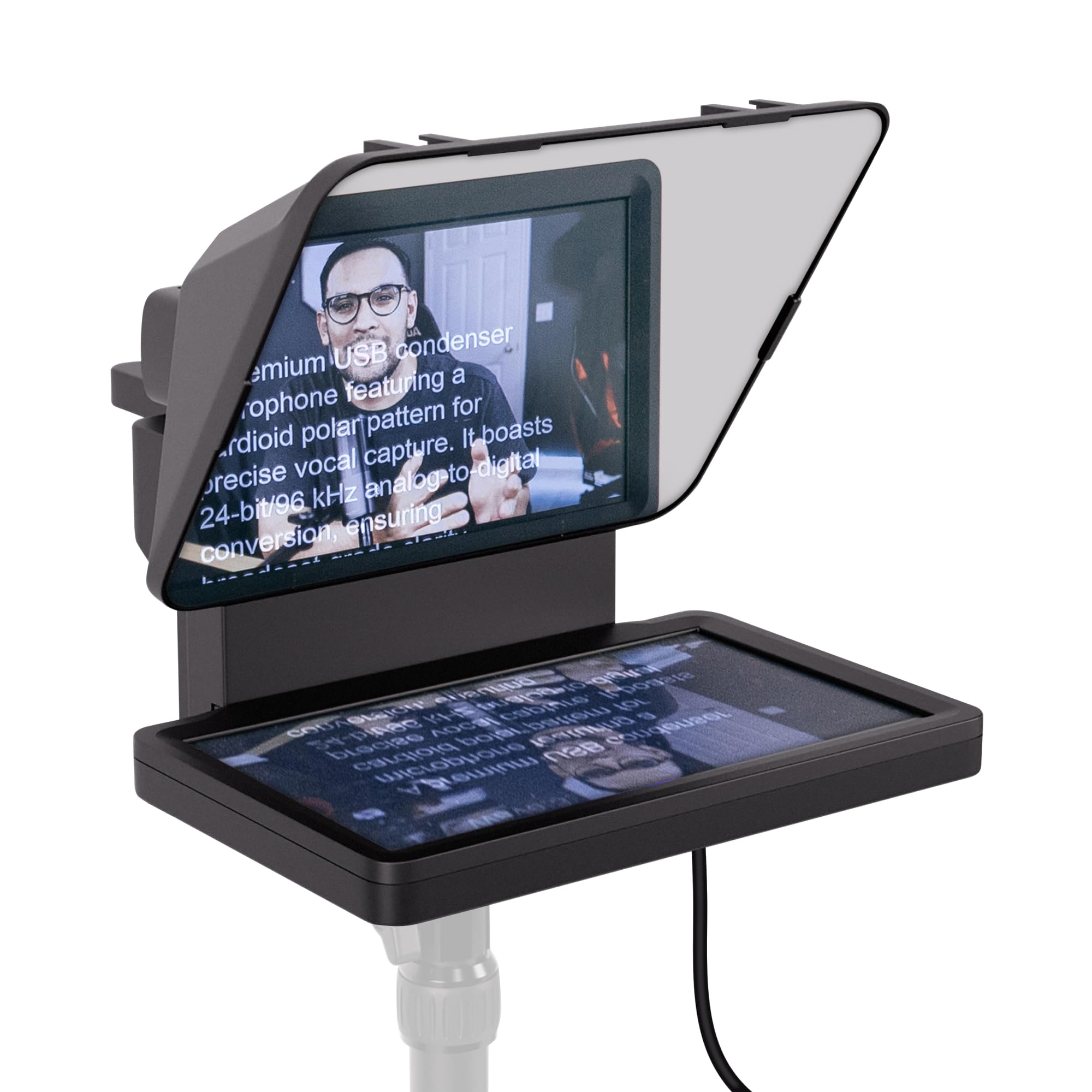
An integrated 9-inch display that acts as a real second computer monitor sets the Elgato Prompter apart from the top pick's tablet-based beam splitter. Drag any window onto the prompter screen and the camera sits behind the glass, so the script stays in your natural line of sight. This removes the phone syncing step and adds a compact desktop display for scripts, notes, or stream metrics.

This is a desktop-bound workflow for PC/Mac streamers, OBS users, and Zoom/Teams presenters who already have a camera on a desk. Stream Deck and Camera Hub control fits neatly into an existing setup, and the no-phone design will appeal to anyone tired of juggling a tablet. It is not a portable or location-shooting tool; the prompter needs a computer to run. Buyers who dislike installing software should look elsewhere, because desktop drivers and app setup are part of the deal.

The display's utility goes beyond prompting: you can park a chat panel, episode notes, or OBS metrics on it while your main monitor stays clean. That flexibility is where the premium price makes sense for desktop-first creators. For anyone who needs a teleprompter on the move, a portable beam-splitter design remains the better fit.

💡 Update display and camera drivers before the first live session to reduce software hiccups.

Pros

  • Integrated 9-inch screen works as a second computer monitor, letting you drag any window into the prompt position.
  • Places the script directly in the camera line of sight, so presenters hold natural eye contact while reading.
  • A single USB connection supplies both power and display, eliminating phone or tablet syncing from the prompt workflow.

Cons

  • The plastic housing can feel less dense than metal alternatives, and occasional units may arrive damaged.
  • On Windows, OBS can crash mid-stream while the prompter software runs.
  • Mac setups may require DisplayLink driver installation and troubleshooting before the prompter is recognized.
Our verdict

This is a focused desktop prompter for streamers and video-call presenters who already work from a computer and want eye contact without a tablet. If your setup is mobile, the top pick serves that better.

Check Latest Price
3

Best Large-Glass Studio Prompter

NEEWER X14 III Prompter

84 /100
Studio Score Strong Evidence

Key details

Control
RT113 remote + app
Mounting
Manfrotto QR plate
Glass Size
14-inch 71%
Max Device
8.7 inches wide
Check Price on Amazon

The X14 III separates itself from the top pick with a 14-inch HD beam splitter that transmits 71% of light, supported by a tool-free all-metal frame. It also sits clearly above the entry-level NEEWER in this guide by adding a Manfrotto 501PL-compatible quick release plate and a wider reading surface. That combination makes it a roomier prompting option for iPad and DSLR creators while keeping setup fast.

Script text stays legible from the full 10-foot reading range, so presenters can keep eye contact with the lens instead of leaning toward the glass. The assembly-free build means the unit arrives ready for a tripod mount, and the included carry case covers transport between shoots. The wide panel also fits a 12.9-inch iPad Pro without crowding the tablet tray, which is where the extra glass pays off.

This NEEWER best fits iPad-first creators and studio presenters who want no-assembly setup, a wide prompting surface, and quick camera changes through the 501PL plate. Buyers who need guaranteed Android remote/app control or prefer a built-in screen workflow should look elsewhere. The RT113 remote can be inconsistent, so iOS users who already rely on the app have a smoother path than Android users.

💡 Set up the RT113 and app before a session so you are not troubleshooting controls mid-recording.

Pros

  • 14-inch HD beam splitter with 71% light transmission keeps script text readable at presenting distance.
  • All-metal frame gives the prompter a solid, studio-grade feel.
  • Tool-free assembly means the unit goes from box to tripod quickly.
  • Manfrotto 501PL-compatible quick release plate allows rapid camera changes.

Cons

  • With a heavy camera and long lens, the mounting can sway; lighter mirrorless bodies hold steady.
  • A unit can arrive without the included RT113 remote, leaving you reliant on app-based control.
Our verdict

The X14 III is the right fit for iPad-first studio presenters who want wide glass, a tool-free frame, and fast quick-release mounting.

Check Latest Price
4

Best for Professional Rail Rigs

SmallRig 3646 Teleprompter

82 /100
Studio Score Strong Evidence

Key details

Control
SmallGoGo app
Mounting
15mm LWS rails
Glass Size
Lens-mounted
Max Device
11-inch tablet
Check Price on Amazon

Unlike the app-agnostic all-rounder in this guide, the SmallRig 3646 is a rail-first teleprompter: it mounts to 15mm LWS baseplates, covers 49-95mm lenses, and stays clear of vignetting from 22mm onward. The modular hood and filter adapter keep the front end configurable, and the silicone cover spans the common 49-95mm filter-thread range.

This is for DSLR and mirrorless video producers with a separate 15mm rail system in their kit. The ABS, aluminum, and polycarbonate shell suits production use, and the modular hood plus filter adapter integrate with the front of the camera build. The device tray accepts iPads and tablets up to 11 inches, which keeps a clean reading surface for studio scripts. Buyers without a rail rig should treat that support as a necessary part of the total setup, since the prompter is not a standalone consumer unit.

Beam-splitter clarity and repeatable mounting are the product's anchor: the hood blocks stray light, and the 49-95mm silicone cover protects the taking lens during swaps. On a rail rig, the prompter stays put between takes, and the filter adapter lets you add glass without breaking down the assembly. For locked-down studio or interview work, this is a solid production component rather than a consumer gadget.

Pros

  • Rigid ABS, aluminum, and polycarbonate shell suits professional production rigs.
  • Delivers clear beam-splitter performance with no vignetting at 22mm or longer.
  • Mounts quickly to existing 15mm rails with a 49-95mm lens cover included.
  • Fits an existing production workflow at a mid-range price.

Cons

  • SmallGoGo remote and app pairing can be temperamental; occasional re-pairing is possible.
  • Setup cost grows for anyone not already running a 15mm LWS rig.
Our verdict

The SmallRig 3646 suits rail-based DSLR and mirrorless producers who want a modular prompter integrated into an existing 15mm rig.

Check Latest Price
5

Best for iPad Pro Users

Desview T12S Prompter

86 /100
Studio Score Strong Evidence

Key details

Control
Remote + Desview app
Mounting
Tripod, tool-free
Glass Size
12.9-inch AR
Max Device
12.9-inch iPad
Check Price on Amazon

Aviation-grade aluminum body, color-neutral anti-reflective beam splitter, and a genuine flight-style case separate this from the compact lens-mounted travel prompter in this guide. The frame holds a 12.9-inch iPad Pro with room to spare, so your primary tablet stays in place instead of switching to a phone. That larger footprint is the whole point: this is a stationary or semi-portable studio tool, not a pocket rig.

This is for podcast and studio creators who work with a larger tablet and want a frame that does not flex when the camera moves. The alignment lock can be finicky during assembly — the locking pieces need a patient hand before they seat — but once in place the frame stays rigid. Phone-only shooters are better served by the smaller travel option in this guide; the 12.9-inch glass and metal case are more than a smartphone workflow requires.

For UGC and social media work, the payoff is natural eye contact: the beam splitter reflects the script at the lens axis, so you are not looking above or beside the camera. The custom aluminum case protects the glass in transit, and the tool-free assembly means the prompter can be stored as a unit and unpacked quickly.

Pros

  • Holds a 12.9-inch iPad Pro without flex during longer recording sessions.
  • Rigid metal frame and custom aluminum case keep the glass safe between shoots.
  • Large beam-splitter glass keeps the script at the lens axis for natural eye contact.

Cons

  • Alignment lock can be finicky during assembly; the joint needs careful seating before it stays put.
Our verdict

For a 12.9-inch iPad Pro user, this is the mid-range build that brings a flight-style case and solid glass to a desk or studio cart.

Check Latest Price
6

Travel Vloggers

Desview T3 Prompter

81 /100
Studio Score Strong Evidence

Key details

Control
Bluetooth + app
Mounting
Lens adapter rings
Glass Size
70/30 coated
Max Device
10-inch tablet
Check Price on Amazon

The Desview T3 wraps a 70/30 beam-splitter, nine adapter rings, and a foldable protective lid into a compact travel package that pairs naturally with smartphones and DSLR bodies. Setup takes little time, and the lightweight frame feels sturdier than the budget price implies. It is not higher in this guide because device-size compatibility is inconsistent and the glass can reflect light and create glare in side-lit scenes; phone-first creators who check their tablet dimensions before ordering and use the hood as a shade will find it easy to live with. That keeps it a sensible travel and live-streaming option for shooters who want a portable prompter without a studio footprint.

Pros

  • Setup is quick thanks to the adapter rings and foldable protective lid.
  • Lightweight build holds up well for travel at this budget level.
  • Budget-friendly entry into beam-splitter prompting for phone and DSLR work.

Cons

  • Camcorder users may need a different mounting setup despite the advertised compatibility.
  • The tablet holder may not secure an 11-inch iPad.
Our verdict

For travel vloggers and run-and-gun smartphone or DSLR creators who want a packable prompter without a studio case, the T3 fits the budget slot.

Check Latest Price
7

Solo Vloggers

LENSGO TC7 Prompter

78 /100
Studio Score Established

Key details

Control
TCQI app + remote
Mounting
49-82mm rings
Glass Size
9.7-inch
Max Device
9.7-inch tablet
Check Price on Amazon

The TC7 adds a small-tablet-capable beam splitter over the phone-only mini prompter in this set, while still folding into a compact kit. Multiple cold shoes and 49-82mm lens rings make it a practical companion for phone-based shoots. The included phone/tablet holder is light-duty, and the TCQI app can feel fiddly, which keeps it below the top picks in this lineup. For a solo vlogger or remote worker who wants a lightweight teleprompter for smartphone or small-tablet video calls, that trade is acceptable; for heavy-duty studio work, the TC7 is the wrong tool.

Pros

  • Folds into a compact kit and sets up quickly for one-person shoots.
  • Covers phone, small tablet, and 49-82mm-lens cameras from one kit.
  • Budget-friendly entry to beam-splitter prompting with the core functions included.

Cons

  • The reading surface caps out around small-tablet size, so larger tablets won't fit.
  • Beam-splitter clarity can vary between units, so a close look at the glass before regular use is wise.
Our verdict

For phone-first vloggers, remote workers, or first-time buyers, the TC7 is a cost-effective way to learn a teleprompter workflow without committing to a studio rig.

Check Latest Price

How to Choose

Beam-Splitter Size and Light Transmission

The beam splitter is the glass that reflects your script toward your eyes while letting the camera lens shoot through it. Larger glass gives you a longer readable script area and a more comfortable reading distance, but it also adds weight and bulk to the rig. A 12-inch splitter is the practical sweet spot for solo creators; 14-inch and 17-inch versions suit studio presenters who need to glance down at a full page of text without scrolling.

Light transmission matters because it directly affects your image. A 70/30 splitter reflects 70 percent of the script light and transmits 30 percent of the camera's view; a 75 percent reflective surface reads brighter but can cut more light reaching the lens. On a dimly lit set, lower-transmission glass will force you to raise your ISO or add lighting. That is a hidden trade-off that only appears after your first low-light shoot.

Maximum Device Size

A teleprompter tray that holds a tablet is not the same as a tray that holds your tablet. Check the maximum device dimensions, not the advertised screen size. A prompter that supports an 11-inch iPad may still fail to grip a 12.9-inch iPad Pro because the tray opening is too narrow.

This matters most if you plan to shoot with a full-sized tablet as your script display. The weight of a large iPad also changes the center of gravity, so a prompter that feels secure with a phone can sag or shift when you clamp in a heavy tablet.

Remote and App Control

Every brand claims its app and Bluetooth remote are seamless, but the physical realities of Bluetooth pairing and background app execution make that hard to deliver consistently. Some remotes drop connection when the app is not in the foreground, and some apps do not mirror text properly on Android tablets. A prompter that works with any standard mirror-text app removes that dependency, trading the convenience of a dedicated remote for the reliability of a passive display.

If you need scroll speed control, a remote is still useful, but treat the included app as a contingency rather than a core feature. Test the connection before a live shoot and keep a backup app installed.

Build Material and Mounting System

Aluminum frames withstand the repeated setup and teardown that content creators put on a prompter. ABS plastic is lighter and cheaper, but it flexes more under heavier cameras and tablet loads. The mounting system also determines which tripod heads and rail systems you can use; 1/4-inch-20 threads are standard for consumer cameras, while 15mm LWS rails are the professional videography standard.

If your camera sits on a gimbal or a slide rail, a lens-mounted prompter may interfere with the rig. A stand-mounted prompter keeps the camera independent, but it takes up more floor space and requires a sturdier tripod.

Lens Focal Length and Adapter Rings

The camera lens must sit close enough to the glass that it sees through the splitter without catching the edges. If your lens is wider than the prompter's minimum focal length, you will capture the prompter frame and bracket in the shot. Dedicated phone shades and camera adapter rings help center the lens and block stray light.

A prompter that supports 49-82mm rings is flexible, but verify that your specific lens diameter is included. Some budget prompters list a wide range and then require a separate stepping ring that is not included in the box.

Frequently Asked Questions