5 Best Scanner for Documents and Photos in 2026: Match Your Real Workflow

The best scanner for documents and photos depends on whether you need photo-safe batch speed or high-resolution single scans. Find your match.

Scanner listings love to lead with resolution numbers and page-per-minute claims, but the actual source of frustration is usually software, connectivity, and feed handling. A 4800 dpi spec means little if the driver drops the connection mid-scan or the feeder chews up a curled receipt.

When the job includes both documents and old photos, the right tool depends on volume and photo condition. A flatbed gives you careful single-photo control at high resolution, while a photo-safe ADF turns a shoebox of prints into a finished digital archive in an afternoon. Both approaches can work; the right one is the one that fits how you actually scan.

This guide focuses on that fit, with picks that balance speed, image quality, and connection reliability across real-world use.

1

Best Overall

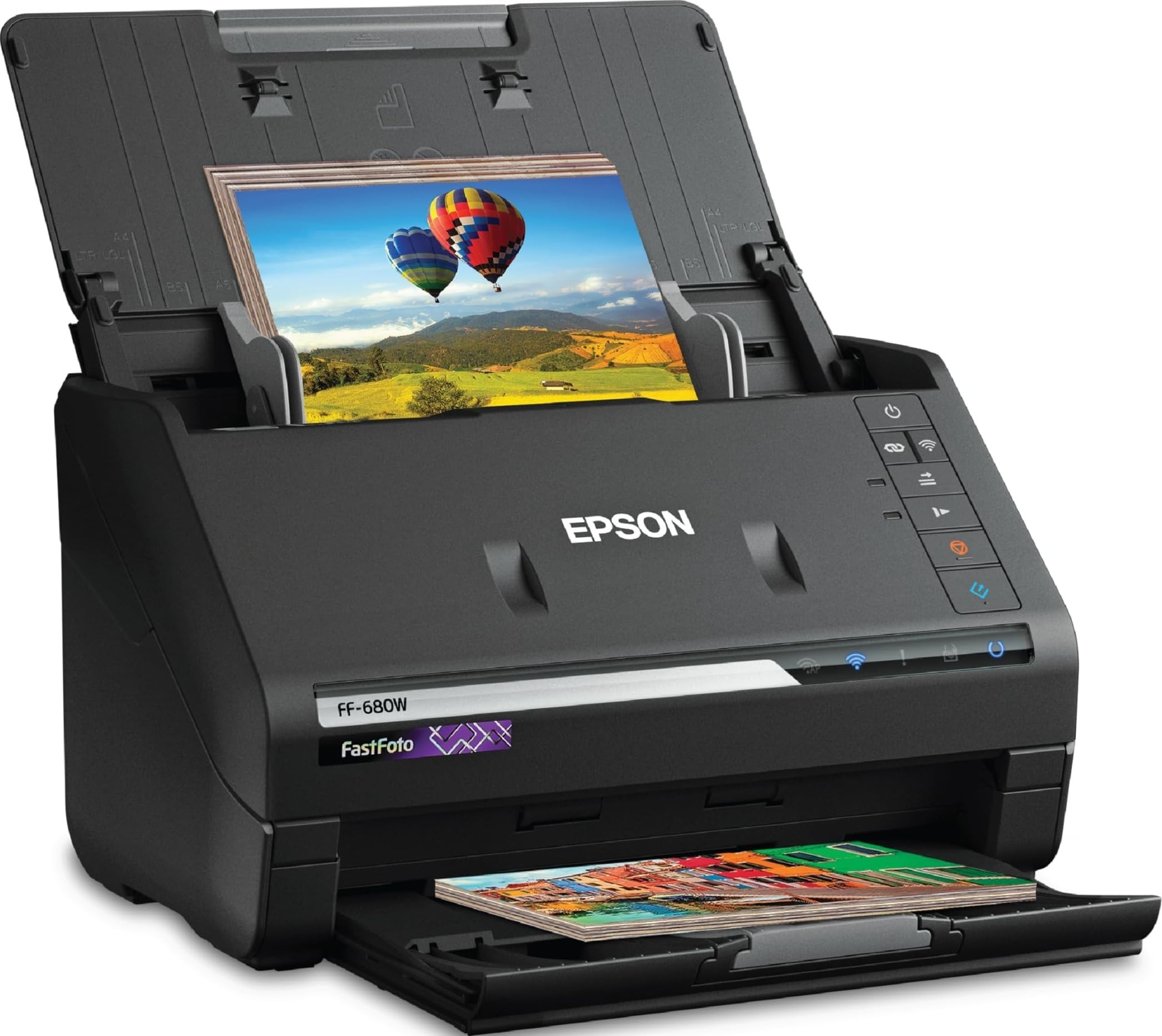
Epson FastFoto FF-680W

90 /100
Studio Score High Confidence

Key details

Speed
45 ppm / 90 ipm
Scan Type
Duplex ADF photo/document
Connectivity
USB 3.0 + Wi-Fi
Check Price on Amazon

The FastFoto FF-680W is the only scanner in this set that moves a shoebox of old photos through the same feeder that handles double-sided documents with OCR. It accepts up to 36 photos per batch and scans at roughly one photo per second at 300 dpi, so a stack of family prints becomes an afternoon project instead of a week-long one. On the document side, the same mechanism pulls both sides of a page in one pass and produces searchable text. The photo path is made for prints rather than forcing them through a standard document transport. That dual role is the core of its appeal.

A 1,000-photo archive can be digitized in under three hours without sorting by size or orientation. The scanner also reads the back of every print, so handwritten dates and names on the reverse end up preserved in the same pass. That volume-plus-capture handling is what separates it from document-only feeders, which use a tighter paper path that can curl or scuff prints. The photo-safe ADF also means you are not standing over a flatbed one print at a time.

This is a large desktop unit, so it fits best when the job is ongoing rather than a one-time scan. Families with boxes of prints and home offices clearing double-sided paperwork are the natural owners. Wireless setup on 5GHz networks can be frustrating; connecting via USB clears the connection issues. If desk space is tight, a compact feeder is a better fit.

The same ADF takes on document stacks after a photo session, with rated speeds of 45 ppm simplex and 90 ipm duplex. The document feeder uses the same transport as the photo path, so you do not switch hardware when the task changes. The feeder accepts mixed paper weights without carrier sleeves, and OCR output lands in searchable PDFs. For a home office that still processes double-sided paperwork, this one unit covers both archives and active files.

The 600 dpi optical resolution is lower than a dedicated photo flatbed's 4800 dpi, but for a 4x6 print it still produces roughly 2400x3600 pixels, enough for screen viewing and standard reprints. At 300 dpi, the one-second-per-photo speed makes that tradeoff worth it when the pile is large. For anyone weighing a flatbed against this feeder, the question is whether per-print attention matters more than clearing a full box in one sitting.

Pros

  • Batch-feeds up to 36 photos at once at roughly one scan per second.
  • Duplex photo capture preserves handwritten backs without a second pass.
  • Document scanning with OCR means the same device clears paper stacks.
  • Mixed paper sizes and weights run without carrier sleeves.

Cons

  • Premium price puts it above entry-level flatbed and compact document scanners.
  • Some glossy or matte photo finishes may produce a color shift from the original.
Our verdict

For a household with a photo archive and a paperwork pile, this is the one unit that clears both without switching devices.

Check Latest Price
3

Best High-Volume Windows Feeder

Canon RS40

79 /100
Studio Score Established

Key details

Speed
40 images/min duplex
Scan Type
Duplex ADF photo/document
Connectivity
USB
Check Price on Amazon

The Canon imageFORMULA RS40 is a 60-sheet automatic document feeder that scans both sides of a mixed photo-and-paper stack at 40 images per minute. That batch capacity is what separates it from the high-resolution flatbed in this set, which requires one item at a time.

Large stacks of old prints and double-sided paperwork clear quickly, and the RS40 does not require separating receipts, cards, and IDs into different runs. The speed advantage holds up even when the pile mixes glossy prints with flimsy receipts, which is where an ADF earns its place next to a flatbed.

Windows-based offices digitizing receipts, cards, IDs, and mixed documents are the right audience. The RS40's limits are clear: photo color accuracy is poor, with red casts and oversaturation, and recent macOS compatibility is not dependable. Color-critical photo archivists and Mac users should consider the flatbed alternative instead.

At a mid-range price, the RS40 gives small offices a 60-sheet ADF without moving into premium-priced territory. The tradeoff is that the fastest path to a digitized pile is not a color-faithful path, so matching scanner to task matters.

๐Ÿ’ก Keep the RS40 connected to a Windows PC for the smoothest day-to-day experience.

Pros

  • Duplex scanning at 40 images per minute clears large mixed stacks quickly.
  • The 60-sheet feeder accepts documents, photos, cards, and receipts in one run.
  • USB-only setup keeps the connection simple for a dedicated office PC.

Cons

  • Recent macOS versions may not connect dependably, so this is a Windows-first scanner.
  • Fine detail in photo scans may look soft or pixelated at closer inspection.
  • Photo scans can carry a red cast and oversaturated tones, so color correction may be needed.
Our verdict

For a Windows office that needs receipts, cards, IDs, and mixed photo batches cleared fast, the RS40 is the volume pick at a mid-range price.

Check Latest Price
4

Best Budget Flatbed for Photo Scanning

Canon LiDE 400

83 /100
Studio Score Strong Evidence

Key details

Speed
8 seconds per page
Scan Type
Flatbed document/photo
Connectivity
USB Type-C
Check Price on Amazon

The LiDE 400 pairs 4800 dpi optical resolution with USB-C simplicity, giving budget-minded photo archivists the most resolution per dollar in this set for both photo and document scans. It is a true flatbed, so each print stays flat under the lid and the optical path works the same for a single photo as for a letter-size page. The 60-sheet feeder model in this lineup prioritizes throughput; the LiDE 400 prioritizes optical quality.

The bundled software turns multi-page documents into a single PDF without fuss, and Windows setup is quick enough for a small home office. Switching between document mode and photo mode takes a couple of clicks, so a mixed job of receipts, forms, and family prints can be handled in one sitting.

At full resolution, a simple print shows paper texture and ink detail that lower-resolution feeder models miss. The scan speed is calibrated to single-page photo work: roughly eight seconds per page, with enough consistency to keep a small batch moving without feeling tedious.

This scanner suits budget photo archivists and Windows home offices that need a compact flatbed. Mac users should not expect plug-and-play, durability can vary between units, and there is no document feeder. If your project is a shoebox of prints scanned a few at a time, the LiDE 400 keeps the workflow simple and the cost low.

Pros

  • 4800 dpi scans capture paper texture and ink detail from prints, making it a real photo-archival tool.
  • USB-C connection and Windows setup are easy for a small home office.
  • Multi-page PDF creation is handled smoothly by the bundled software.
  • Flatbed speed stays reasonable at about eight seconds per page, so a stack of prints moves along without long pauses.

Cons

  • Windows software can drop the connection, which interrupts a longer photo session.
  • Blur or magenta streaks can show up on individual scans, which matters most when archiving prints.
Our verdict

For Windows home offices that want a compact flatbed with real photo resolution, this budget scanner does exactly what it promises.

Check Latest Price
5

Best Premium Office Document Scanner

ScanSnap iX2500

85 /100
Studio Score Strong Evidence

Key details

Speed
45 ppm duplex
Scan Type
Duplex sheet-fed
Connectivity
USB-C + Wi-Fi 6
Check Price on Amazon

The ScanSnap iX2500 is the full-size office feeder in this lineup, sitting above the compact U-turn model while adding a 100-sheet ADF, 45 ppm duplex scanning, a touchscreen, Wi-Fi 6, and a four-year warranty. It can operate as the shared scanning station for a small business while still treating cards and photo prints that fit the feeder as part of the same batch workflow. That combination matters when the inbox contains a mix of letterhead, business cards, receipts, and the occasional 4x6 print.

Small offices that already use ScanSnap Home and cloud services will get the most value from the iX2500. It is a workgroup tool for clearing a daily pile of mixed documents, not a photo-lab system. Businesses scanning mixed paper sizes will find the 100-sheet ADF absorbs the stack without constant reloading.

After configuration, the daily flow is one-touch: scan, OCR, and file to the cloud. Reaching that point can take time, though, because setup involves several software choices. TWAIN support is absent for third-party applications, and Wi-Fi wake and reconnect can add a few seconds; a USB-C connection keeps the scanner ready when batch speed matters.

Pros

  • 100-sheet ADF and 45 ppm duplex speed move large batches without constant reloading.
  • Color and resolution hold up on documents and printed photos, so scans stay usable for records.
  • Four-year manufacturer warranty makes the premium price more defensible for a workgroup purchase.

Cons

  • Large desktop footprint needs a dedicated workbench or counter.
  • No flatbed means fragile or oversized photo prints need a separate scanner.
Our verdict

For a small business that wants one high-capacity feeder for paperwork, cards, and feeder-friendly prints, the iX2500 turns mixed stacks into searchable files at office speed.

Check Latest Price
6

Travel Single Pages

HP PS100

82 /100
Studio Score Strong Evidence

Key details

Speed
15 ppm
Scan Type
Single-sheet simplex
Connectivity
USB 2.0
Check Price on Amazon

Compact and easy to set up, the PS100 suits a traveler who needs to digitize one receipt or document and keep moving. The 1200 dpi marketing figure overstates its capture; the product details specify 300 dpi, which shows up as modest contrast and detail on photo prints. A page can enter at an angle, and unit-to-unit behavior may vary, so this is a budget travel tool rather than an archival scanner. For occasional single pages, that is a workable tradeoff; for archival photo quality, a flatbed is the right tool.

Pros

  • Setup is quick enough to scan a single receipt before moving on.
  • Compact body fits in a commuter bag or carry-on.
  • Budget-friendly price suits occasional scanning without overcommitting.

Cons

  • A double-sided contract means flipping it over for a second scan; there is no two-sided path.
  • With no feeder, each page is placed by hand, so a small pile becomes deliberate work.
Our verdict

Keep it in a travel bag for unplanned, occasional scans away from a desk.

Check Latest Price

How to Choose

Duplex vs Simplex and ADF Capacity

A duplex ADF scans both sides of a page in one pass, which matters for anything with handwriting or printing on the back. A simplex portable feeder only captures one side, so you either flip every page manually or lose the back entirely.

ADF capacity sets the ceiling for hands-off batches. A 20-sheet feeder handles a handful of receipts; a 100-sheet feeder clears a whole drawer of paperwork before you sit down. If you scan documents daily, a larger tray is worth the extra desk space.

Photo-Safe Transport and Mixed Media

Old photos are brittle, curled, and often have fragmented backs or sticky album residue. A photo-safe ADF uses gentler rollers and a straighter paper path than a standard document feeder, reducing the risk of creases or jams. A flatbed is the safest option of all, but it is slow for large collections.

Mixed-media scanning is the hidden variable: cards, Polaroids, receipts, and laminated IDs all behave differently in a feeder. A scanner with a straight or U-turn path that handles thick and thin items in the same batch saves you from sorting everything by hand first.

Optical Resolution and Color Accuracy

Optical resolution determines how much fine detail the sensor physically captures. A 4800 dpi flatbed can reproduce film grain and fine print; a 600 dpi feeder is sufficient for documents and standard prints, but not for enlarging small originals.

Color accuracy is a separate issue from resolution. A scanner can resolve plenty of detail while still delivering red casts or oversaturated tones if its color profile is tuned for documents rather than photographs. If you are archiving family photos, look for reviews that mention neutral color rather than just high DPI.

USB vs Wi-Fi Reliability

USB gives you a direct, stable connection that rarely drops in the middle of a long batch. Wi-Fi adds convenience, but every brand in this category has users who report reconnection failures, slow wake times, and trouble on 5GHz networks.

The practical approach is to treat Wi-Fi as a backup. If you plan to scan daily, plan to use USB and keep Wi-Fi for occasional mobile use.

Speed for Batch Work

Speed matters most when you have a stack of papers or a shoebox of photos that needs to be digitized in one sitting. A 45 ppm duplex feeder can clear 100 pages in about two minutes; a flatbed takes eight or more seconds per page.

For documents, speed is about duty cycle. For photos, speed matters in images per minute, and photo-safe feeding is more important than a faster rated speed.

Frequently Asked Questions