5 Best Motorized Camera Slider in 2026: Moves That Stay Smooth

A motorized camera slider's real test is smoothness on set, not spec-sheet claims. This guide matches travel, control, and power to your shooting style.

A motorized camera slider should turn a locked-off tripod into a moving shot, but the first few runs often reveal the catch: start/end judder, motor whine, and a control workflow that needs more setup than the shot itself.

The central trade-off is travel distance versus portability. Longer rails create sweeping landscape moves and interview tracks, but they amplify any flex in the carriage and demand solid support near both ends. Compact sliders pack easier and shorten the shot.

Smoothness comes from how the motor, rail, and control system behave as one unit, not just the name of the motor. This guide sorts those decisions by shooting style, so you can match travel, payload, and power setup to the work you actually do.

1

Best Overall

GVM 31-inch Carbon Fiber Slider

84 /100
Studio Score Strong Evidence

Key details

Control Method
Dedicated remote
Shooting Modes
Video, time-lapse, tracking, pan
Travel Distance
31 in / 80 cm
Payload Capacity
20 lb
Check Price on Amazon

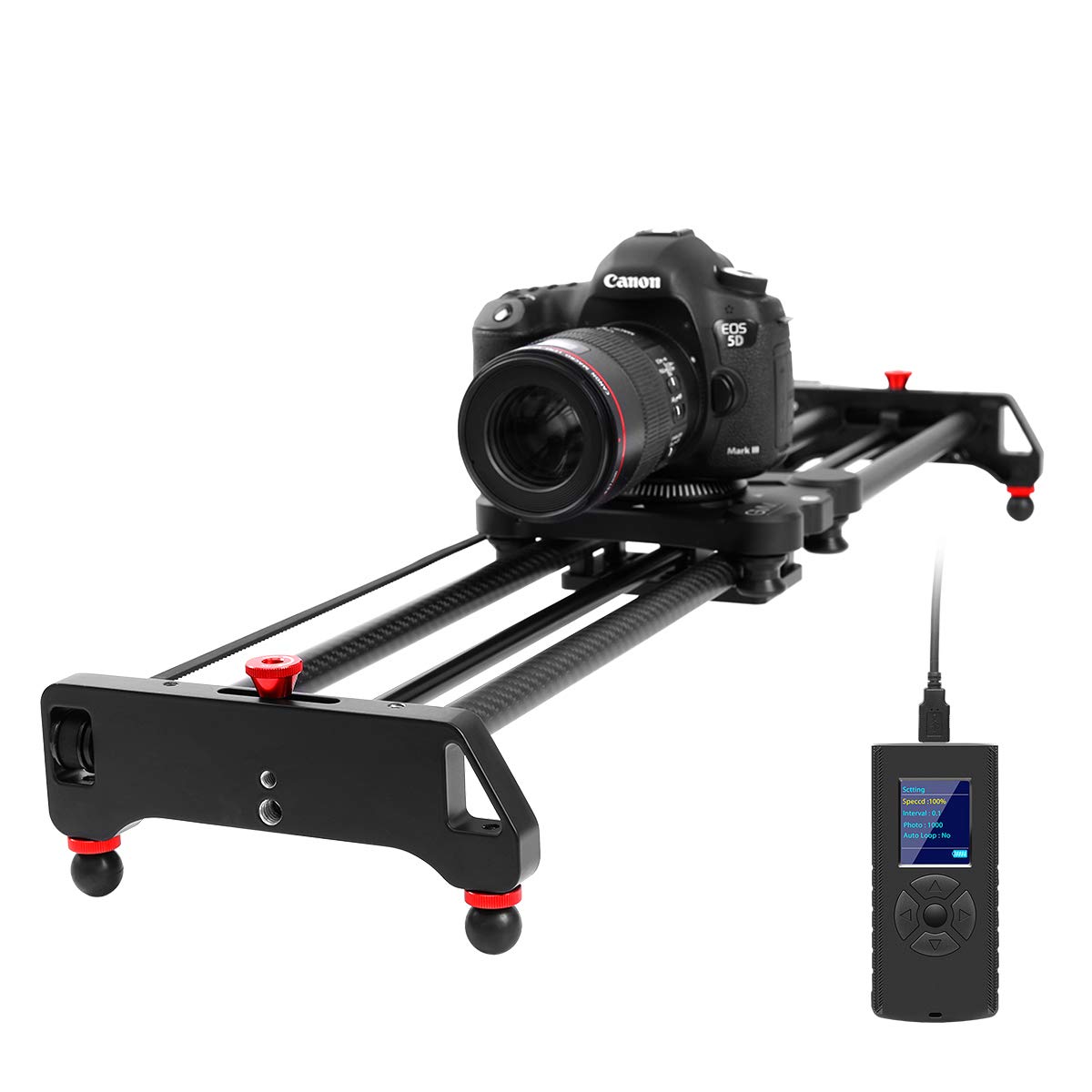
The 31-inch carbon-fiber rail pairs a quiet motor with a complete accessory kit that works from the included remote instead of a phone. Horizontal tracking, 120-degree panoramic sweeps, and time-lapse runs all come from that remote, which is useful for solo shooters who don't want to pull out a phone between takes. The motor keeps motion steady at moderate speeds, and the 20 lb payload clears most mirrorless and compact cinema builds with room for a follow-focus or external recorder.

On location the bundle covers the essentials: NP battery, charger, ball head, and six shutter cables are included, so the rail is ready for an interview setup without extra power purchases. The carbon-fiber body keeps the full kit light enough for a camera bag, and the rail's travel gives enough room for slow push-ins or lateral pans across a two-person conversation. Because the rail runs on the included NP battery, you can power it from the same spares you already carry for a monitor or other camera accessories.

Once the start and end points are set, the remote repeats the same pass with the same path, which is useful when you need several takes of the same move. The motor's low whine at slow speeds stays in the background during indoor interview recording, so it doesn't compete with dialogue.

The bundle's value is strongest for videographers who don't already own a drawer full of NP batteries and shutter cables. The package price undercuts carbon-fiber sliders that ship without power or a head, so the real cost of a working kit is lower than the rail price alone suggests.

Compared with the longer sliders in this set, this model is easier to support and set up on a tripod or tabletop. The smaller footprint makes it a practical travel kit, while still providing enough travel for standard interview framing. If your work is run-and-gun documentary, this is the size that will actually make it into the bag on a regular basis.

Best for enthusiast videographers and interview/documentary shooters who want a compact, remote-controlled rail without a phone in the workflow, and for travelers who want carbon fiber without a premium price. Start/end vibration can appear on individual units when the motor begins or ends a move, and the dedicated remote's menu is workable but less polished than phone-app rivals; both are tradeoffs to accept if you want this specific balance of size, kit, and quiet operation.

Pros

  • Carbon-fiber rail feels high-end without the premium price of larger travel sliders.
  • Smooth, quiet motor holds steady motion for video, time-lapse, and 120-degree pan sweeps.
  • Complete kit includes remote, NP battery, charger, ball head, and six shutter cables at a mid-range price.
  • Lightweight carbon build travels well and sets up quickly on location.

Cons

  • Initial assembly is time-consuming because the printed manual is hard to follow.
  • The 31-inch travel won't cover scenes that need a longer push-in or wider lateral move.
Our verdict

Between the longer sliders and the bare aluminum options, this kit is the one that balances travel weight, included hardware, and quiet motorized moves for a working videographer.

Check Latest Price
2

Long-Travel / App Control

GVM 48-inch Carbon Fiber Slider

82 /100
Studio Score Strong Evidence

Key details

Control Method
iOS/Android app
Shooting Modes
Video, time-lapse, panorama, tracking
Travel Distance
48 in / 120 cm
Payload Capacity
20 lb
Check Price on Amazon

The 48-inch carbon slider covers 120 cm of motorized travel and uses an iOS/Android app for pan, time-lapse, and video moves. That extended reach sets it apart from the compact 31-inch carbon kit, which is easier to support and quicker to set up.

Motorized motion is smooth at slow crawl speeds, and the carbon rail keeps weight low enough for field work. The included carry bag, six shutter cables, and extension cable make it a complete location package. The shutter cables cover common mirrorless cameras, and the 120-degree pan mode adds a useful extra axis without a separate pan head.

This is the right fit for videographers who need 48 inches of travel for landscape pans and interview staging and who prefer app control over a physical remote. Indie filmmakers who want a lightweight carbon rig will appreciate the portability. Belt durability can vary between units, so it suits shooters who inspect and maintain their gear rather than those who expect years of trouble-free use. The app workflow also requires manual start and end points, a reasonable trade only if you are comfortable programming moves on a phone.

💡 Confirm the product page shows the 120 cm carbon version before purchase, since GVM groups several slider lengths under one listing.

Pros

  • Strong value for money with a carbon-fiber build and app control at a mid-range price.
  • Lightweight carbon-fiber rail is portable enough for field location work.
  • Motorized moves run smoothly, especially when the app handles the motion path.
  • Quiet enough for interview-style shooting without constant motor hum.

Cons

  • Ramp-up and ramp-down whine can be audible in a silent interview room.
  • Long rail needs two solid supports; lighter stands may allow flex over the full 120 cm.
Our verdict

For landscape and interview teams that need the extra reach, this is the long-travel app-controlled rail to consider; shooters who value easy setup and a physical remote will be happier with the compact carbon kit.

Check Latest Price
3

Pro Multi-Axis / Gimbal Integration

IFOOTAGE Shark Nano II

83 /100
Studio Score Strong Evidence

Key details

Control Method
Touchscreen + app
Shooting Modes
Multi-axis, AI tracking
Travel Distance
26 in, 17 in travel
Payload Capacity
15.4 lb horizontal
Check Price on Amazon

The Shark Nano II 660 pairs 360-degree unlimited pan, AI tracking, and a clean DJI RS adapter into one rail — a capability the compact carbon all-rounder does not attempt. For a solo shooter already running a DJI RS gimbal, this one unit replaces a separate pan/tilt head and a slider, with the gimbal acting as an integrated motion axis rather than an add-on.

Touchscreen and app control make multi-target move programming fast, and the 15.4-pound horizontal payload rating covers full camera builds without sag. The brushless motor stays quiet enough for ASMR and interview sets, and properly configured units deliver smooth carriage travel with no micro jitters. The IPS display handles speed, angle, and distance parameters on the rail body, so a phone is not required for every adjustment; the DJI adapter also simplifies cable paths compared with a separate motorized head bolted under a slider.

This is a purchase for professional solo filmmakers and commercial motion-control shooters who already own a DJI RS gimbal and need a slider that behaves like part of a multi-axis rig. The premium price is the first filter: anyone who needs simple rail moves for occasional video should look at the compact carbon kit instead, because the AI tracking and DJI adapter earn their keep only when used regularly.

💡 Before building a multi-target sequence, run a full-length test move at your expected payload to confirm the setup.

Pros

  • Unlimited 360-degree pan and DJI RS integration let a solo shooter combine slider travel with gimbal pan without extra hardware.
  • Smooth brushless carriage holds up under heavy payloads with no visible micro jitters.
  • Touchscreen and app let you program multi-target moves quickly on set.
  • Professional motion-control capability for less than a modular pan/tilt-plus-slider system.

Cons

  • Customer support response can be slow when owners need help resolving setup or hardware problems.
  • Carriage judder can appear on individual units, showing up as stutter in precision moves.
Our verdict

The Shark Nano II 660 turns a DJI RS gimbal into a multi-axis motion system, which is the deciding factor for professional solo filmmakers who already work with that ecosystem.

Check Latest Price
4

Mid-Range App/Button Option

Toprig 60cm Motorized Slider

76 /100
Studio Score Established

Key details

Control Method
Bluetooth app + buttons
Shooting Modes
Video, time-lapse, loop, pan
Travel Distance
60 cm / 24 in
Payload Capacity
4 kg horizontal
Check Price on Amazon

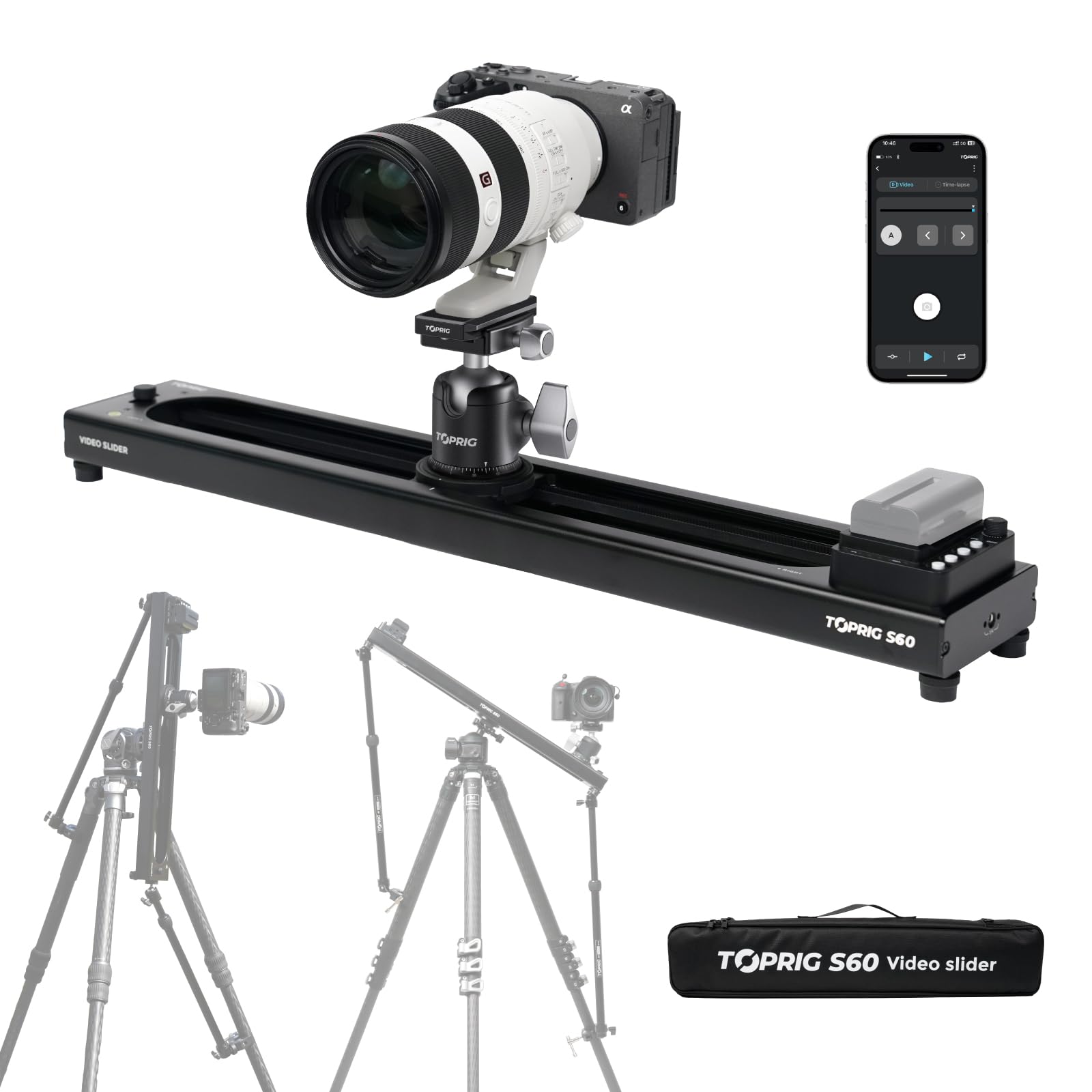
The Toprig S60 stands apart from the compact carbon-fiber kit in this lineup by pairing the Bluetooth app with a physical button panel and speed knob, so you can program time-lapse, loop, and 120-degree pan moves from a phone or run a quick glide without it. The 24-inch aluminum rail keeps travel compact, and the brushless drive holds a quiet, even pace through slow pans.

The motor is quiet enough to sit near a subject, and the speed knob lets you change pacing between shots without opening menus. On a hybrid shoot, video moves and time-lapse runs share the same rail setup with minimal fiddling. Loop mode and the 120-degree pan expand what a single rail pass can cover, so basic follow shots do not need a separate motorized head. The aluminum body stays manageable on a tripod while supporting the 4 kg horizontal payload that covers mirrorless setups.

This is for mid-budget hybrid shooters who already run NP-F cells and want a motorized rail they can drive from either the app or the onboard controls. The listing has mixed S40 and S60 naming, so confirm the delivered rail length before mounting it.

💡 Keep an NP-F550 charged for longer time-lapse runs; the 60-hour runtime figure assumes that cell.

Pros

  • Onboard button panel and speed knob enable app-free control of quick slider moves.
  • Quiet brushless motor produces smooth glides for video and time-lapse work.
  • Aluminum body keeps weight down while maintaining a sturdy footprint on the tripod.

Cons

  • The kit omits NP-F batteries and the DC cable, so buyers without existing cells need a separate order.
  • Motor control behavior can vary between units, making a return policy worth checking.
Our verdict

For a mid-budget shooter with NP-F batteries already in the bag, the Toprig S60 delivers direct button control and app-based time-lapse in a light aluminum body, a practical runner-up to the compact carbon kit.

Check Latest Price
5

Floor Dolly Shots

NEEWER 3-Wheel Dolly

87 /100
Studio Score Strong Evidence

Key details

Control Method
Wireless remote, 3 speeds
Shooting Modes
Floor tracking, 3 speeds
Travel Distance
No rail travel
Payload Capacity
6.6 lb
Check Price on Amazon

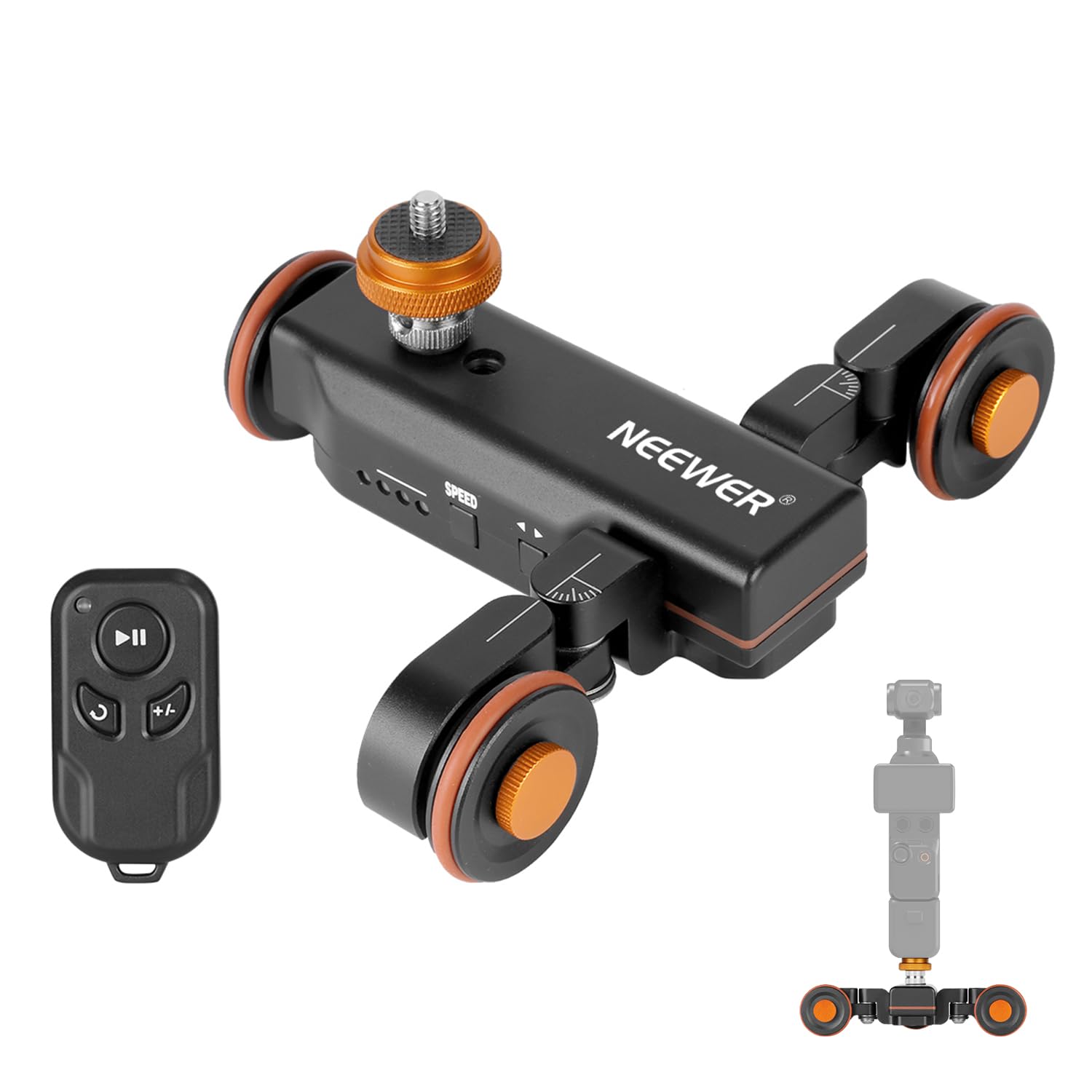
Compactness is the dolly's best card: 180° adjustable wheels, a wireless remote, and an 1800mAh battery turn an action cam or smartphone into a floor-level tracking rig without hauling a rail. The metal frame feels solid for the money, and the remote keeps setup free of app pairing.

It sits below the sliders in this comparison because it is a motorized wheel dolly, not a rail slider; motor noise and floor-surface limits keep it off precision rail work. For flat-floor circular or curved shots with a small camera, those boundaries fade; for buyers expecting slider-style automation, the mismatch is real.

Pros

  • Compact body fits in a small bag, so floor dolly moves travel well.
  • Metal build adds stiffness without adding bulk to the carry load.
  • Wireless remote gets you recording quickly, with no app pairing.

Cons

  • Only three fixed speeds, so precise speed ramping isn't possible.
  • Floor tracking only, without rail-guided linear travel or pan/tilt.
Our verdict

For flat-floor smartphone and action-cam dolly moves, this budget-friendly dolly works; anyone whose main goal is slider-style automation should look elsewhere.

Check Latest Price

How to Choose

Travel Distance

Rail length sets the physical distance of the move. Longer rails cover landscape and interview tracking, but they also amplify flex in the carriage, so vibration shows up more easily unless the rail is supported near both ends.

A 60-80cm rail is easier to pack and easier to brace, but it limits how far the camera travels in a single take. Match the length to the scene you shoot most, not to the biggest number on the listing.

Payload Capacity

Payload capacity is a limit, not a suggestion. A 20 lb rating assumes the load is centered and balanced on the carriage; a long lens shifts the center of gravity and makes the motor work harder.

Lower-rated sliders can still carry a mirrorless kit, but adding a cage, monitor, or gimbal can push the drive into skipped steps and micro-jitter. Keep a margin between the weight of your rig and the slider's rating.

Control Method

Control method defines how fast you can turn the idea into a shot. Wired remotes are simple but the cable is a weak point; Bluetooth apps add programming power but introduce pairing and menu friction; onboard buttons and a speed knob are the quickest for small adjustments.

The hidden part is acceleration handling. A controller with adjustable start and end ramps lets the carriage ease into a move, while a basic one starts and stops abruptly, which reads as vibration on screen.

Shooting Modes

Modes decide whether the slider earns its place in your bag. Video needs continuous smooth motion; time-lapse needs precise step increments; panorama adds a rotating axis that the motor must drive at the same time as the rail.

Check how the modes are actually triggered. Some sliders require manual start and end programming for every shot, and a confused time-lapse interval shows up as visible pulsing. Choose the mode set that matches the work you do most.

Power and Accessories

Power is the difference between a grab-and-go kit and an extra purchase. Some sliders include a battery, charger, and shutter cables; others expect you to supply NP-F cells, a DC cable, or a remote separately.

Battery consistency matters more than the marketing label. A slider that drops voltage under load can slow down mid-shot, so check whether the included power solution holds steady through your longest planned move.

Frequently Asked Questions