9 Best Key Light for Streaming in 2026: Soft, Color-Accurate Picks

Find the key light for streaming that flatters skin tones, mounts securely, and fits your desk without sacrificing control.

Streaming light listings love wattage, app features, and lumen numbers, but the parts that determine a good stream are softer: diffusion, color rendering, and whether the mount holds position session after session. A light that looks impressive on paper can produce harsh shadows or drift mid-stream if the arm is weak.

Cheap multi-light kits attract buyers with their low entry price, yet their weak point is rarely the LED itself. Clamps, stands, and remote receivers tend to wear out first, and a two-light kit with one non-working panel is just a single light with extra cables. One dependable key light with a stable mount and usable controls does more for a stream than two pieces that need constant attention.

This guide sorts the trade-off between compact desk panels and larger softbox-style lights so the choice matches your desk space, camera distance, and tolerance for app-based control.

1

Best Overall

Logitech Litra Glow

90 /100
Studio Score High Confidence

Key details

Control Method
USB + G HUB app
Color Rendering
TrueSoft full-spectrum
Mount & Adjustability
3-way monitor mount
Brightness & Diffusion
Check Price on Amazon

The Litra Glow combines USB power and full-spectrum TrueSoft LEDs in a compact monitor-mounted form, with enough brightness and color-temperature range to act as a primary webcam light. A powered USB port is all it needs. It requires no Wi-Fi, and the physical controls cover everyday changes; G HUB support adds software control for Logitech desktop setups. That keeps the light set-and-forget for daily calls and streams.

Sitting above the monitor, it casts a soft, even light across the face at normal desk distance. The 3-way mount tucks the panel close to the screen, so it reads as a natural key light rather than monitor glare. A few quick adjustments position the panel for a straight-on camera angle. The adjustment range shifts from cool to warm and from dim to bright, which covers changing room conditions without extra gear.

TrueSoft LEDs keep skin tones neutral under webcam color processing, which matters when the light is the only key source. The diffusion also softens edges, so you don't get a hard spot on one side of the face. It's a controlled desktop source rather than a broad wash.

Build quality is a step above budget LED panels; the arm stays where you set it, and the panel feels solid when moved. It does not depend on a phone app for day-to-day use, which is a relief when you need the light on before a meeting. For Logitech webcam owners, G HUB adds software control, but the buttons on the light work even when the app is closed.

This is a desk-first key light for streamers, video recorders, and remote workers who want a main face light without wrestling with an app or network setup. It suits flat-monitor setups best; curved or unusually thick displays can put the mount in a bind. Output is close-range by design, so it works well at arm's length but will not replace a large softbox or a 2800-lumen panel for room-filling coverage.

Compared with larger panels, the tradeoff is raw output, not control consistency. Other desk panels may offer more lux, but some add Wi-Fi or app-control layers to get there; the Litra Glow keeps every essential on the unit or one USB cable away. For a dedicated face light at a desk, that predictability matters more than peak brightness.

Pros

  • Plug-and-play USB operation starts the light without Wi-Fi, app setup, or extra drivers.
  • Bright, soft light at desk distance avoids the harsh shadows that small LED sources can create.
  • Adjustable brightness and color temperature cover a useful range for video calls and streams.
  • Build quality holds through everyday use and repositioning.
  • Consistent lighting performance for webcam and streaming setups.

Cons

  • Output is close-range, so a large softbox or high-output panel will cover much more room.
  • The included mount may not hold on curved or unusually thick displays.
Our verdict

For a desk-bound key light that turns on when the computer does, the Litra Glow keeps the setup simple and predictable — no Wi-Fi, no app required, just USB power.

Check Latest Price
2

Best Desk-Clamp Soft Panel

Godox ES45 Key Light

85 /100
Studio Score Strong Evidence

Key details

Control Method
Magnetic remote + app
Color Rendering
Mount & Adjustability
Clamp stand, 2-in max
Brightness & Diffusion
Edge-lit soft panel
Check Price on Amazon

The Godox ES45 is an edge-lit soft panel with a magnetic 2.4G remote, 0-100% dimming, and a 2800K-6500K color range. It delivers a soft, even pool of light without the diode dots you see on cheaper panels, and it stays flicker-free at camera shutter speeds. The Logitech Litra Glow is still the simpler plug-and-play USB light, but the ES45 trades that ease for a larger face-illuminating source and a physical remote that snaps to the panel.

The remote and app control are the reasons to choose this over a basic USB bar. The magnetic remote stays where you put it, and the Godox app handles color temperature changes without leaning over the light. That control range matters when you switch between a daytime call and an evening stream. For streamers and video-call users who already know they want soft, wide coverage, the ES45 behaves like a small studio panel rather than a webcam accessory.

This is for streamers and home-office presenters who want a step up from a monitor light and don't mind a desk clamp instead of a free-standing base. The clamp fits desktops up to 2 inches thick, so a slab desk or thick butcher-block top is out. For a normal desk with a bit of depth, the ES45 behaves like a small studio panel, not a webcam accessory.

Pros

  • Soft, even diffusion removes the hard shadow line of bare LED panels.
  • Brightness range covers subtle fill to a proper key-light level.
  • Magnetic remote and app control keep adjustments quick from the desk.
  • Flicker-free output suits cameras at common shutter speeds.

Cons

  • The lowest dimming step can still be intense in close-up desk setups.
  • The mounting screw can snap under over-tightening, and the stand may loosen with repositioning.
Our verdict

For a streamer or remote worker on a normal desk who wants a larger soft key light with physical controls, the Godox ES45 delivers in the same space as the Elgato Key Light at a lower price.

Check Latest Price
3

Best for Elgato Ecosystem / High Output

Elgato Key Light

91 /100
Studio Score High Confidence

Key details

Control Method
Wi-Fi + desktop app
Color Rendering
Mount & Adjustability
Desk pole clamp
Brightness & Diffusion
2800 lumens
Check Price on Amazon

The Elgato Key Light outputs 2800 lumens from 160 OSRAM LEDs, enough to act as the primary face light for a stream or video call while clamping directly to the desk. It is the higher-output alternative to the top pick's plug-and-play USB panel, but it routes brightness, color temperature, and power through Elgato's desktop app and Stream Deck.

The 2900K-7000K color range covers warm indoor calls and cooler stream looks, and the pole clamp adjusts height and tilt without a floor stand. Heat stays low enough that the panel can run through a long recording without turning the room into a sauna, and the clamp holds position well on a standard desk edge. At full output, the panel serves as the sole key light in a normally lit room rather than a supplement to an existing source.

This panel suits streamers who already keep a Stream Deck on the desk and set up lighting through Elgato's software. The catch is that Wi-Fi/app connectivity is the known weak point here: the light has no manual controls, so every change depends on the network link. A stable home network is part of the setup, and the panel holds its last settings if the software connection drops.

💡 Create a saved color and brightness profile in the desktop app before your first session, then use Stream Deck keys for quick changes.

Pros

  • Bright 2800-lumen output is enough for a primary face light in a webcam or mirrorless setup.
  • Initial setup takes minutes: clamp the pole, attach the panel, and follow the app prompt.
  • Height, angle, brightness, and color temperature adjust without moving the clamp.
  • Low-heat build stays cool over long recording sessions.

Cons

  • Premium pricing sits above simpler USB key lights that cover close-range streaming setups.
  • If the Wi-Fi connection drops, the panel stays at its last setting until the desktop app reconnects.
Our verdict

The highest-output desk-clamp panel in this group belongs to Elgato users; anyone not running Stream Deck should start with the top pick instead.

Check Latest Price
4

Best Mid-Range Value Panel with Remote

NEEWER GL25B 12.9-in Key Light

90 /100
Studio Score High Confidence

Key details

Control Method
2.4G remote, PC/Mac app
Color Rendering
CRI 98+
Mount & Adjustability
Desk stand
Brightness & Diffusion
2300 lux @ 0.5m
Check Price on Amazon

The NEEWER GL25B is a compact key light that pairs a 12.9-inch soft panel with a 2.4G remote and a PC/Mac app. It reaches CRI 98+ color accuracy and 2300 lux at 0.5m across a 2900K-7000K range, so streamers get a soft, controllable face light without the footprint of a softbox. The diffused output covers a head-and-shoulders frame evenly, which is what matters for a main streaming light. That positions it differently from the top pick's plug-and-play USB simplicity; the NEEWER adds a remote and app control path for seated adjustments.

The 2.4G remote controls brightness and color temperature from a few feet away, and the PC/Mac app mirrors those controls for adjustments without reaching over the monitor. At the distances used for desk streaming, 25W is enough to separate the face from a busy background, while the desk clamp keeps the panel off the desk surface and out of webcam frames. The wide dimming range also lets the panel drop to a subtle fill level instead of forcing a full-key blast.

This is for streamers and video-call users who want a compact desk-mounted key light with remote or app control as the main convenience. RGB color and battery portability are not part of the package, so think of it as a permanent desk light. The 2.4G remote and physical controls are the safe baseline for making adjustments from your seat.

💡 Keep the 2.4G remote within reach and use the panel's physical controls as the primary fallback during long sessions.

Pros

  • Soft, bright panel that holds up as a main face light for streaming and video calls.
  • Wide brightness and color temperature range gives control over mood and skin-tone matching.
  • 2.4G remote and PC/Mac app adjust settings without reaching over the monitor.

Cons

  • The 25W output is best at typical webcam distances; wide shots or larger areas need a higher-output panel.
  • During a long session, the panel can shift brightness or power off; keeping the remote nearby is the workable fallback.
Our verdict

For streamers who want a compact desktop key light with remote/app control, this panel delivers soft output and wide color adjustment at a mid-range price.

Check Latest Price
5

Best Budget Video-Call Light

LitONES 7-in Desk Video Light

90 /100
Studio Score High Confidence

Key details

Control Method
Touch controls
Color Rendering
CRI >98
Mount & Adjustability
Stand, 28.5-in max height
Brightness & Diffusion
30 light modes
Check Price on Amazon

The LitONES 7-inch desk light pairs a CRI above 98 with 30 light modes, a memory function, and a 360-degree head on a stable non-clamp base. That combination makes it a practical primary face light for video calls: skin tones stay natural, the saved setting returns after power-off, and the head can angle toward the face without moving the stand.

Brightness spans ten levels across three color temperatures, which is enough range for a dim evening call or a brighter daytime recording. The wide foot sits solidly on a desk where a C-clamp won't fit, and the phone holder keeps a secondary camera in the same light path.

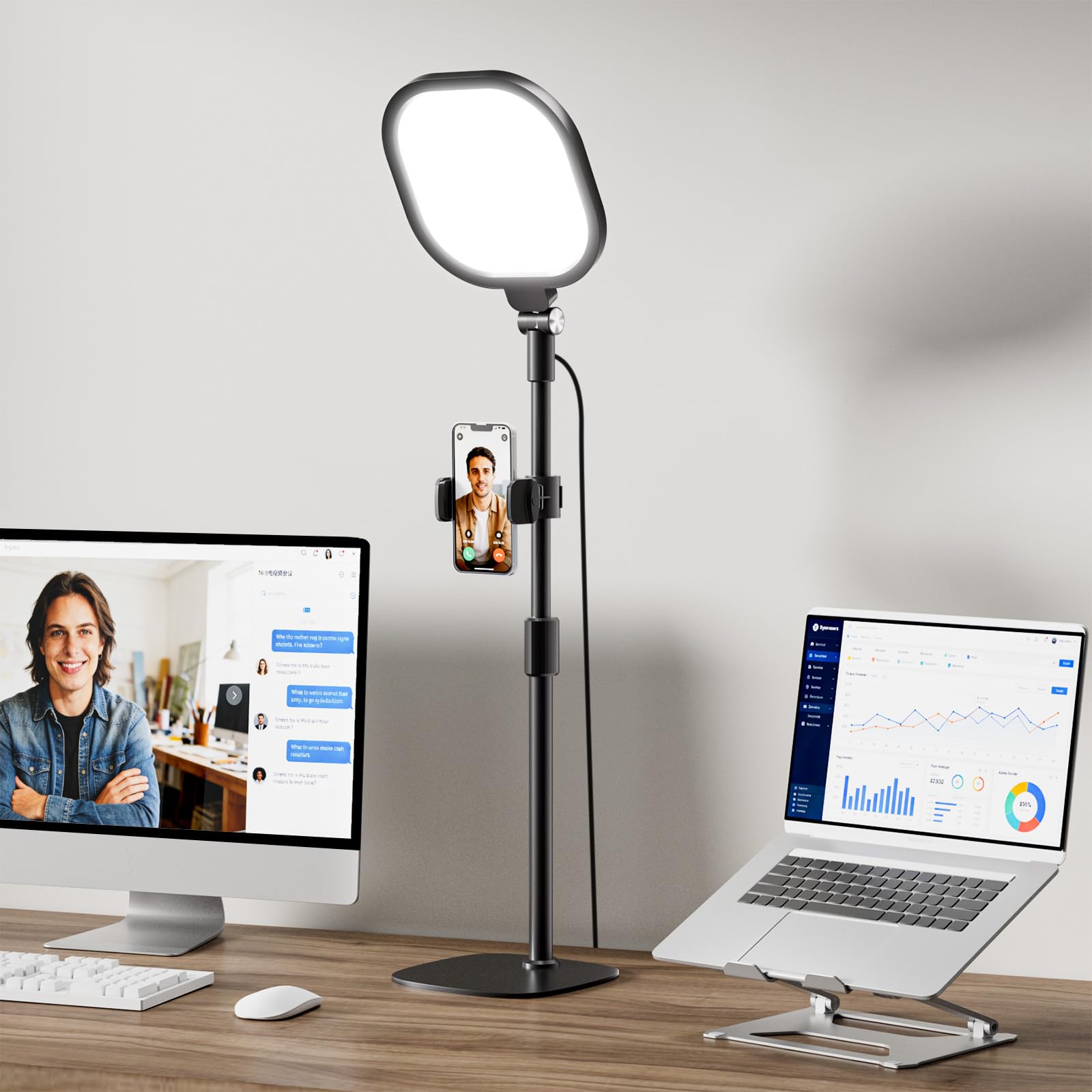
This is a desktop-first tool for users who want a main key light without clamping to the desk or needing tall-stand reach. It suits a desk with limited edge space, not a standing desk or an overhead rig. The single panel is best suited to one person at a desk; a two-light setup still needs a second source. At this price, it is a low-commitment way to move beyond a laptop screen's built-in light.

💡 Set the column height once and use the 360-degree head for fine adjustments.

Pros

  • High-CRI panel renders natural skin tones during video calls and streams.
  • Memory function recalls the saved brightness and color temperature after power-off.
  • Stable desktop base holds position without a C-clamp on desks with thick edges.
  • Ten brightness levels across three color temperatures cover daytime and evening lighting.

Cons

  • Height adjustment can stick, and the 28.5-inch maximum may not clear very tall monitors.
Our verdict

A budget-friendly desktop key light that delivers high-CRI output, memory, and stable placement for a one-light video-call setup.

Check Latest Price
6

Stream Deck Users

NEEWER GL1 Pro 15.5-in

88 /100
Studio Score Strong Evidence

Key details

Control Method
2.4G, Wi-Fi, Bluetooth, Stream Deck
Color Rendering
CRI 97+, TLCI 98+
Mount & Adjustability
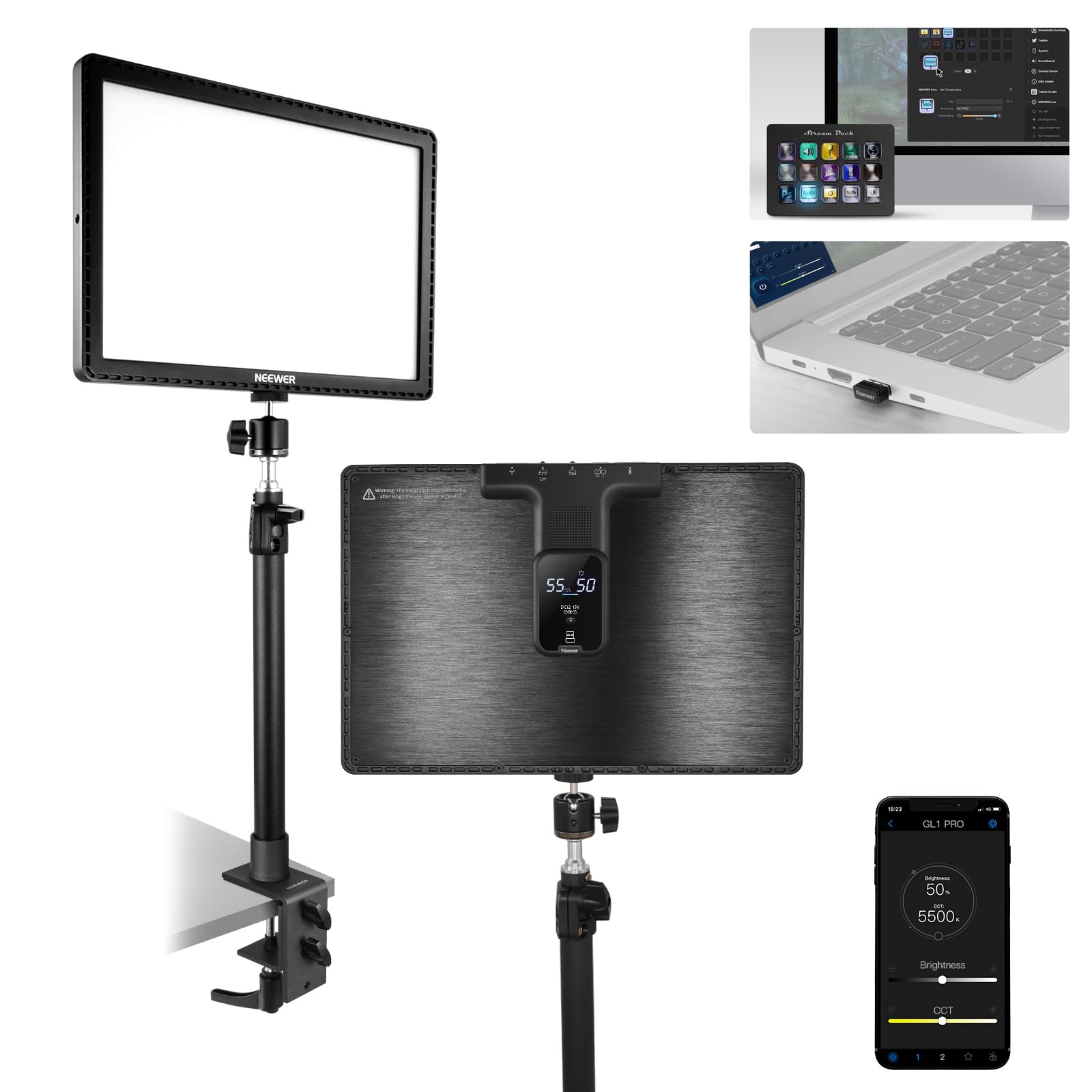
Desk clamp, 0.4-3 in
Brightness & Diffusion
4300 lux @ 0.5m
Check Price on Amazon

The 15.5-inch panel delivers 4300 lux at 0.5m with CRI 97+/TLCI 98+, and Stream Deck support mirrors the Elgato ecosystem at a lower price. The app and wireless setup can be clunky, and the physical controls are small; that puts it behind smoother all-rounder panels for users who want simple out-of-box operation. As a main key light for close-range face-lit streaming, the output and color rendering are strong enough for a clean camera image. Streamers who already run Stream Deck will find the integration practical.

Pros

  • Stream Deck compatibility brings Elgato-style control to a panel that costs less.
  • The 4300 lux output and CRI 97+/TLCI 98+ keep faces well lit and skin tones accurate.
  • Sturdy metal desk clamp suits a permanent streaming position.

Cons

  • Desk clamp accepts surfaces up to 3 inches, so very thick work desks need another mounting plan.
  • The deepest adjustments live in the app, so a phone or computer is part of the workflow.
Our verdict

Pick the GL1 Pro for a Stream Deck-driven setup that needs high output and accurate color in a desktop clamp panel.

Check Latest Price
7

Two-Light Setups

NiceVeedi 2-Pack LED Kit

88 /100
Studio Score Strong Evidence

Key details

Control Method
Manual buttons
Color Rendering
CRI 97+
Mount & Adjustability
Tripods to 60 in
Brightness & Diffusion
15W per panel
Check Price on Amazon

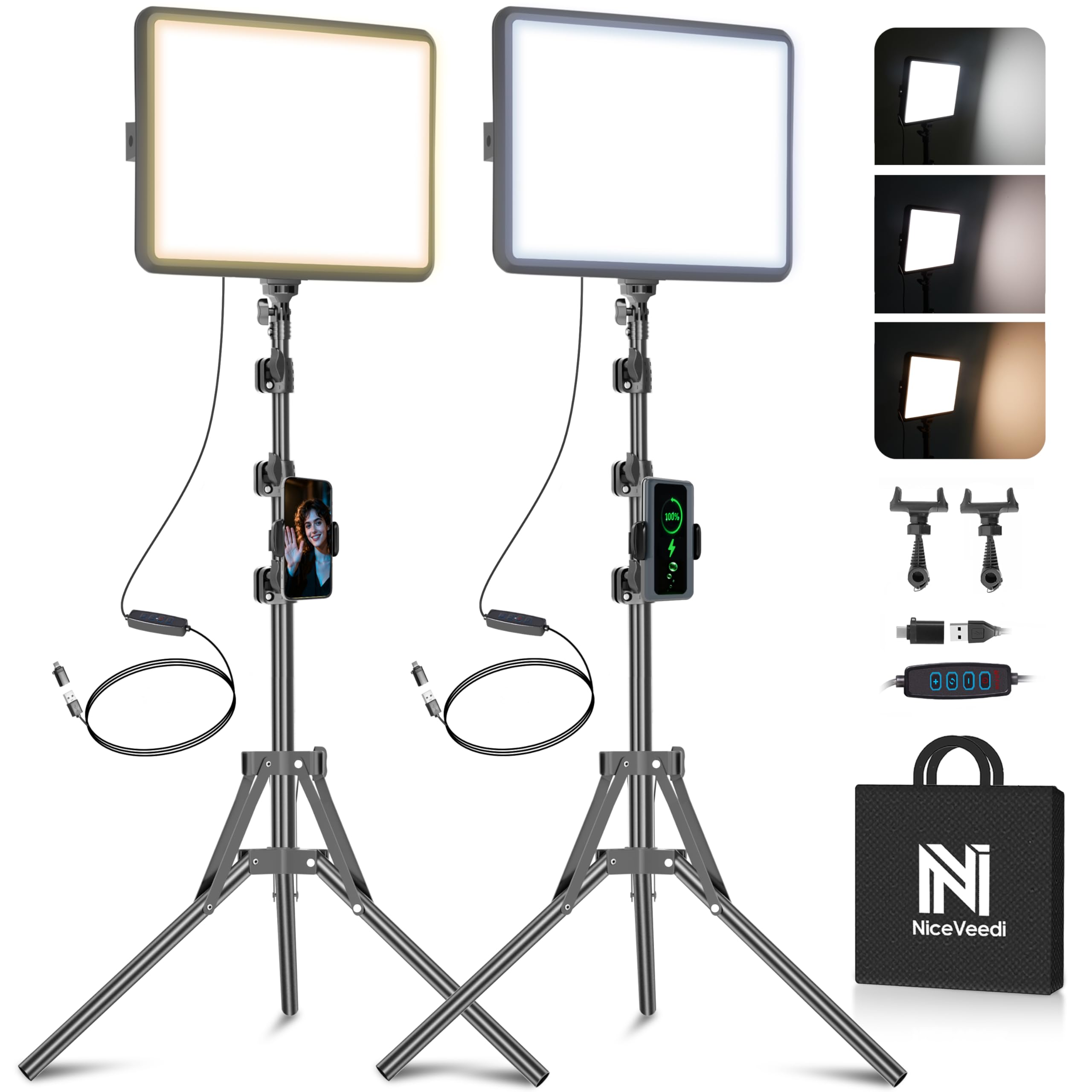
Two 15W CRI 97+ panels with tripods, a phone holder, and a storage bag make this a ready-made key-and-fill kit for a beginner live-stream or video-call setup without buying separate components. Stands reach 60 inches, and the three color-temperature presets cover warm and cool face light for a range of skin tones. At this budget tier, the value is in coverage: one panel serves as the main key light while the second fills shadows, saving the cost of a separate light later. The trade-off is unit-to-unit consistency: one panel may not power on, so test both as soon as they arrive and keep packing materials for a possible return. That inconsistency keeps it out of the higher tier and matters in a paid broadcast with no backup.

Pros

  • Two 15W CRI 97+ panels with tripods and phone holder give a beginner key-and-fill setup from one box.
  • Height, angle, and brightness adjust quickly, making two-light framing simple.
  • Three color-temperature presets cover warm and cool face-light looks without app control.

Cons

  • One panel may not power on despite the other working normally, so early testing matters.
Our verdict

A beginner stream or video-call setup that needs a main key light plus a fill from the same purchase gets the most useful layout for the money, assuming both panels pass an early check.

Check Latest Price
8

Small-Space Streamers

Weilisi 10.2-in Ring Light

89 /100
Studio Score Strong Evidence

Key details

Control Method
Manual buttons
Color Rendering
Mount & Adjustability
C-clamp, 360° arm
Brightness & Diffusion
10.2-in edge-lit ring
Check Price on Amazon

The Weilisi 10.2-inch edge-lit ring light gives a small desk a real key-light setup without a tripod footprint. Ten brightness levels and three color temperatures cover close-range face lighting for streaming or video calls. The C-clamp and articulating arm position well in tight spaces. What keeps it from a higher tier is the modest output and the finicky mounting hardware: it suits close-up work, not full-room lighting, and desk thickness must fit the 2.34-inch clamp opening. Check clamp security and screw seating before a long stream.

Pros

  • Good brightness with ten levels and three color temperatures for close desk use.
  • C-clamp and 360-degree arm adjust without taking up floor space.
  • Setup is quick for a budget desk light.

Cons

  • C-clamp and screw ends can be finicky to seat; desk thickness must fit the 2.34-inch limit.
  • Output is modest at distance, so it won't replace a full-room key light.
Our verdict

For desk-bound streamers who work close to the camera and want an affordable clamp key light, this fits — if the desktop accepts the clamp.

Check Latest Price
9

Budget Softbox Users

Torjim 16-in Softbox Kit

88 /100
Studio Score Strong Evidence

Key details

Control Method
Remote + manual
Color Rendering
CRI 90
Mount & Adjustability
Tripod to 60 in
Brightness & Diffusion
85W LED bulb
Check Price on Amazon

The 16-inch softbox spreads light broadly, and the 85W LED at CRI 90 renders skin tones naturally for live streaming and video calls. Setup is beginner-friendly, and the tripod reaches 60 inches, so you can position it above camera height. The bundled remote is the main tradeoff: it can be unresponsive at first or after some use, so plan to use the manual controls. The tripod and softbox frame are light-duty, which suits a fixed corner setup but not packing up and moving each session. Compared with twin-panel budget kits, this single softbox offers a broader, softer source, but the remote and stand keep it behind the more consistent single-panel lights in this roundup.

Pros

  • Broad 16-inch softbox creates flattering diffusion for face lighting in streams and video calls.
  • Setup is quick and beginner-friendly, with a tripod that extends to 60 inches.
  • Strong value for streamers building a first lighting kit without spending much.

Cons

  • Remote control can be unresponsive, so manual dials are the safer way to adjust brightness and color.
  • Stand and softbox frame are light-duty; the stand may wobble at full height and the frame closure can be fiddly.
Our verdict

For a streamer who wants soft, broad key light and will control it manually from a fixed position, this kit fits. If remote operation or regular transport matters, another single-panel light is a better match.

Check Latest Price

How to Choose

Color Rendering and CRI

High CRI means the LED spectrum covers natural wavelengths, keeping skin tones neutral. CRI 90 works in a pinch, but 95 or higher is the safe line for faces. Cheap LEDs often boost blue output to look bright, which leaves skin looking sallow.

Color temperature range matters too. A 3200K-6500K range lets you match warm room light or daylight webcam white balance.

Brightness and Diffusion

Raw output only matters after diffusion. A bare high-lumen panel creates hard shadows and shiny skin; a soft panel spreads the beam and lowers contrast. Diffusion absorbs output, so a 4300 lux panel will out-brighten a larger softbox at close range.

For desk setups, target enough power to expose a face at one meter without pushing ISO. A 1000-lux reading at one meter is a good benchmark. Full-body shots need taller stands and more output.

Mount and Adjustability

The mount is the most used mechanical part and the most common weak point. Clamp designs have maximum desk thickness, monitor mounts assume flat displays, and articulating arms loosen over time.

Measure your desk or monitor before buying. A light with the right beam is useless if it cannot sit at the right height without sagging.

Control Method

Physical buttons are the only control that never depends on a network. Remotes and apps add pairing steps and Wi-Fi dropouts, and a light without manual controls becomes a fixed-output lamp when the app stops connecting.

Choose the level of control you will actually use. One set-and-forget dial is enough for many streamers; preset switching justifies app-based control.

Fanless and Flicker-Free Operation

LED driver quality determines whether a panel hums or flickers on camera. Pulse-width modulation dimming can create rolling bands in video at shutter speeds near 1/60 to 1/125. Fans also leak into microphones more than most streamers expect.

Flicker-free panels use constant-current drivers, so green-screen keying stays clean.

Frequently Asked Questions