8 Best Docking Station for Photographers in 2026: SD and 4K Ports

The best docking station for photographers depends on your laptop's USB-C video path, SD card needs, and monitor setup - get the right one without paying for ports you won't use.

Most USB-C docks advertise dual 4K support, but the real variable is your laptop's video path. macOS mirrors external displays unless the dock uses DisplayLink, and Windows machines need a USB-C port with DP Alt Mode. The same dock that drives two extended monitors on one laptop can be limited to mirroring on another.

The practical question for photographers is matching the hub to the workflow. SD-card offloads, Ethernet tethering, and laptop charging are the core jobs, and they should not be buried under a pile of unused ports. A compact dock with the right I/O covers location shoots; a larger dock earns its place when you need three extended displays and a permanent studio desk.

The trade-off comes down to display count versus portability. Small docks travel well but usually mirror on Macs, while multi-monitor docks add drivers and desktop bulk. Choose the smallest dock that handles the number of screens you actually edit on, then confirm the laptop's USB-C port supports video output before you buy.

1

Best Overall

Anker 8-in-1 USB-C Hub

88 /100
Studio Score Strong Evidence

Key details

Card Reader
SD + microSD
Ethernet & USB
GbE, 2 USB-A
Power Delivery
85W pass-through
4K Display Support
Dual 4K30, macOS mirror
Check Price on Amazon

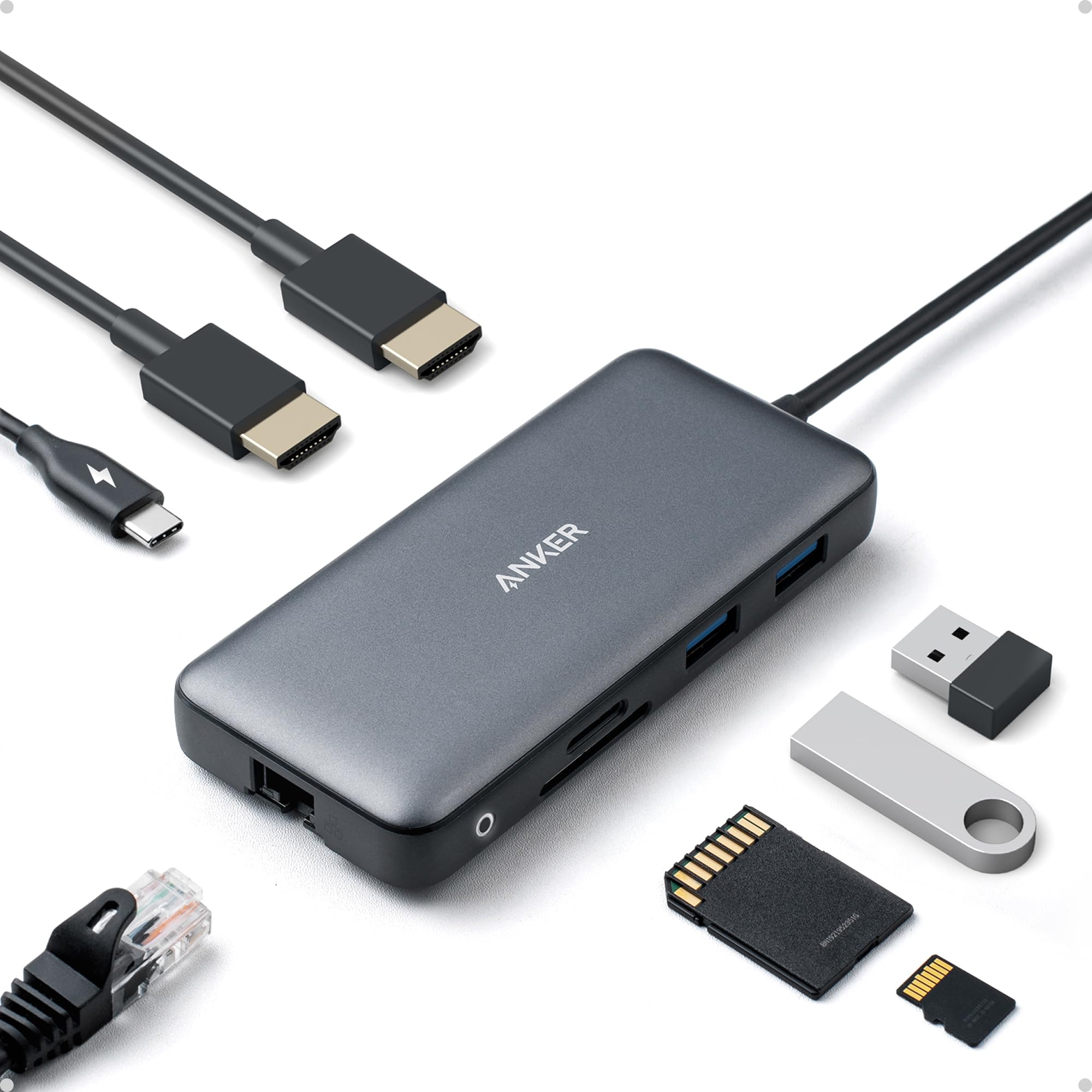
The Anker PowerExpand 8-in-1 pairs SD/microSD, Gigabit Ethernet, dual HDMI, two USB-A ports, and 85W pass-through charging in a body closer to a card reader than a desktop dock. Plug a full-function USB-C laptop into it and the desk expands: camera files come off the card, an external drive connects over USB-A, uploads run over Ethernet, and a 4K monitor comes up for photo review. For a photographer, the port count is less important than the fact that the essential workflow is covered without carrying a separate card reader, Ethernet dongle, and display adapter. The footprint is small enough that the hub can stay connected to a laptop case or desk organizer as a permanent part of the kit.

On Windows and ChromeOS laptops, the dual HDMI outputs handle one 4K display at 60Hz or two 4K displays at 30Hz without driver installation. The SD and microSD slots sit side by side, so a camera card and a backup card can be read without swapping adapters. That makes the transition from a location shoot to a studio edit a single-cable operation. Laptop charging runs through the same USB-C connection, so the desk setup reduces to one power cable and one hub cable. In this mode the hub behaves like an extension of the laptop, not a separate device that needs its own setup ritual.

This is aimed at location and event photographers who want one compact hub that covers SD ingest, Ethernet upload, a second display, and laptop charging. The tradeoff is boundary-specific: Mac owners who expect two independent external displays will get mirrored output instead, and unit-to-unit consistency can vary enough that it is worth testing display and Ethernet connections soon after setup. If your primary laptop runs Windows or ChromeOS and your second display is for photo review rather than a permanent editing wall, these boundaries land outside the day-to-day workflow. A photographer who needs triple monitors or high-port-count workstation expansion should look at a premium DisplayLink dock instead.

The hub is less a permanent desk dock and more a travel kit that happens to be capable enough for everyday studio use. Its aluminum body keeps the port layout tight, so the whole dock can stay packed with a charger and a USB-C cable in a camera bag. From a home desk to a client studio, the same setup carries over without unpacking and re-cabling. At the budget end of the category, that combination of port breadth and portability is what separates it from larger, pricier docks.

💡 Pair the hub with a 100W USB-C charger to reach the full 85W pass-through rate on power-hungry laptops.

Pros

  • SD/microSD, Gigabit Ethernet, dual HDMI, and USB-A in a package that travels like a card reader.
  • Windows and ChromeOS laptops connect without driver installation, so desk setup is fast between shoots.
  • Compact footprint suits location and event work where a desktop dock is overkill.
  • A single USB-C cable can carry display, data, and laptop charging through the hub.

Cons

  • On macOS, the two HDMI outputs mirror the same display rather than extend to independent desktops.
  • Power-hungry laptops can show slow-charging warnings because pass-through tops out at 85W.
  • Unit consistency can vary; occasional display or Ethernet dropouts have been noted.
Our verdict

For Windows and ChromeOS photographers, this is the compact hub that carries the full location-to-desk workflow: SD ingest, Ethernet upload, dual HDMI, and laptop charging in one small body.
Check Latest Price
2

Best Value Port Expansion

MOKiN 14-in-1 Dock

88 /100
Studio Score Strong Evidence

Key details

Card Reader
SD/microSD
Ethernet & USB
GbE, 3 USB-A, 2 USB-C
Power Delivery
100W PD input
4K Display Support
Triple display, macOS mirror
Check Price on Amazon

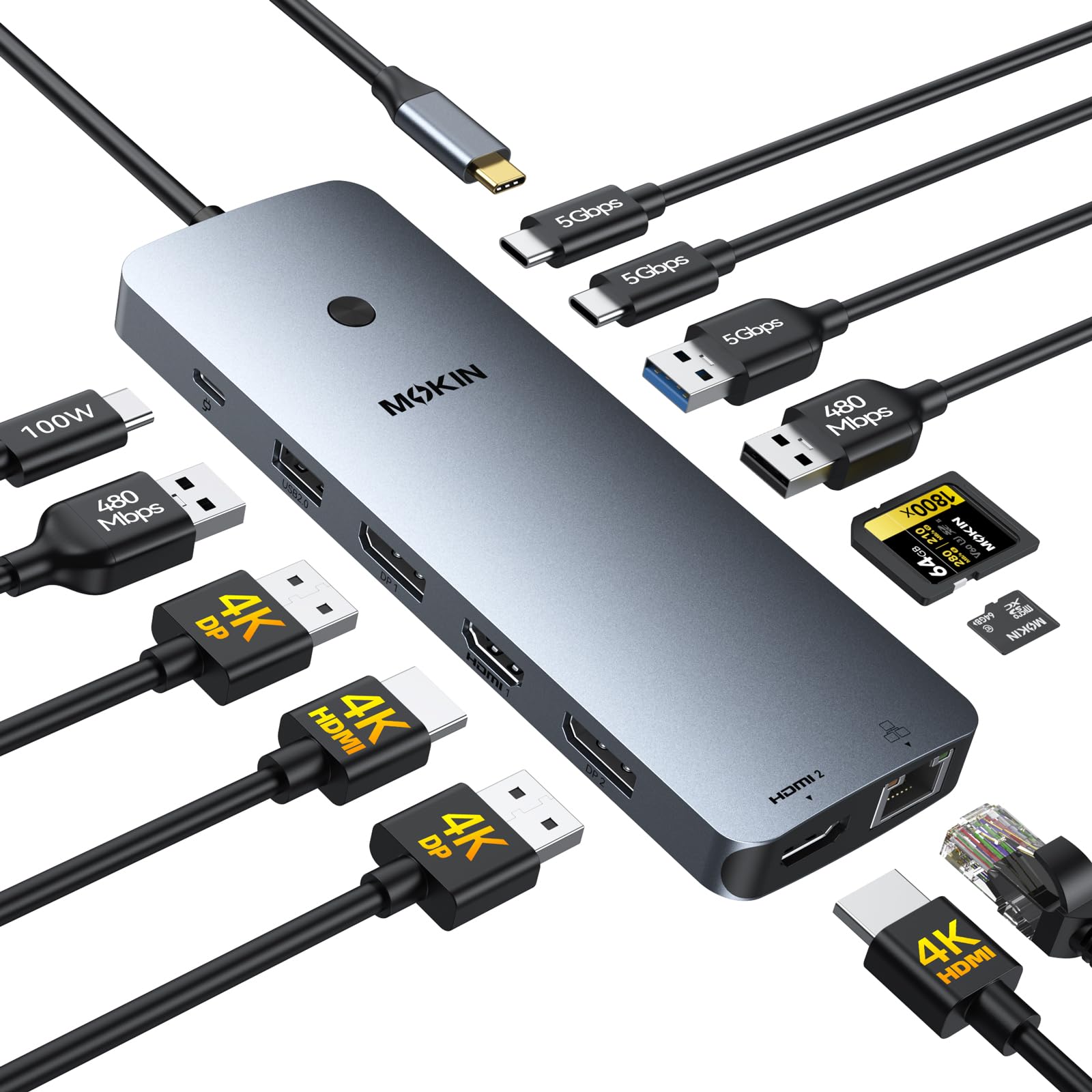
MOKiN's 14-in-1 dock packs dual HDMI, dual DisplayPort, SD/microSD, Ethernet, wired USB, and 100W PD into a single aluminum housing at an entry-level price. That combination beats compact hubs on port count and avoids the status-screen complexity of the larger 17-port alternative. For a Windows laptop with Thunderbolt 3/4 or full-function USB-C, this is the most complete low-cost way to run multiple monitors and keep photo peripherals attached.

On a supported host, the dock runs a multi-monitor photo desk: card reader, Ethernet, external drives, and displays can stay connected while the laptop charges through the same cable. Charging is host-dependent, though. A full-function USB-C or Thunderbolt port negotiates power delivery normally, while a standard USB-C data port will not activate video or charging. PC compatibility is worth checking before you commit; a laptop that does not expose full-function USB-C video signaling will not unlock every output.

This dock is for a budget-conscious photographer who wants maximum port variety without paying for a premium dock. It also assumes a Windows-centric workflow; macOS users get mirrored external displays, so independent dual-screen photo editing on a Mac is not on the table. The same cost savings come with some quality variance, so this suits buyers who prefer a big feature set over enterprise-level consistency.

💡 Connect through a Thunderbolt 3/4 or full-function USB-C port so video and power negotiate correctly; a standard USB-C data port will not unlock the display outputs.

Pros

  • Solid aluminum shell keeps the dock stable and clean-looking on a busy desk.
  • Dual HDMI and dual DisplayPort outputs support multiple monitor arrangements for Windows laptops.
  • SD/microSD, Ethernet, and three USB-A ports cover the usual photo-editing desk connections in one dock.
  • 100W PD input lets you charge the host laptop while keeping peripherals connected.

Cons

  • Laptop charging can be inconsistent; a host with limited PD negotiation may report slow charging or ignore the dock's power.
  • PCs that lack full USB-C video signaling may not activate every display output, so host compatibility needs checking.
  • A unit can develop display or power-delivery issues within the first weeks or months of use.
Our verdict

Choose this dock when port count and budget outrank enterprise-level consistency; Mac users who need two independent extended displays should look elsewhere.

Check Latest Price
3

Best for Mac Multi-Monitor

Plugable UD-ULTCDL

88 /100
Studio Score Strong Evidence

Key details

Card Reader
SD
Ethernet & USB
GbE, 4 USB-A, USB-C
Power Delivery
100W laptop + 20W device
4K Display Support
Triple HDMI, 4K30 primary
Check Price on Amazon

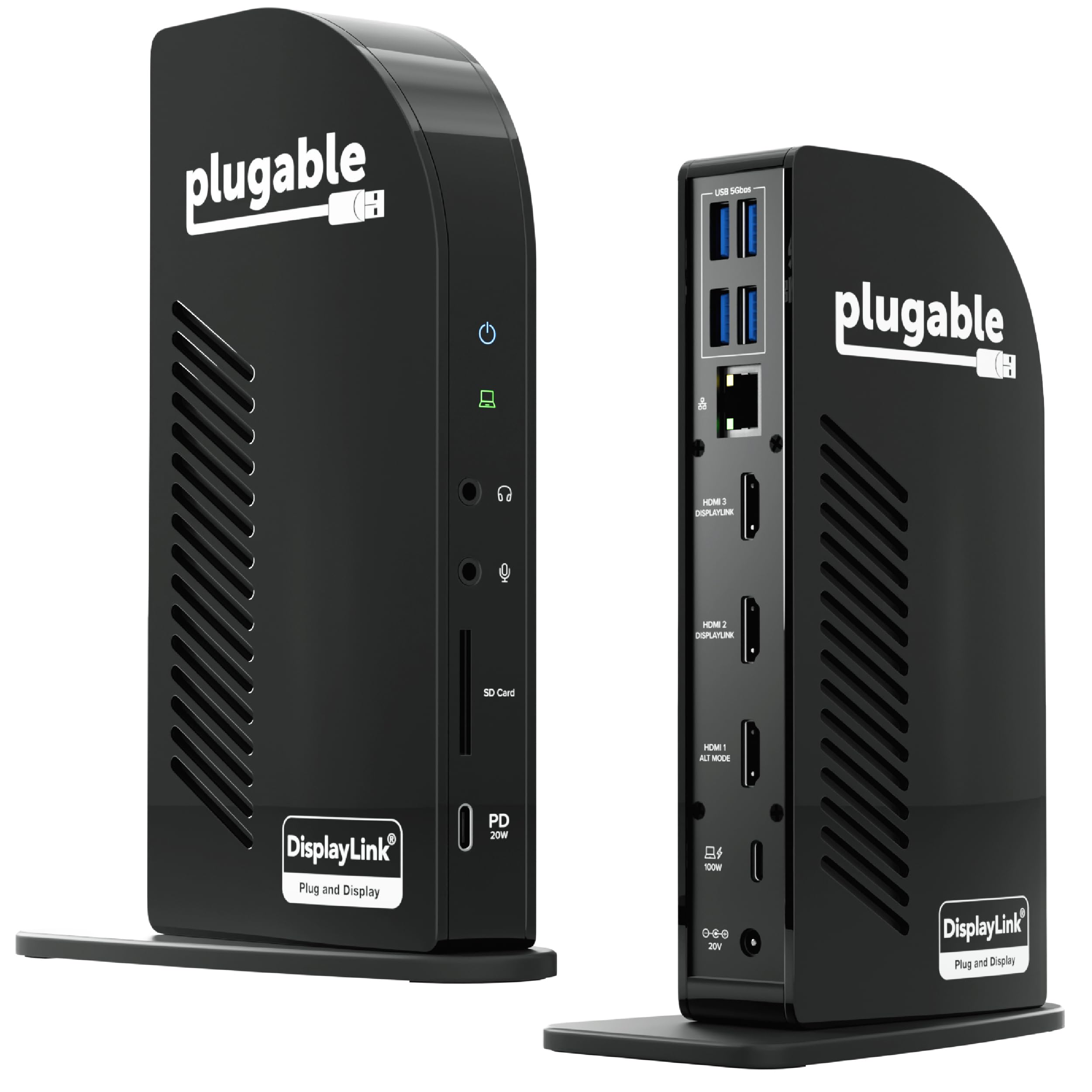
The Plugable UD-ULTCDL drives three independent HDMI displays from a single USB-C connection, while the built-in SD reader and 100W laptop charging cover the main photo-desk workflow. A MacBook can show different content on three screens at once instead of mirroring the same image, which is what separates this dock from a basic multi-port hub. The result is a single-cable photo desk with three usable screens, so the preview window, editing tools, and file manager can stay open at the same time.

For a MacBook Pro or Air photographer, this dock consolidates the editing desk: SD card ingestion, Ethernet, multiple USB-A ports, and laptop plus phone power in one connection. The tradeoff is that the multi-monitor mode depends on the DisplayLink driver, and HDCP-protected streaming services will not play through it. Individual units can show intermittent HDMI or Ethernet output, so testing each port during the return period is a sensible first step.

The 20W front USB-C port keeps a phone topped up without reducing the 100W laptop charge, and the audio jack sits close to the card reader on the front edge. HDMI and Ethernet plug in around back, keeping cable routing away from the card slot.

💡 Keep the front USB-C port free for phone charging and use the rear ports for storage and card readers.

Pros

  • Three independent HDMI outputs let a Mac run separate apps on three extended displays.
  • SD card reader plus four USB-A ports handle camera ingestion and peripheral connections without an extra hub.
  • 100W laptop charging and a 20W front USB-C port power the Mac and phone from one dock.
  • Aluminum shell and organized rear ports keep a fixed edit desk clean without cable clutter.

Cons

  • Certain HP and Mac hosts need extra setup or lose display features, so confirm behavior on your exact laptop.
  • Secondary HDMI outputs reach 1920x1200; only the primary display runs 4K, and that tops out at 30Hz.
Our verdict

This dock is the Mac answer when three extended displays and an SD reader have to share one cable.

Check Latest Price
4

Best Pro Quad-4K Workstation

TobenONE 20-in-1 Dock

91 /100
Studio Score High Confidence

Key details

Card Reader
SD/microSD
Ethernet & USB
GbE, USB 3.2, USB-C
Power Delivery
100W laptop, 18W device
4K Display Support
Quad 4K60 via DisplayLink
Check Price on Amazon

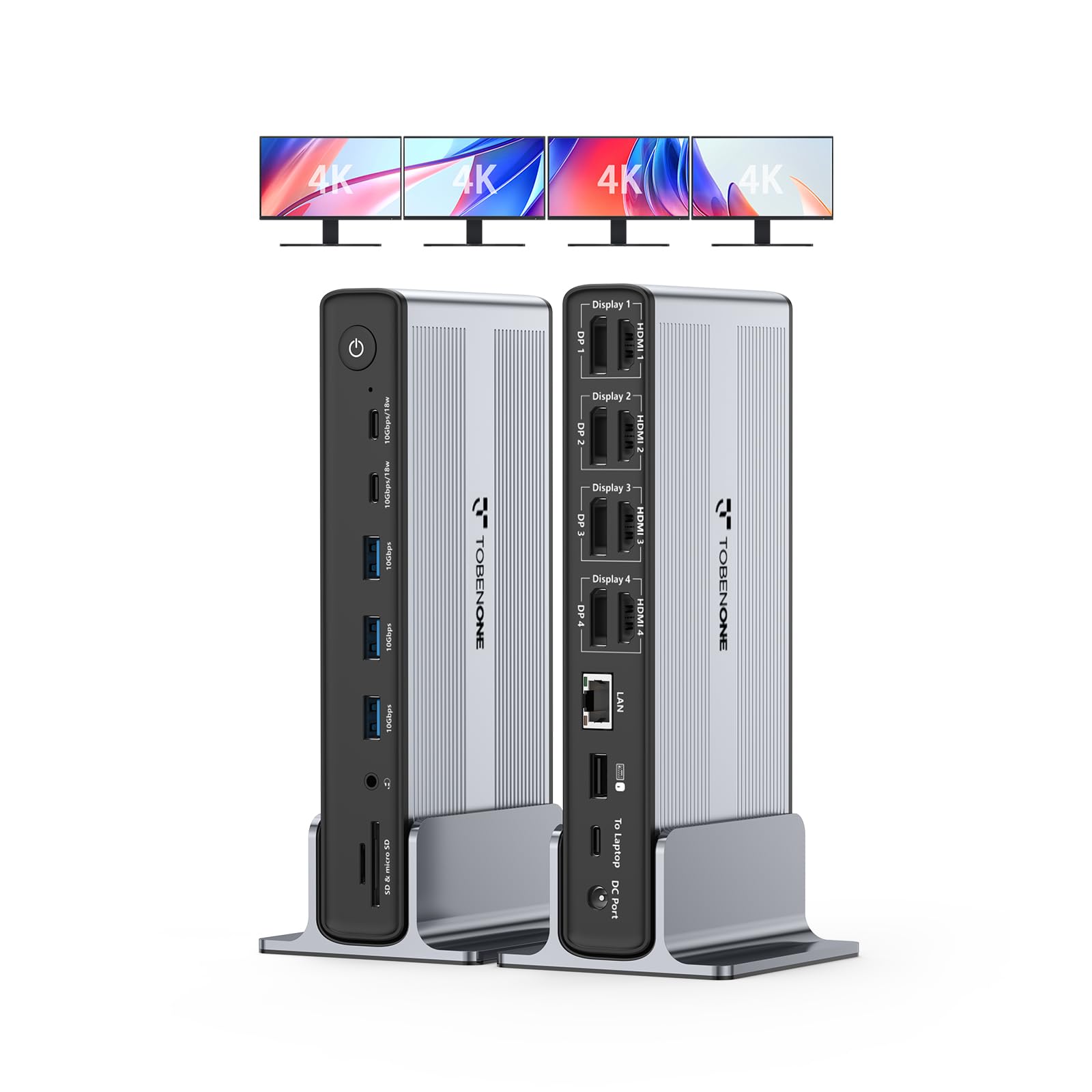
The TobenONE 20-in-1 is a desk-scale dock for photo and video editors who need more than a quick port expansion: four HDMI and four DisplayPort outputs drive quad 4K@60Hz, and the 20-port layout includes SD/microSD, Ethernet, USB-A, USB-C, and audio. One 150W adapter covers the host laptop at 100W and leaves 18W for phone charging, so the photographer’s usual cable clutter collapses into a single connection.

The dock accepts Thunderbolt 3/4/5, USB4, and USB-C hosts across Windows, macOS, ChromeOS, and Android, so it is not tied to a single laptop generation. SD and microSD slots sit alongside Ethernet and a full USB bank, letting camera-file transfers and cabled network access coexist without a second adapter. A power button controls all external devices, which lets an editor shut down monitors, card readers, and drives together at the end of a session.

Professional editors running four independent 4K displays are the core audience; long-term durability under sustained quad-4K load is the trade-off a buyer accepts at this price point. Photographers who travel or edit on a single screen will find the 20-port design over-specified and the premium price hard to justify.

💡 The master power button shuts down the whole external-device stack, so the editing desk drops to idle draw when the session ends.

Pros

  • Four 4K displays at 60Hz plus 100W laptop charging from a single dock connection.
  • The 20-port bank covers SD/microSD, Ethernet, USB-A, USB-C, and audio for a full photo-editing desk.
  • Broad OS support spans Windows, macOS, ChromeOS, and Android, so the dock stays useful when the host laptop changes.
  • A compact build and master power button keep a multi-monitor workstation organized.

Cons

  • HDCP-protected streaming is blocked on external displays, so Netflix and similar apps remain on the laptop screen.
  • The mandatory DisplayLink driver must be installed before any external display activates; guest machines without it won’t show output.
Our verdict

The TobenONE is the dock for editors who treat four displays and a full 20-port I/O bank as baseline desk requirements, not convenience features.

Check Latest Price
5

Best Compact Travel Dock

Baseus 9-in-1 Dock

86 /100
Studio Score Strong Evidence

Key details

Card Reader
SD/TF
Ethernet & USB
GbE, USB-A 5Gbps
Power Delivery
100W input, 85W laptop
4K Display Support
Dual HDMI, 4K120 single
Check Price on Amazon

The Baseus 9-in-1 is the travel-first option in this lineup, packing SD/TF card reading, Gigabit Ethernet, dual HDMI, and 100W PD input into a compact aluminum shell. A photographer working from a hotel desk gets card transfers, wired networking, and laptop power through one USB-C cable.

With a full-function USB-C host, the dock drives a single 4K display cleanly, and the SD/TF slot handles UHS-I cards at up to 104MB/s, fast enough to offload a large card before the next shoot. The 100W PD input supplies up to 85W to the laptop, enough to keep a 13- or 14-inch ultrabook charged during a long import session, while the 5Gbps USB-A ports keep external SSDs from becoming a bottleneck.

Two USB-A ports and a separate 2.0 port give the dock room for a card reader, mouse receiver, and backup drive at the same time. Ethernet is the other traveler-friendly addition, since hotel Wi-Fi is not a dependable upload path for large catalogs.

The right match is a travel photographer who wants a compact dock for card reading, wired Ethernet, and a single 4K edit display. Unit-to-unit reliability can vary, so this is best treated as a travel tool rather than a mission-critical desktop backbone. The boundary is macOS multi-monitor: Apple laptops mirror external displays through these HDMI outputs rather than provide two independent desktops. If a guaranteed dual-screen Mac photo bay is the goal, this is not the dock.

Pros

  • SD/TF and Ethernet are included in a body compact enough for a travel bag.
  • The aluminum shell is small and easy to pack, so it suits location editing.
  • 100W PD input plus 5Gbps USB-A ports keep laptop charging and SSD transfers on one cable.

Cons

  • The aluminum shell can get warm during sustained transfers, so it helps to leave it in the open.
  • On high-draw laptops, charging can be slow or intermittent, so PD expectations need checking.
  • On Windows hosts without full DisplayPort Alt Mode, the second HDMI may mirror or go unrecognized.
Our verdict

For photographers who need SD/TF, Ethernet, and one 4K edit screen in a portable shell, this is a budget-friendly match.

Check Latest Price
6

Budget Triple-4K Specs

Selore 13-in-1 Dock

86 /100
Studio Score Strong Evidence

Key details

Card Reader
SD/microSD
Ethernet & USB
GbE, 10Gbps USB
Power Delivery
100W PD 3.0
4K Display Support
Triple 4K60 on Windows
Check Price on Amazon

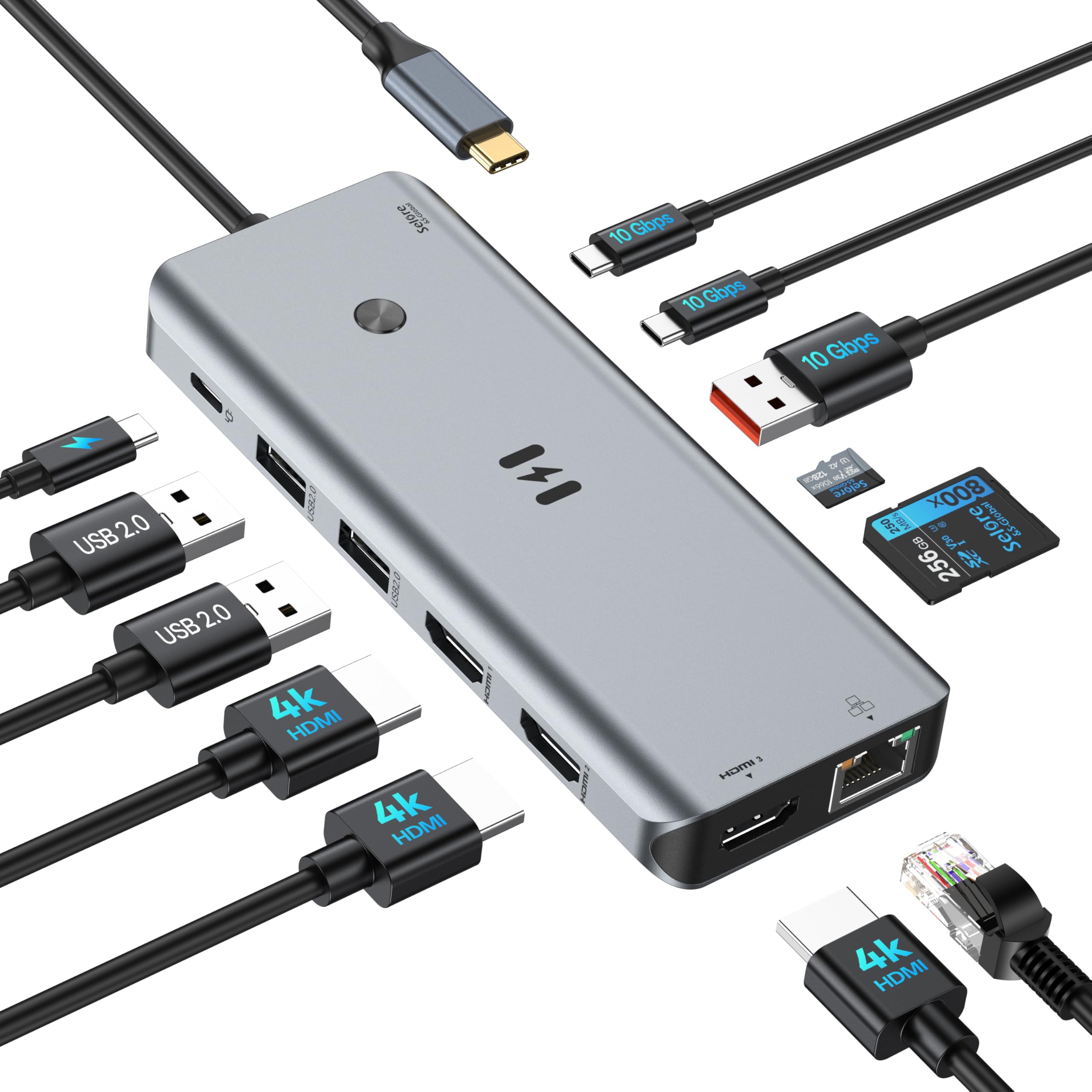
The Selore 13-in-1 Dock offers three HDMI 4K@60Hz ports, SD/microSD, Ethernet, and 10Gbps USB in a single compact hub — exactly the port map a photographer wants for moving RAW files and driving an editing display. At this price, the port count is the story. Power delivery is less certain: some laptops report slow-charging warnings or shutdowns, so users with power-hungry machines should verify charging headroom. Unit longevity can vary, and some units develop issues within the first few months, which makes a longer warranty or generous return policy worth checking. For a Windows photographer on a tight budget, the feature set is compelling, but it is a spec-first purchase rather than a settle-and-forget dock.

Pros

  • Three HDMI 4K outputs plus SD/microSD, Ethernet, and 10Gbps USB cover a photographer's editing desk from one port.
  • 10Gbps USB-C and USB-A data ports move large RAW files without long transfer waits.
  • Build quality and port layout feel above the entry-level price class.

Cons

  • Mac laptops are limited to two external displays, so triple-monitor photo editing on macOS is unavailable.
  • Triple-display output requires a host with DP Alt Mode or Thunderbolt; some Windows laptops won't drive three monitors.
Our verdict

For a Windows photographer whose main requirement is triple 4K plus card-reader I/O, this dock's entry price fits the desk.

Check Latest Price
7

Driverless Windows 4K

Plugable UD-MSTH2

80 /100
Studio Score Strong Evidence

Key details

Card Reader
Ethernet & USB
GbE, 3 USB-A, USB-C
Power Delivery
65W PD
4K Display Support
Dual 4K60, no Mac dual
Check Price on Amazon

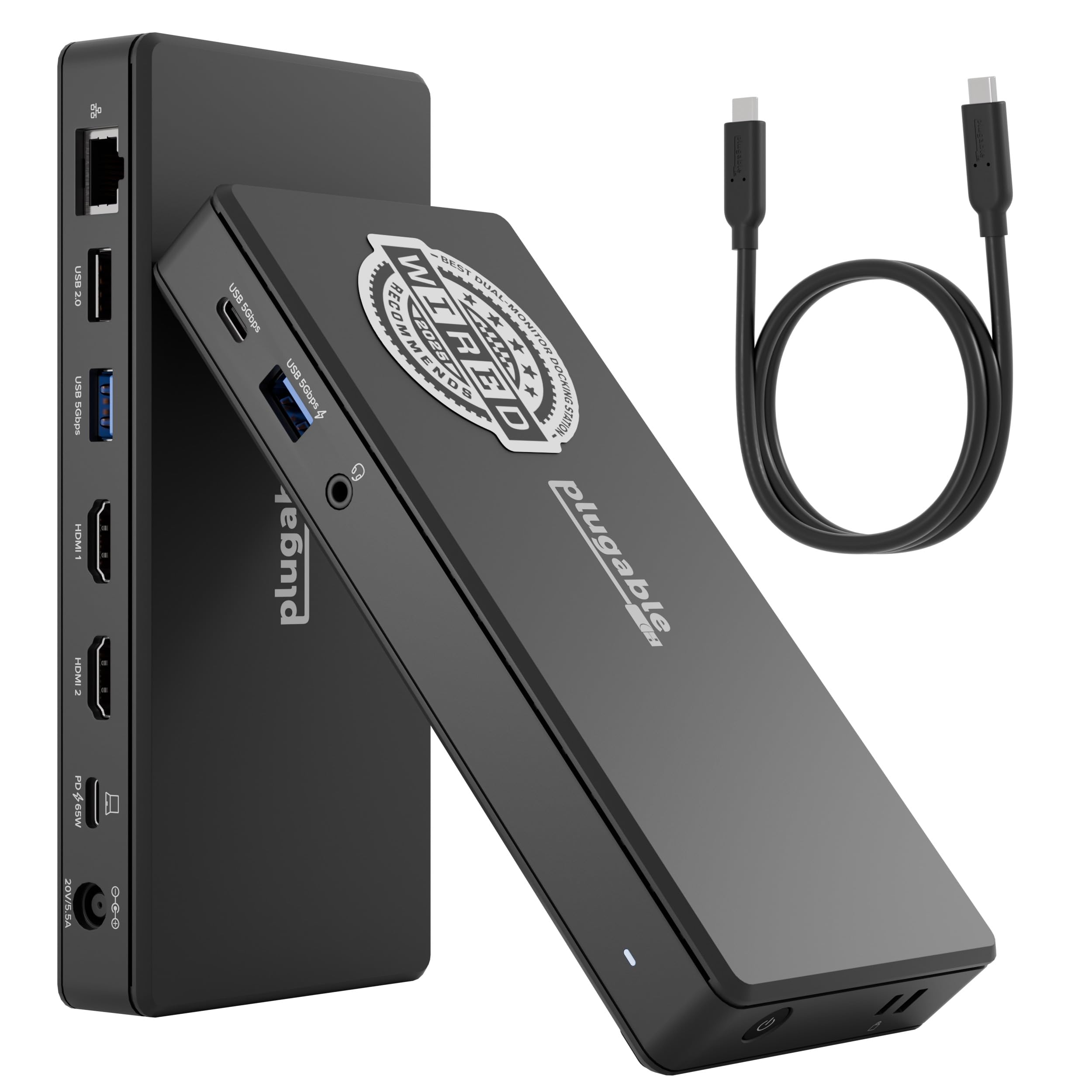
Plugable's UD-MSTH2 runs dual HDMI 4K@60Hz on Windows and ChromeOS laptops with DP Alt Mode and MST, no driver installation needed, and adds Gigabit Ethernet, three USB-A ports, one USB-C port, and 65W charging in a compact shell. That makes it a capable center for a Windows-based editing desk. It ranks below the card-reader docks here because photographers who need SD/TF will have to use an external reader, and Mac hosts are limited to one external monitor, so the dual-display advantage is Windows/ChromeOS-only.

Pros

  • Driverless setup on supported Windows/ChromeOS laptops gets you from box to dual displays with no software install.
  • Compact shell includes dual HDMI, Gigabit Ethernet, three USB-A ports, and a USB-C data port.
  • Dual 4K@60Hz output works on hosts with DP Alt Mode and MST, covering modern Windows/ChromeOS portables.

Cons

  • Dual 4K@60Hz output may require an 8-bit color setting, so 10-bit grading is not always available.
  • Charging can be weak or sporadic on some laptops during sustained editing.
Our verdict

A Windows/ChromeOS photography workflow that values plug-and-play dual 4K has a sensible mid-range match here.

Check Latest Price
8

Tech-Savvy Multi-Display

MOKiN 17-in-1 Dock

84 /100
Studio Score Strong Evidence

Key details

Card Reader
SD/microSD
Ethernet & USB
GbE, 4 USB
Power Delivery
100W input, 85W laptop
4K Display Support
Triple 4K60 on Windows
Check Price on Amazon

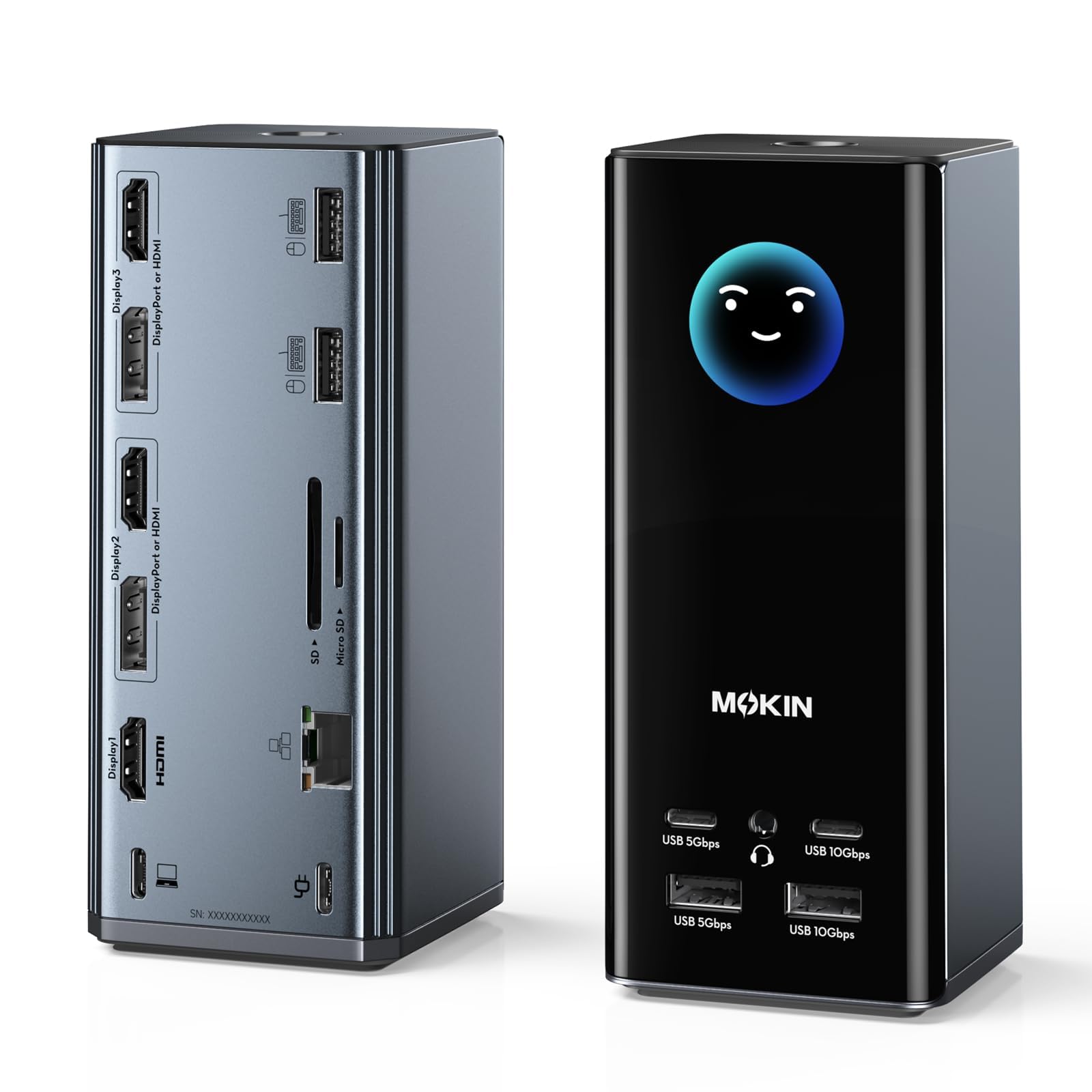
The MOKiN bundles 17 ports into one cable: three HDMI, two DisplayPort, four USB, SD/microSD, Ethernet, audio, and 100W PD input for laptop charging — enough to turn a Windows laptop into a photo-editing desk with a 4K monitor, card reader, and wired network. The LCD status readout adds a live look at connection and power information, though it is more convenience than functional necessity. Why it doesn't rank higher: host compatibility matters more than port count. Some USB-C hosts may drop display or Ethernet connections intermittently, and durability can vary between units; photographers who want predictable one-cable behavior over port density should consider a simpler dock with fewer outputs.

Pros

  • One cable drives a 4K monitor, card reader, Ethernet, and multiple USB peripherals from a Windows laptop.
  • The LCD status screen shows connection and power information at a glance during desk setup.
  • 100W PD input keeps a laptop charged while the dock handles displays and card transfers.

Cons

  • Some USB-C hosts may drop display or Ethernet connections intermittently in mixed-brand setups.
  • Durability can vary between units; one dock may serve for years while another shows issues within months.
Our verdict

For a tech-savvy Windows photographer who wants three 4K outputs, SD/microSD, Ethernet, and laptop charging from one cable, this dock offers the port density — provided occasional host quirks and durability variance are acceptable.

Check Latest Price

How to Choose

4K Display Support

Check how the dock outputs 4K before counting monitors. A USB-C dock with two HDMI ports can still drive only one external display on many MacBooks, because macOS reserves the second screen unless the dock uses DisplayLink. On Windows, both outputs only work when the laptop's USB-C port supports DP Alt Mode and the dock uses MST.

Frame rate matters for photo review, too: dual 4K often drops to 30Hz or 8-bit color to fit the available bandwidth. A single 4K display at 60Hz is usually cleaner for retouching than two 4K screens at 30Hz.

Power Delivery

Look for the dock's input wattage, not the number printed on the box. A 100W PD dock still passes through only what your charger supplies; with the stock 65W charger, a demanding laptop may charge slowly under load or trigger a low-power warning.

Higher wattage also affects monitor setup. Driving multiple 4K panels plus charging the laptop pulls more power through the dock, so a 100W input gives headroom that a 65W dock lacks.

Card Reader Support

Most built-in SD slots in docks are UHS-I, which caps transfer at about 104MB/s. That is fine for copying a few hundred RAW files while traveling, but a dedicated UHS-II reader will offload a full card noticeably faster.

Check whether the slot accepts SD, microSD, or both. If you shoot with a mirrorless camera that uses SD and a drone that uses microSD, a combo slot keeps one dock on the desk.

Ethernet and USB Speed

Ethernet matters when tethering or uploading large sets; a Gigabit port prevents Wi-Fi bottlenecks during backup. USB data speed is separate from display bandwidth, but cheap docks often share it across ports.

Fast transfer ports are usually labeled 10Gbps or 5Gbps. If you copy cards through the dock, use the high-speed USB-A or USB-C port instead of a 2.0 port.

Host Compatibility

A full-function USB-C port or Thunderbolt 3/4 is required for the display features on these docks. On a laptop with a USB-C port that only charges, the dock's HDMI outputs will not wake up.

Macs need extra scrutiny: standard MST-based docks mirror external displays on most Apple Silicon models, while DisplayLink docks can extend them. Decide which behavior your editing setup requires before buying.

Frequently Asked Questions