4 Best HomeKit Camera of 2026: Match Specs to Apple Home Limits

Which HomeKit cameras actually deliver reliable recordings in Apple Home, and which are best for your indoor/outdoor setup, storage, and budget.

Most HomeKit camera listings lead with 2K or 4K sensors, but Apple Home records every HomeKit Secure Video clip at 1080p. The real purchase decision is about detection reliability, power setup, and whether the camera actually delivers in the Apple Home app or only in the vendor app. This guide separates those issues so you buy from the category's strengths rather than a spec sheet.

Outdoor buyers face a second fork: a weatherproof Wi-Fi camera, a PoE wired model, or a two-pack placed around the home. Each setup has a different infrastructure cost, from cold-rated USB-C adapters to a PoE switch. The right choice depends on where you can run power and how much local recording you want.

HomeKit buyers also sacrifice some control: pan/tilt and advanced AI often stay inside the manufacturer's app. Knowing that limitation before purchase prevents the common regret of buying a camera that looks powerful but behaves differently in Apple Home.

1

Best Overall

Tapo C225 Pan/Tilt

88 /100
Studio Score Strong Evidence

Key details

Storage
microSD, Tapo Care cloud
Resolution
2K sensor, 1080p Home
Weatherproofing
Indoor only
Pan/Tilt Coverage
360° pan/tilt
Check Price on Amazon

The Tapo C225 pairs native HomeKit pan/tilt with smooth 2K PTZ and local microSD recording at a budget price. Apple Home records at 1080p, so the 2K sensor is best viewed in the Tapo app; every HomeKit camera in this comparison shares that same stream cap. The 4K pan/tilt option in this set costs more, but the Tapo covers the practical HomeKit needs without a subscription. Native HomeKit also means no hub or bridge — the camera connects over Wi-Fi and appears in Apple Home within a few minutes. The 2K sensor also keeps detail in the Tapo app's playback, where the extra resolution actually shows.

The 360-degree horizontal sweep covers a full room from one corner, and the physical privacy shutter slides over the lens when you want it out of sight. The pan/tilt motor is smooth and quiet during auto-tracking, while the F1.6 aperture keeps low-light footage watchable. Setup is fast in the Tapo app, and person, pet, vehicle, and baby-cry alerts are easy to configure. The microSD slot accepts cards up to 512GB, so the camera can keep rolling even if you skip the Tapo Care cloud plan. That local recording path is the main reason this camera works for buyers who refuse monthly fees.

Inside Apple Home, the camera works as a HomeKit Secure Video device, so encrypted clips and notifications flow through iCloud. The Home app gives you a live view, recorded events, and notifications without opening the Tapo app; the Tapo app is where you adjust detection settings and review microSD clips. It also handles person, pet, vehicle, and baby-cry alerts, plus the privacy shutter and microSD playback. HomeKit Secure Video requires an iCloud+ plan, while the Tapo app's local recording needs only a microSD card; either path avoids the Tapo Care subscription. New HomeKit users get the best of both: Apple Home for simple clips, Tapo app for deeper control.

This is the pick for first-time HomeKit buyers who want pan/tilt and local recording without a mandatory cloud plan, and for indoor monitoring of rooms, pets, and babies. It is not outdoor-rated; use it in covered spaces only. Occasional Wi-Fi drops and close-range person-detection misses have been noted, so keep it near a strong router and position it across the room from the subject.

Pros

  • Native HomeKit pan/tilt at a budget price, with smooth 2K PTZ and local SD recording.
  • 2K QHD image stays clear in low light, and the motor is smooth during pan/tilt.
  • Setup takes minutes, and the Tapo app keeps motion alerts and playback easy to manage.
  • MicroSD recording up to 512GB makes cloud storage optional for local monitoring.

Cons

  • Person detection can miss within a few feet, and auto-tracking may not re-center afterward.
  • Wi-Fi connectivity can be inconsistent in some environments, with occasional drops.
  • Long-term reliability varies between units; some stop responding after months of use.
Our verdict

For indoor HomeKit users who want pan/tilt and local storage without a subscription, this is the budget pick that gets the essentials right.
Check Latest Price
2

Best Indoor/Outdoor Value

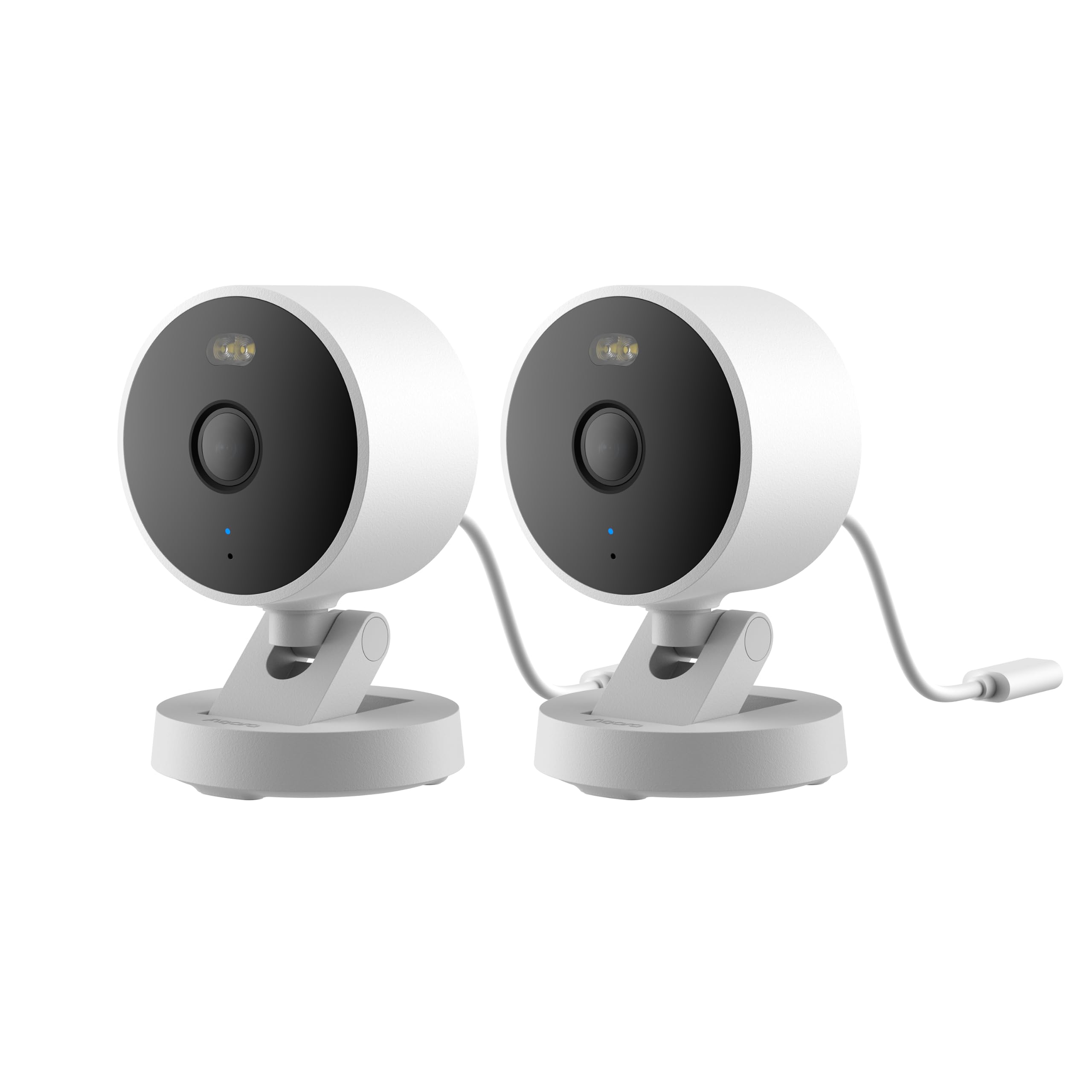
Aqara G100 2-Pack

84 /100
Studio Score Strong Evidence

Key details

Storage
microSD, NAS, cloud
Resolution
2K sensor, 1080p Home
Weatherproofing
IP65 indoor/outdoor
Pan/Tilt Coverage
No pan/tilt
Check Price on Amazon

Two HomeKit Secure Video cameras arrive in one box, each rated for indoor and outdoor placement and able to stream to the Apple Home app without a separate bridge. The top pick in this set offers one pan/tilt camera; the G100 answers the opposite question: how to cover two fixed locations for one purchase. Wi-Fi 6 on the 2.4GHz band is built in, and 24/7 recording to microSD or NAS provides a local backup layer.

Image quality benefits from a 2K sensor, and night vision stays usable in dim conditions. Setup starts directly in the Home app, and the two-pack keeps the per-camera cost lower than buying single units.

Buyers with a Home hub who want baseline coverage on a porch and a hallway are the right audience. The box includes no power blocks, so each camera needs a separately supplied DC 5V/1A adapter. HKSV motion and person triggers can miss events in some setups, and the lenses are fixed at installation, so this is a set-and-forget camera rather than a remote-controllable one. For that tradeoff, it delivers two HomeKit endpoints at a lower combined cost than single-camera alternatives.

Pros

  • Two native HomeKit Secure Video cameras in one package, with no hub or extra bridge required.
  • IP65 weatherproofing lets you place one camera indoors and one outdoors.
  • 2K image detail and usable night vision cover daylight and dim scenes.
  • Local storage accepts a 512GB microSD card, so continuous recording does not depend on cloud alone.

Cons

  • HomeKit streams are capped at 1080p, so full 2K sensor detail shows only in the Aqara app.
  • A unit can drop offline in weak Wi-Fi environments, so placement near the router matters.
Our verdict

The G100 2-Pack is the strongest multi-camera value in this HomeKit comparison for households that want two vantage points without adding a hub.

Check Latest Price
3

Best Indoor Feature Set

eufy E30 4K Pan/Tilt

88 /100
Studio Score Strong Evidence

Key details

Storage
Local microSD
Resolution
4K sensor, 1080p Home
Weatherproofing
Indoor only
Pan/Tilt Coverage
360° pan/tilt
Check Price on Amazon

The eufy E30 is the indoor HomeKit camera that combines 4K capture in eufy's own app with 360-degree pan/tilt, a 180-degree privacy rotation, and local microSD storage that requires no subscription.

This suits pet owners and parents who want the lens to follow movement across a room, and HomeKit households willing to use the vendor app for 4K while Apple Home records at 1080p. It is not an outdoor-rated camera, and Wi-Fi connectivity can be unstable for some units while AI person/pet detection is not always consistent.

The 4K lens stays sharp in dim light, the pan/tilt motor tracks people and pets smoothly, and color night vision with spotlight and IR keeps the image usable after dark. Apple Home caps the stream at 1080p, so the 4K advantage lives inside eufy's app, where local recording and activity-zone controls are adjusted.

Setup through eufy's app takes only a few minutes, and the privacy control physically rotates the lens into the base rather than relying on a software shutter. Local microSD recording keeps the running cost at zero, giving the E30 a clear value angle over subscription-reliant competitors.

Pros

  • Sharp 4K video in dim rooms keeps pets and people identifiable.
  • Quick setup and a well-organized app get the camera running in minutes.
  • Local microSD recording means no subscription is required to store footage.
  • Pan/tilt follows movement smoothly, so pets and kids stay in frame.

Cons

  • Person and pet detection can be inconsistent, with false alerts or missed triggers at close range.
  • In homes with marginal Wi-Fi coverage, the camera may drop offline until the signal recovers.
Our verdict

For HomeKit households that want whole-room coverage and 4K detail in eufy's app, the E30 is the one that lets the lens hide when privacy matters.

Check Latest Price
4

Best Outdoor Color Night Vision

Aqara G5 Pro Wi-Fi

85 /100
Studio Score Strong Evidence

Key details

Storage
8GB eMMC, NAS, cloud
Resolution
4MP sensor, 1080p Home
Weatherproofing
IP65 indoor/outdoor
Pan/Tilt Coverage
No pan/tilt
Check Price on Amazon

True color night vision is the standout feature here, and the built-in 8GB eMMC plus NAS/RTSP recording mean you can skip a cloud subscription. The IP65 body takes outdoor mounting in stride, and the built-in hub adds Zigbee/Thread for an Aqara or Matter household. Compared with the two-camera package in this lineup, this single unit trades per-camera value for a stronger feature set at the mount point.

HomeKit Secure Video records at 1080p, so the 4MP sensor’s full detail only shows up in the Aqara app, local eMMC, or RTSP. The 133-degree field of view covers a wide yard, and dual-band Wi-Fi lets you choose 2.4 GHz for range or 5 GHz for throughput. The dimmable spotlight powers the color night vision, which means the camera is clearly visible when the light is on.

This is for outdoor HomeKit users who want no-subscription local recording and a camera-hub hybrid. Since Aqara does not include a USB-C adapter, you need a cold-rated unit before mounting. Buyers expecting PoE or covert IR night vision should look at other options.

Pros

  • True color night vision keeps details visible in low light without the grayscale look of IR-only cameras.
  • HomeKit support plus local eMMC, NAS, and RTSP recording removes any need for a cloud subscription.
  • IP65 weatherproofing and quick mounting make it simple to place outside.

Cons

  • The exposed USB-C connection has no locking mechanism, so wet or frozen conditions can interrupt power.
  • Occasional reboots or offline drops can occur during extended use.
Our verdict

Outdoor HomeKit households get a single-camera path to color night vision and local/NAS recording without a monthly fee.

Check Latest Price

How to Choose

HomeKit Compatibility

HomeKit Secure Video stores encrypted clips in iCloud and requires an Apple home hub such as a HomePod, Apple TV, or iPad. Cameras that are only HomeKit-compatible can appear in the Home app but route clips to the vendor's app or a memory card. That difference changes how you get alerts and how far back you can scrub.

A native HomeKit Secure Video camera also records event clips only, not continuous footage. If you need 24/7 coverage, pair it with local SD or NAS recording in the camera's own app.

Weatherproofing

An IP65 rating means the camera housing survives rain and dust, but the power connection decides whether it keeps working. Several outdoor models ship without a power adapter or use an exposed USB-C port with no locking collar.

In wet or cold climates, a third-party adapter that is not cold-rated can shut the camera down before the housing shows any wear. Check the cord and connector before installing, and use a weatherproof cover if the port is exposed.

Resolution vs HomeKit Cap

HomeKit Secure Video caps all streams at 1080p, no matter what the sensor advertises. A 2K, 4K, or 4MP sensor only improves zoom and playback inside the manufacturer's app, not in Apple Home.

Buyers who pay a premium for 4K expect a sharper Home app view and do not get one. The resolution upgrade only matters if you plan to watch and export clips from the vendor app.

Pan/Tilt Coverage

A pan/tilt camera adds mechanical convenience but often splits your control between apps. Apple Home rarely exposes pan/tilt, so you will open the vendor app to turn the lens, set privacy mode, or enable auto-tracking.

Fixed cameras avoid that two-app workflow and usually cost less. Choose pan/tilt only if you genuinely need to reposition the lens remotely.

Storage

Local SD recording gives continuous, subscription-free footage, but it lives on the camera and can be stolen or corrupted. NAS/RTSP adds 24/7 recording to a network drive for a more permanent archive.

HomeKit Secure Video stores encrypted event clips in iCloud, so it is convenient but only records what the camera detects. If you need a full timeline, local or NAS recording matters more than the vendor's cloud plan.

Frequently Asked Questions