10 Best Audio Interface for Content Creators 2026: Stable Picks

Find a stable USB-C audio interface for content creators that keeps phantom power, monitoring, and drivers working past the first week.

Most audio interfaces sound good during the first session. The category separates later, when drivers drop connections, USB ports loosen, and quiet hiss finds its way into recordings. Long-term stability matters more than preamp marketing.

For content creators, the practical trade-off is between a simple one-mic interface you can trust and a two-mic unit with extra routing for guests or live streams. More inputs and loopback flexibility are useful, but every extra feature adds more software to update and another possible point of trouble.

This guide matches those trade-offs to specific recording and streaming setups, so you can buy an interface that still works cleanly after months of travel, recording, live broadcasts, and client calls.

1

Best Overall

Focusrite Scarlett Solo 3G

95 /100
Studio Score High Confidence

Key details

Mic Inputs
1 XLR + inst
Connectivity
USB-C
Max Sample Rate
24-bit/192 kHz
Monitoring Features
Direct monitor
Check Price on Amazon

The Scarlett Solo is the safe default for one XLR mic and one instrument: Air mode adds usable high-frequency detail to voices and acoustics, and the two gain knobs plus monitor switch cover the core tasks without menu diving. Plug in the USB-C cable, install the driver, and you are recording. A large installed base means tutorials, forum answers, and presets are easy to find, which lowers the learning curve for first-time buyers. Low-latency monitoring matches the simple workflow: set one knob for input, one for playback, and you can track with latency low enough for normal recording.

This is the right interface for podcasters, streamers, voice-over work, and solo musicians recording one mic at a time. The second input is line/instrument level, so simultaneous two-mic podcasting is outside this box; MIDI and advanced loopback routing belong to the feature-heavy rival in this set. USB connection stability and long-term durability can vary between units, and a given Scarlett may show port wear or disconnects after months of use.

Pros

  • Air mode adds usable high-frequency detail to vocals and acoustics, making a single XLR mic sound clearer.
  • USB-C plug-in and driver setup get you recording quickly, with controls simple enough for a first interface.
  • Simple gain and monitor controls handle solo sessions without menu diving.

Cons

  • USB port can become loose or drop connection intermittently after months of cable movement.
  • Overall longevity can vary between units, and a given example may show wear sooner than expected.
Our verdict

Solo creators who want a low-friction way into USB-C recording get exactly that here; two-mic podcasters or MIDI users should start with the feature-heavy rival instead.
Check Latest Price
2

Best for Streaming & Musicians

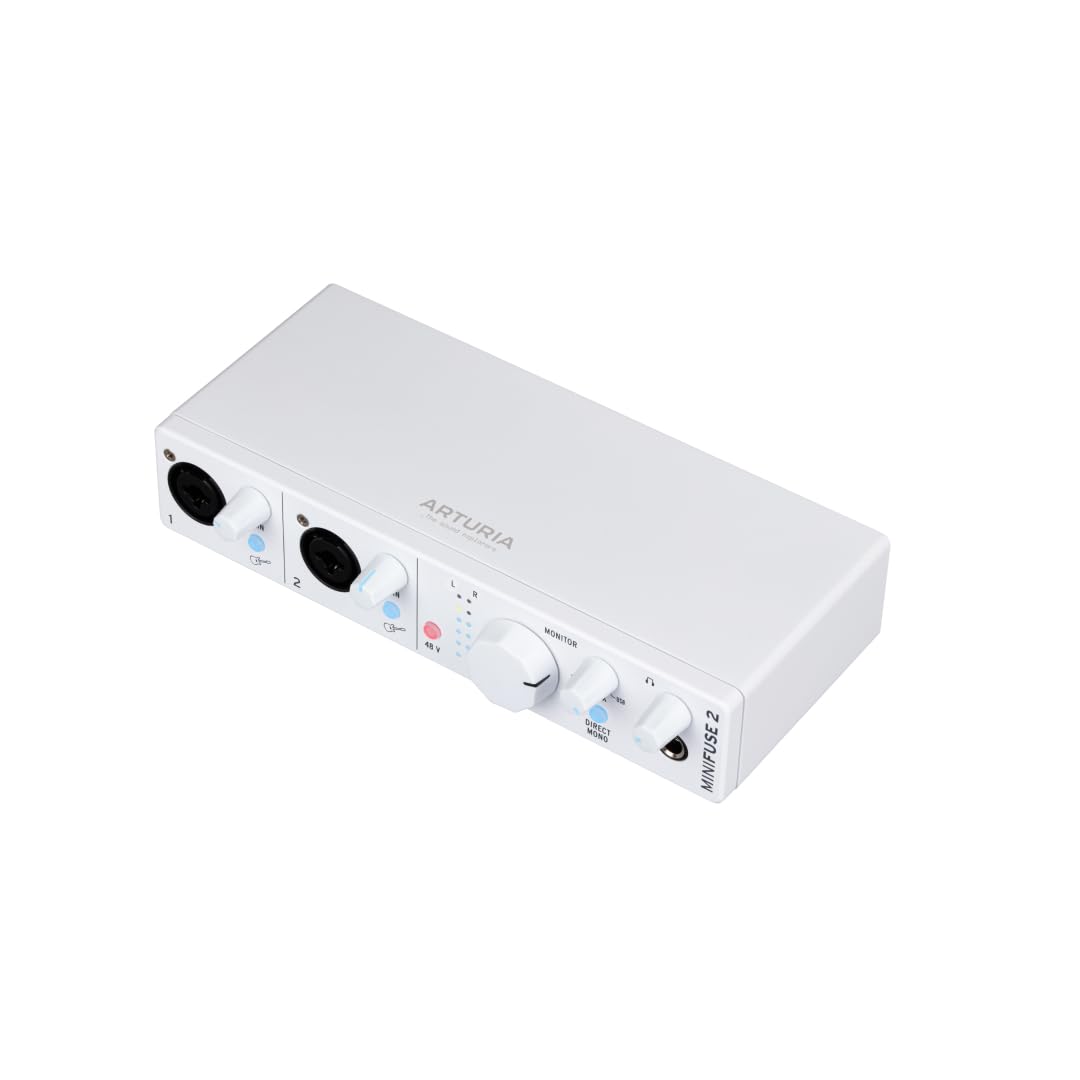
Arturia MiniFuse 2

93 /100
Studio Score High Confidence

Key details

Mic Inputs
2 XLR + inst
Connectivity
USB-C, MIDI
Max Sample Rate
24-bit/192 kHz
Monitoring Features
Loopback
Check Price on Amazon

The MiniFuse 2 is a feature-dense compact interface: dual XLR inputs, 5-pin MIDI, loopback, a USB hub, and a generous software bundle all fit in a small desktop footprint. That combination makes it a strong starting point for streamers and musicians who expect their setup to grow without swapping hardware soon.

It fits podcasters running two mics plus MIDI gear and streamers capturing desktop audio through loopback. Windows users may encounter occasional disconnects or static in certain setups, so use a solid USB-C cable and current drivers. If your plan needs more than two XLR inputs, this compact box is the ceiling.

Pros

  • Bundled Ableton Live Lite, Analog Lab Intro, and effects allow new users to record and produce right away.
  • Two combo XLR inputs with 48V phantom handle dual-mic podcasts and stereo recording.
  • Loopback plus 5-pin MIDI and a USB hub make it a central hub for streaming and hardware synths.

Cons

  • First-time setup requires an Arturia Software Center account before the bundled software suite unlocks.
Our verdict

The MiniFuse 2's combination of dual XLR, MIDI, loopback, software, and a five-year warranty is the rare compact package that grows with a creator's setup.

Check Latest Price
3

Best Sound Quality & Low Latency

MOTU M2

91 /100
Studio Score High Confidence

Key details

Mic Inputs
2 XLR + inst
Connectivity
USB-C
Max Sample Rate
24-bit/192 kHz
Monitoring Features
Loopback, LCD
Check Price on Amazon

Transparent preamps, ultra-low latency, loopback routing, and LCD metering keep the M2 among the stronger 2-in/2-out interfaces in its price band. Two combo inputs accept mic or instrument signals independently, so a podcaster and guitarist can set levels without touching the other channel.

Buyers who prioritize recording quality over driver hand-holding will find a compact fit in the M2. The honest boundary: crackling or dropouts can develop in a unit over time, and Windows driver behavior varies by machine, so confirm compatibility before committing. The payback is clean conversion and responsive direct monitoring.

Pros

  • Transparent preamps and very low latency keep recordings clean and monitor mixes responsive.
  • LCD meters make level-setting easier during tracking or streaming.
  • Two combo inputs with independent gain handle a mic-plus-instrument setup without re-patching.

Cons

  • Two combo inputs cap simultaneous sources at a pair of mics.
Our verdict

The M2 is the compact choice when sound quality and low-latency monitoring matter more than extra inputs.

Check Latest Price
4

Best Budget Two-Mic Podcasting

M-Audio M-Track Duo

89 /100
Studio Score Strong Evidence

Key details

Mic Inputs
2 XLR + inst
Connectivity
USB Type B
Max Sample Rate
48 kHz
Monitoring Features
USB/Direct switch
Check Price on Amazon

The M-Track Duo puts two combo XLR inputs, 48V phantom, and a USB/Direct zero-latency monitor switch in an entry-level box. That setup suits affordable two-mic podcasting without paying for 192 kHz or MIDI. Its 48 kHz ceiling is fine for spoken-word and streaming; musicians needing higher sample rates should look at the two-XLR 192 kHz option in this category.

It is best for first-time streamers and home creators on a tight budget who want a simple two-mic workflow. Noise in quiet gain settings and unit-to-unit power or connection inconsistency can appear, so a quiet preamp isn't guaranteed. Skip it if you need MIDI, higher sample rates, or studio-grade clean preamps; this is a budget tool, not a premium front end.

Pros

  • Two XLR inputs with phantom power simplify two-mic podcasts in one budget box.
  • USB/Direct switch enables zero-latency headphone monitoring, so streamers stay on cue.
  • Plug-and-play operation with common DAWs and OBS reduces setup friction.

Cons

  • In quieter voice recordings, self-noise can appear at higher gain settings.
  • Power and connection behavior can vary between units, with occasional dropouts worth checking before long sessions.
Our verdict

This is the budget two-XLR runner-up for creators who want two mics on a stream without paying for high-sample-rate extras.

Check Latest Price
6

Best Bundled DAW / Studio One Starter

PreSonus Studio 24c

92 /100
Studio Score High Confidence

Key details

Mic Inputs
2 XLR + inst
Connectivity
USB-C, MIDI
Max Sample Rate
24-bit/192 kHz
Monitoring Features
Monitor mix
Check Price on Amazon

The PreSonus Studio 24c pairs a compact USB-C 2x2 frame with a full Studio One 6 Artist license, which makes the bundled software the headline for first-time buyers. Two combo inputs handle mic, line, or instrument signals, and MIDI In/Out keeps it useful for keyboard players. The hardware itself has a sturdy feel, low-noise preamps, and plug-and-play setup, so beginners can record vocals or guitar without wrestling with drivers.

This package suits singer-songwriters and new producers who need a DAW and a simple two-input studio. It is not the pick for multi-source streams or guest podcasts: only two inputs and no built-in loopback mean you will outgrow it once a second mic and a computer return feed enter the chain.

Pros

  • Bundled Studio One 6 Artist gives new producers a complete DAW from day one.
  • Low-noise preamps keep vocals and acoustic guitar clean.
  • Easy plug-and-play setup with USB-C and two combo inputs.

Cons

  • Headphone output placement can feel awkward in tight desktop arrangements.
  • Only two inputs and no loopback
Our verdict

For a first-time producer with one mic and a laptop, the bundled DAW is the centerpiece; the two-input limit is the boundary that keeps it a starter rather than a stream hub.

Check Latest Price
7

Multi-Source Streams

MOTU M4

90 /100
Studio Score High Confidence

Key details

Mic Inputs
2 XLR, 4-in
Connectivity
USB-C
Max Sample Rate
24-bit/192 kHz
Monitoring Features
Loopback, LCD
Check Price on Amazon

The M4 delivers four inputs, two mic preamps, loopback, LCD metering, and broad OS support. It suits streamers and growing studios routing multiple mics and line sources. Extra I/O costs more and takes up desk space, so two-channel setups may prefer the slimmer model. Long sessions can surface intermittent dropouts on some units, while normal sessions stay clean.

Pros

  • Low-latency drivers hold up under recording and streaming workloads.
  • Clean inputs and outputs keep vocals and instruments accurate.

Cons

  • Minimalists who only need two inputs may leave half the I/O unused.
Our verdict

Choose it when four inputs and loopback are on the checklist for a growing stream or studio.

Check Latest Price
8

Dual-Headphone Studio

Audient iD14 MKII

91 /100
Studio Score High Confidence

Key details

Mic Inputs
2 XLR
Connectivity
USB-C
Max Sample Rate
96 kHz
Monitoring Features
Monitor mix, pan
Check Price on Amazon

Two Class-A console preamps, 48V phantom, and dual headphone outputs suit collaborative sessions with monitor mix and panning. Premium build and clean gain fit serious home-studio producers. On Windows, driver behavior and software registration can vary by system, so plug-and-play buyers may prefer the slimmer single-input alternative. The premium price keeps this a specialist studio tool.

Pros

  • Two Class-A console preamps and dual headphone outputs make it easy to track a singer and producer in one session.
  • Compact metal chassis holds up under daily desktop use.

Cons

  • In fast-paced sessions, the single-knob control scheme can feel finicky when switching between monitor mix and gain.
Our verdict

Choose it when two headphone outputs and console-style preamps matter more than a zero-hassle Windows unboxing; this is for producers who expect to configure their gear.

Check Latest Price
9

Solo Songwriters

Universal Audio Volt 1

90 /100
Studio Score High Confidence

Key details

Mic Inputs
1 XLR + inst
Connectivity
USB
Max Sample Rate
24-bit/192 kHz
Monitoring Features
Vintage mode
Check Price on Amazon

The Volt 1 pairs a Vintage 610 preamp mode with a deep software bundle — LUNA, UAD plugins, Ableton Live Lite, and Melodyne — in a compact body. No loopback and no MIDI I/O mean streamers who need to capture console audio alongside a mic should look elsewhere. Solo songwriters get the analog color and bundled tools that matter most.

Pros

  • Low-noise preamp keeps solo vocal takes clean, with Vintage mode adding tone when wanted.
  • Bundled LUNA, UAD plugins, Ableton Live Lite, and Melodyne add real value to the starter package.

Cons

  • Only one XLR input means co-host podcasts and dual-mic sessions need a different interface.
Our verdict

This fits when your tracking plan stays solo and you want the Vintage 610 preamp plus bundled software.

Check Latest Price
10

Multi-Mic Bands

Behringer UMC404HD

92 /100
Studio Score High Confidence

Key details

Mic Inputs
4 XLR, MIDI
Connectivity
USB 2.0, MIDI
Max Sample Rate
24-bit/192 kHz
Monitoring Features
Direct monitor
Check Price on Amazon

Four Midas preamps, MIDI I/O, and 192 kHz make this a budget multi-channel workhorse for home bands. Mac compatibility and reliability can be uneven, and the chassis is too large for portable kits. Home bands get four mic inputs at a price that leaves room for better microphones.

Pros

  • Four combo inputs let home bands track several mics simultaneously without a rack unit.
  • Midas-designed preamps give vocals and instruments a clean, quiet foundation.

Cons

  • The 4x4 layout is more than a solo podcaster or streamer needs.
Our verdict

The value lands when you need four simultaneous mic inputs and MIDI in one box.

Check Latest Price
11

Ultra-Budget Musicians

Behringer UMC22

91 /100
Studio Score High Confidence

Key details

Mic Inputs
1 XLR + inst
Connectivity
USB 2.0
Max Sample Rate
96 kHz
Monitoring Features
Direct monitor
Check Price on Amazon

The UMC22 packs a Midas-designed preamp, two inputs, and 48V phantom at a price that's hard to beat for Windows musicians starting out. High-gain noise and driver friction keep it from being a clean streaming box or an easy Mac option, but as a budget-only Windows starter it still handles one mic and one instrument.

Pros

  • Two-input Midas-preamp setup at a price that undercuts most 2x2 interfaces.
  • Basic recording can be plug-and-play on Windows when drivers cooperate.

Cons

  • DAW compatibility can require extra setup before recording sessions run smoothly.
Our verdict

For Windows-first beginners on a strict budget, the UMC22 is the affordable entry point.

Check Latest Price

How to Choose

Mic Inputs

Interfaces are built around XLR microphone preamps. A one-input box handles a solo podcast or voiceover, but a two-input interface lets you add a guest, record two mics, or track a stereo pair. Every extra preamp adds cost and circuitry, which is why budget multi-input units often cut corners in noise performance or drivers.

Match the input count to the session you will actually run. A single-input interface becomes a limitation on the first day a guest sits down across from you, so think about your recording plans before you save money on fewer inputs.

Phantom Power & Monitoring

Condenser microphones need 48V phantom power; dynamic mics do not. If you want a condenser for voiceover or acoustic work, every interface here can supply it, but the implementation matters. The first sign of a bad cable or a deactivated +48V switch is a mic that produces no usable level.

Headphone monitoring is the other half. A direct-monitor switch or low-latency control app lets you hear your voice without the delayed software return path. Without it, you will notice a slight echo in your headphones, especially if your computer is handling video work at the same time.

Latency & Loopback

Low latency is the time between speaking into the microphone and hearing yourself in the headphones. Hardware direct monitoring short-circuits the computer and gives you an immediate mix, while software monitoring depends on your buffer size. Smaller buffers reduce delay but put more strain on the CPU.

Loopback routing captures the computer's system audio along with your mic signal. Streamers need this to send game audio, music, or a co-host into a broadcast without external cables. If an interface lacks loopback, you will need a virtual audio cable, so check the routing features before ordering.

Connectivity & Drivers

The USB connector and driver package decide whether the interface works next month as well as it does on day one. USB-C is the current standard, but a cheaply anchored port can loosen over time and produce random disconnects when the cable moves. A shorter, strain-relieved cable helps a lot.

Driver maintenance matters even more. A perfectly good interface may not work on a newer operating system if the manufacturer stops updating software. Match the interface to your current computer and keep the vendor app current.

Sample Rate & Software

Sample rate is the least important decision in this category for content creators. 48 kHz/24-bit captures the full vocal range and plenty of music detail; 192 kHz mainly matters for producers doing heavy pitch-shifting or flexible editing. Do not pay extra for a spec you will not use.

Bundled software can outweigh a few dollars in hardware cost. A DAW like Studio One, Ableton Live Lite, or Pro Tools Intro removes the first software purchase and gets you recording on day one. For a new producer, that bundle is a concrete part of the value.

Frequently Asked Questions