9 Best Canon EOS R5 Mark II Accessories 2026: True Compatibility

Find Canon EOS R5 Mark II accessories that fit the body you own, not just the one in the marketing photos, and skip the compatibility traps.

The Canon EOS R5 Mark II looks like the R5, but its accessory needs are not identical. The biggest trap is power: several highly rated LP-E6NH kits are built for the original R5 and its siblings, and their compatibility lists exclude the R5 II. A battery that works in one body can be rejected by the other.

Screen protection has the opposite problem. Listings for R5 II glass are often shared with older Canon bodies, so a star rating may not tell you how it fits this specific camera. The fix is to check the stated measurements and R5 II-specific fit feedback, not the aggregate score.

This guide separates what matters for the R5 II from what is carried over from R5-era marketing. Every pick is positioned around a concrete use-case, from storage speed to active cooling, so you can match the accessory to the way you actually shoot.

1

Best Overall Accessory

SanDisk Extreme PRO 256GB

96 /100
Studio Score High Confidence

Key details

Compatibility
UHS-I SD card
Check Price on Amazon

V30 certification and 140MB/s write speed keep Canon EOS R5 Mark II 4K UHD recording moving while high-res burst buffers drain without slowing the shot. The V30 rating is the practical floor for 4K UHD, and this card sits near the top of the UHS-I class rather than at that floor. The 256GB capacity handles long event segments, and the up-to-200MB/s read speed moves clips off the card quickly when the job is done.

Hybrid sessions with continuous 4K takes and rapid bursts have kept files intact on this card; there are no missing frames or corrupted clips under sustained use. Write speed holds up as the card fills, a place where lesser V30 cards can stumble. The lifetime limited warranty adds a backstop for working shooters if a card issue ever appears. This is the storage behavior a paid event shoot depends on.

Canon EOS R5 Mark II shooters carry two card formats, and this SDXC card covers stills and standard 4K without needing CFexpress data rates. The lock slider can come loose on some units, so testing the card immediately on arrival is wise. Shooters who never pull the SD card out can pass; anyone using the SD slot for overflow or primary 4K gets the speed and capacity the R5 II asks for. Event and wedding photographers treating this as secondary storage will find it keeps pace with the rest of the workflow.

This card does not replace the CFexpress slot; it fills the secondary slot with enough performance that a hybrid shoot never feels hobbled. Paired with a CFexpress card, the SD slot becomes the R5 II's working card: 4K clips and high-res bursts live here while the fast slot stays free for primary capture. The 256GB size is enough for a long day of hybrid shooting, and the read speed keeps the end-of-day transfer from being the bottleneck.

Physical handling is easy: clear capacity and speed markings make quick sorting simple, and the card seats firmly in the SD slot. It also formats quickly in the R5 II, so a fresh card is shoot-ready in seconds. The label stays legible after repeated insertions, which helps when two cards are in the bag and the next card change needs to be fast. The shell also survives regular card-swap cycles without contact wear showing up in normal use.

Pros

  • V30 write speed sustains 4K recording and keeps R5 II burst buffers moving without stutters.
  • 256GB capacity covers long event or wedding sessions without mid-card swaps.
  • Data integrity holds up through repeated heavy-use sessions; files stay whole.
  • Clear markings and firm seating make card changes quick in the field.

Cons

  • Premium-priced for a UHS-I card, so entry-level V30 alternatives cost less.
  • Some camera bodies may not recognize the card on first insertion until formatted in-camera.
Our verdict

The R5 II's SD slot gets a card that matches its hybrid workload, not just its physical fit.

Check Latest Price
2

Best Screen Protection

iDaPro R5 II Protector

90 /100
Studio Score High Confidence

Key details

Compatibility
Canon R5 Mark II only
Check Price on Amazon

The iDaPro kit covers both glass surfaces on the R5 Mark II: two 9H tempered glass protectors for the main LCD and two for the top status screen. The glass is cut specifically for the Mark II body, so the edges align cleanly with the display bezel. Installation follows a simple clean-apply-press routine, and the spare pair in the box makes a first-time misalignment easy to recover from. The included top-screen glass is a detail not every kit offers.

Image clarity stays neutral after installation, and the oleophobic coating keeps fingerprint smudges from lingering. Taps register accurately on the touchscreen, while long finger-drag movements can feel slightly more resistant on the glass surface. This matters primarily when moving focus points or scrolling through menus, less so for plain tapping. Adhesive behavior varies between units, so inspect the first installation for an air gap that does not clear before relying on it; the second set of glass is there if you need to redo it.

This kit suits new R5 Mark II owners who want immediate scratch protection without a larger accessory purchase. The dual-screen coverage and spare glass are the main draw. It is a clear gloss protector, so matte or anti-glare fans should skip it; the drag friction and possible air gap are the boundaries to check against your own workflow. For tap-driven use, the glass stays out of the way. For drag-heavy use, test that gesture before committing.

๐Ÿ’ก Save the second set of glass for after the installed protector shows wear.

Pros

  • Two LCD protectors plus two top-screen protectors cover every R5 Mark II display with spares.
  • Glass cut for the R5 Mark II body aligns cleanly with no overhang.
  • Clear glass with an oleophobic layer keeps review images undistorted and fingerprint smudges to a minimum.

Cons

  • A unit-level adhesive gap can remain after pressing and may not settle on its own.
  • Finger-drag operations on the main LCD can feel more resistant through the glass.
Our verdict

For a new R5 Mark II owner, this is the screen protection kit that covers both displays and leaves spares in the box.

Check Latest Price
3

Best Travel Case

LTGEM Camera Case

90 /100
Studio Score High Confidence

Key details

Compatibility
Compact R5 II body kits
Check Price on Amazon

The LTGEM hard case brings a stiff exterior and four adjustable dividers that keep a compact R5 II outfit separated and protected in transit. The shell is the main event: it holds its shape under pressure, so the camera and lens sit in a fixed layout rather than shifting inside a soft bag. For travelers who want a case that stacks, packs, and survives baggage handling, this is the structured option in the budget range.

The interior measures about 8.6 x 6 x 3.1 inches, which fits an R5 II body with a compact prime or a standard zoom attached, plus one spare lens in the adjustable sections. Larger combinations change the picture: an R6 with a 24-70mm zoom barely fits, and any battery grip or big telephoto will not. Shooters who carry one body and one or two modest lenses will find the layout intuitive; those expecting to store a fully rigged camera need a larger case.

This case suits R5 II shooters who want a hard-shell alternative to a soft bag for daily carry and short trips. The padding is light, so impacts transfer through the shell more than a padded insert; the hard outer surface gives structure but not deep cushioning. For a one-body, one-or-two-lens kit, the LTGEM is an easy recommendation.

Pros

  • Sturdy hard-shell construction protects a compact kit from bumps and crushing.
  • Adjustable dividers keep a body and one or two lenses neatly separated.
  • Handle and shoulder strap make it easy to carry between locations.
  • Budget-friendly price for a structured case that holds up to regular travel.

Cons

  • Hard impacts get only light padding between gear and the shell; the case is structured, not cushioned.
  • Once you add a battery grip or large telephoto zoom, the interior runs out of room.
Our verdict

For compact R5 II travel kits, the LTGEM is the structured case worth packing โ€” it adds protection and organization without taking over a bag.

Check Latest Price
4

Best for Video Overheating

SmallRig Cooling Fan 5063

83 /100
Studio Score Strong Evidence

Key details

Compatibility
R5 II, R5, R50 V
Check Price on Amazon

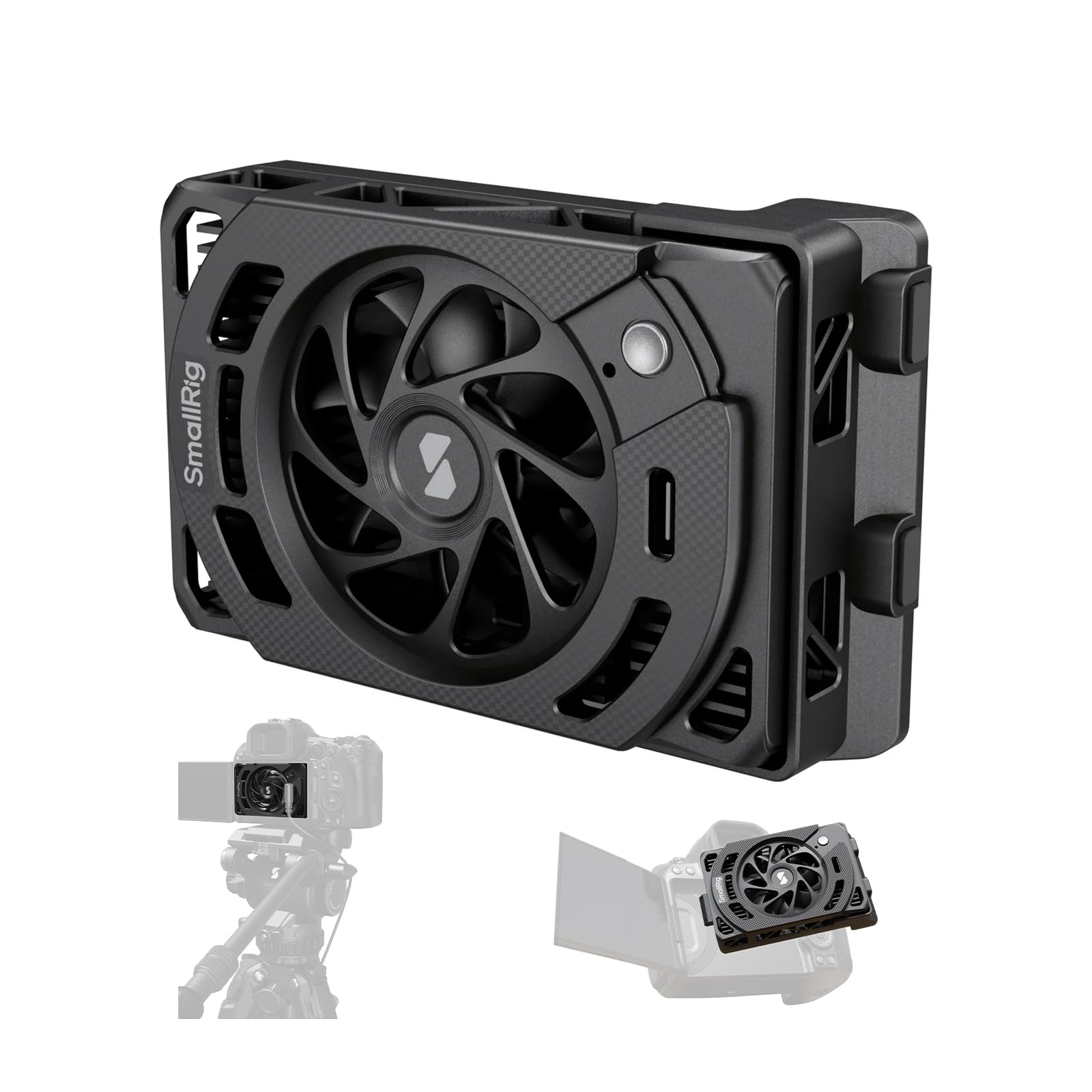
The 7000 RPM fan and TEC module target a different R5 II bottleneck than storage speed: heat. It mounts to the body and pulls heat away during recording, with high and low modes to choose your airflow-versus-noise tradeoff. Unlike a modular frame, this unit doesn't add mounting points or change handling; it stays focused on keeping the sensor within operating range. The same cooler fits R5, R50 V, and several Sony bodies, so it can move across a hybrid kit.

At 101g it won't unbalance a handheld R5 II kit, and the low-profile housing doesn't block buttons or the rear controls. Long 4K or open-gate takes benefit most; instead of waiting for the sensor to cool between clips, the fan keeps recording time going without changing the camera's normal handling.

This fits the video-first R5 II shooter who records until the camera stops. A wired USB-C connection is part of the deal, so someone already running an external monitor or recorder will find the cable situation familiar. Humid shooting locations need a quick condensation check before long takes, which is manageable if you know to look for it. Buyers who only shoot stills can skip it; heat is not the bottleneck for stills work.

Pros

  • Actively reduces overheating and extends recording time on long R5 II video sessions.
  • High and low speed modes allow balancing cooling output with acceptable noise.
  • At 101g it stays light and leaves camera controls within reach.
  • Compatible with R5 II, R5, R50 V, and several Sony bodies, so one fan can serve multiple cameras.

Cons

  • The fan draws all power from USB-C, so the recording setup includes one more cable to manage.
  • In humid locations, TEC cooling can create condensation on the module; a quick check before long takes is part of the workflow.
Our verdict

For R5 II shooters who run against the heat limit, this fan keeps recording time up while staying out of the camera's way.

Check Latest Price
5

Best Cage for Rig Builders

SmallRig R5 II Cage 4975

89 /100
Studio Score Strong Evidence

Key details

Compatibility
Canon R5 Mark II only
Check Price on Amazon

The SmallRig cage is an aluminum one-piece frame cut for the R5 II body, with an Arca-Swiss base, cold shoe, and 1/4-20, 3/8-16, ARRI, and QD mounting points. It is explicit R5 II hardware rather than a repurposed R5 cage, so the fit is not a compatibility question. The frame wraps the body tightly while buttons and dials stay exposed.

The Arca-Swiss base is the part that matters most for hybrid shooters: the same cage moves from gimbal to tripod to handheld without pulling the plate off. A monitor, follow-focus, or top handle mounts without introducing flex, and the included 9H screen protector covers the main LCD. That base alone justifies the frame for anyone who already uses an Arca-type head or gimbal.

This is for video rig builders and content creators who attach accessories rather than keep the camera bare. Gimbal users get the Arca-Swiss base as a bonus, and the active TEC cooler in this accessory set covers the heat side of long recordings while this cage covers mounting and handling. The tradeoff is the bulk on the grip side; this frame assumes a rig, not a minimal street carry. Buyers who want a compact street setup should not be looking at a full cage.

๐Ÿ’ก Mount accessories on the left side first so the right-hand grip stays clear for shutter work.

Pros

  • One-piece aluminum shell fits the R5 II body without blocking buttons or dials.
  • Arca-Swiss base plate lets the same cage move from gimbal to tripod to handheld without swapping plates.
  • 1/4-20, 3/8-16, ARRI, QD, and cold shoe mounts give secure anchor points for monitors, handles, and mics.

Cons

  • On a loaded rig, the right-hand dials can sit slightly farther from the thumb.
Our verdict

A rig build starts with this frame; a bare-bones travel kit does not.

Check Latest Price
6

Budget-Conscious Buyers

ULBTER R5 II Protector

88 /100
Studio Score Strong Evidence

Key details

Compatibility
Canon R5 Mark II only
Check Price on Amazon

ULBTER's four-piece kit brings 9H tempered glass to the R5 II's main LCD and top screen, and the spare pair makes this one of the lowest-cost ways to cover both displays. Glass stays clear, touch input stays responsive, and the cutouts do not interfere with the camera's controls. The tradeoff is fit tolerance: some units sit slightly off, leaving a thin exposed edge or an air pocket that will not press out. That puts it below the leading R5 II-specific protector in consistency, though the included second set softens the value equation for budget-focused buyers.

Pros

  • 9H tempered glass covers the main LCD and top screen in one kit.
  • Spare set included: two LCD and two top-screen protectors for the same price.
  • Clarity and touch response remain usable during everyday operation.

Cons

  • Air pockets may remain after installation.
  • Fit tolerance can leave a thin exposed edge along portions of some units.
Our verdict

For budget-focused R5 II owners who want a spare set of glass on both screens, this kit works โ€” provided exact edge-to-edge fit isn't the deciding factor.

Check Latest Price
7

Main LCD Buyers

Mr.Shield R5 II Protector

90 /100
Studio Score High Confidence

Key details

Compatibility
R5 Mark II, R5, R5C
Check Price on Amazon

Mr.Shield's three-pack of 9H Japanese glass protectors fits the R5 Mark II, R5, and R5C main LCD, with an oleophobic coating that keeps the touchscreen smooth and reduces smudging. The fit is correct on all three bodies, and the silicone adhesive supports a bubble-free install when the protector is aligned before pressing down. The kit's scope is the rear panel: it does not include glass for the top status LCD, which is why it sits below the default R5 II screen-protector kit in this roundup.

Pros

  • One order supplies three glass protectors sized for the R5 Mark II, R5, and R5C rear LCD.
  • Clean installation without bubbles is possible when the protector is aligned carefully.
  • Oleophobic coating keeps the rear touchscreen smooth and resistant to fingerprints.

Cons

No notable drawbacks to flag.

Our verdict

Appropriate for R5 family shooters who want spare main-LCD glass at a budget price.

Check Latest Price
8

Dust/debris Protection

JJC Hot Shoe Cover 2-Pack

83 /100
Studio Score Strong Evidence

Key details

Compatibility
Replaces Canon ER-SC2
Check Price on Amazon

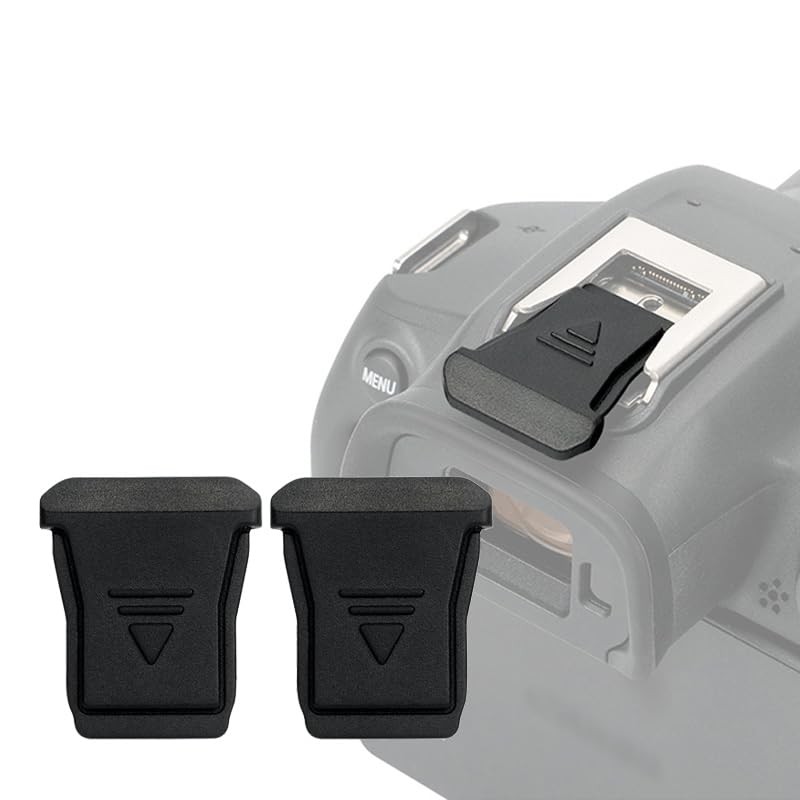
This two-pack gives R5 II owners a low-cost, OEM-style shoe cover in ABS with a spare for another Canon RF body. The low-profile clip keeps dust, sand, and moisture off the exposed hot-shoe contacts while adding almost no bulk. Fit is the tradeoff: the tabs rely on friction against the camera's shoe rails, and tolerances vary from body to body, so the same cover can feel snug on one R5 II and slightly looser on another. That makes it a practical budget spare for a camera bag, not a fit-guaranteed replacement for buyers who want certainty before trusting it on a shoot.

Pros

  • Two ABS covers in one pack: one for the R5 II and a spare for another Canon RF body.
  • Direct replacement for Canon's ER-SC2 at a budget-friendly price.
  • Low-profile shape adds no bulk to the camera top plate.

Cons

  • Friction-fit clip can be knocked out of the shoe in a tightly packed bag.
  • Seating depends on individual camera shoe tolerances, and repeated mount/unmount cycles can loosen the tabs over time.
Our verdict

Keep a set in your bag as a cheap spare for the R5 II's hot shoe, and check the tabs seat snugly on your specific body before relying on it in the field.

Check Latest Price
9

Light Rain Shooters

Kiorafoto Rain Cover 2-Pack

84 /100
Studio Score Strong Evidence

Key details

Compatibility
Fits DSLR/mirrorless kits
Check Price on Amazon

Two clear covers provide a packable emergency layer for an R5 II with lens attached: they drape over the body via drawstring closures, leave the viewfinder and controls visible, and block light rain and dust. The opening around the lens does not seal tightly, so the protection window is a passing shower, not a long storm. Sustained downpours and salt spray need a dedicated weather housing. For travel photographers who want cheap insurance in a side pocket, this two-pack covers surprise rain without adding bulk.

Pros

  • Keeps camera and lens dry in light rain and dust.
  • Two covers cost little and stow flat in a camera bag.
  • Drawstring closures secure the cover while leaving the flash accessible.

Cons

  • Water can enter through the loose lens opening during moderate or heavy rain.
  • Sustained downpours and salt-spray shoots call for a dedicated weather housing.
Our verdict

Fits the emergency layer role for R5 II owners who want cheap, packable insurance for surprise rain, provided they treat it as a light-weather cover rather than a sealed housing.

Check Latest Price

How to Choose

Confirm R5 Mark II Compatibility

The R5 Mark II uses a different power-management handshake than the original R5, so some LP-E6NH cells and chargers are not recognized.

Check the listing's explicit R5 Mark II compatibility before any other feature. If it lists only R5/R6/R7, treat that as a hard stop.

Choose the Right Screen Coverage

Tempered-glass protectors differ by which panels they cover and how thick the glass is. The R5 II's main LCD and top LCD need separate protectors.

Thicker glass resists scratches but can alter touch feel. Look for an oleophobic coating so fingerprints wipe off without drag.

Strap Security Before Comfort

A padded strap feels good until the camera falls. The security chain includes the attachment point, the buckle, and the strap material; one weak link transfers the weight to the floor.

For an R5 II with a zoom lens, choose a strap with a redundant tether or use a neck strap in crowds. Padding is comfort, not a security feature.

Check Internal Case Dimensions

Cases advertise R5 compatibility, but exterior size does not tell you what fits inside. Interior divider layout and depth decide whether the body sits without pressure on the viewfinder.

Measure your longest lens and add the body's depth. A case that fits a compact prime may not close over a 24-70mm zoom.

Match Card Speed to Shooting Load

The card's write speed determines how quickly the R5 II's buffer clears. A V30 card handles common 4K modes, but high-bitrate recording and long RAW bursts benefit from V60/V90 UHS-II or CFexpress.

If you record video while shooting stills, the card is doing two jobs at once. Buy one speed class above the minimum recommended by the camera.

Cooling Power and Condensation

Active cooling pulls heat away from the sensor, but the TEC module draws too much power for the camera battery alone. External USB-C power adds a cable to the rig.

TEC cooling also removes moisture from the air, so condensation can form in humid conditions. Use the fan in dry environments and power it down when recording stops.

Frequently Asked Questions